67
09 Maintenance
User Manual V1.6-2024-03-20
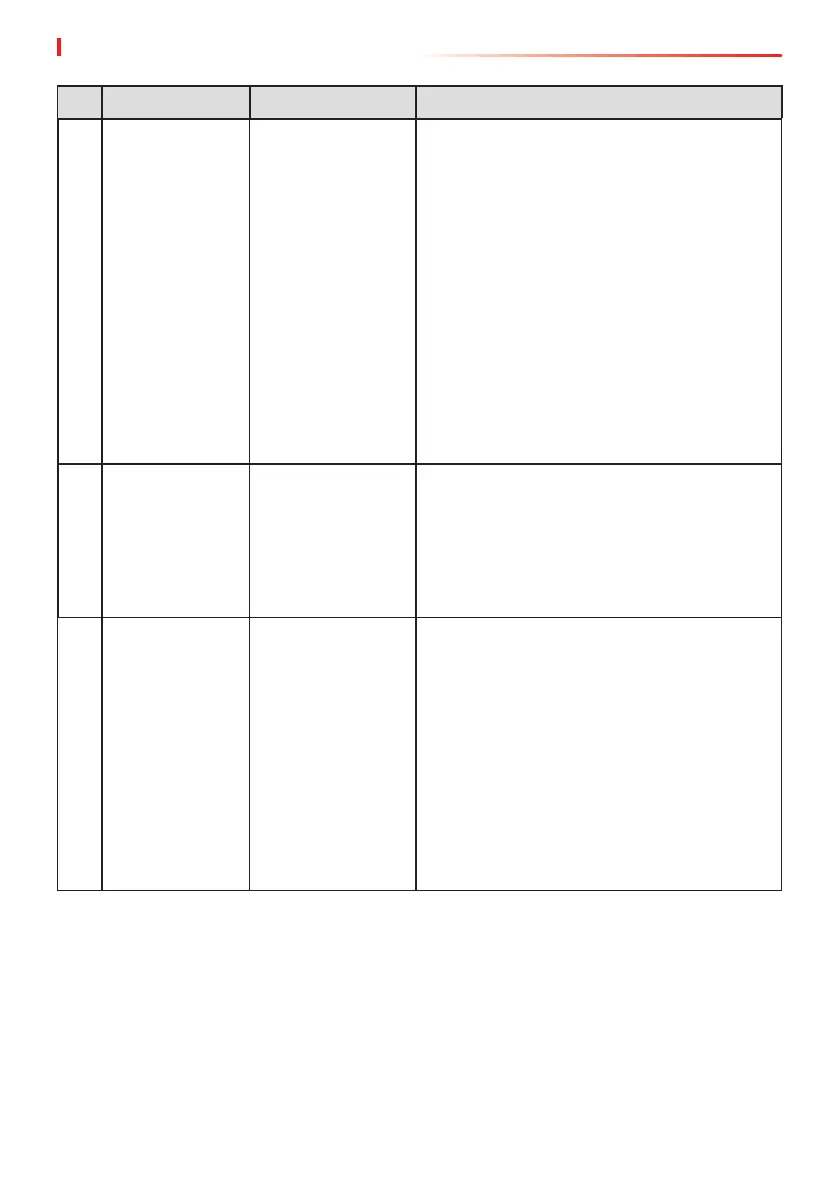
No. Fault Cause Solutions
3
Unable to log in
to the parallel
system interface
in APP
Parallel networking
failed
1. Incorrect communication cable connection
or unreliable cable connection cause
communication failure.
2. Connect the smart meter and Ezlink
module to the same master inverter to
ensure the success rate of networking.
3. Check whether the inverter communication
indicator is normal. If it is not, please check
the individual inverter according to its own
troubleshooting method.
4. If the above methods cannot solve the
problem, please try to restart the inverter
and get networking again.
4
Parallel IO check
fail
Communication of
parallel inverters in
error
1. Check whether the parallel communication
cable is connected correctly and rmly.
2. If the communication cable connection
is normal, it may be an internal
communication failure. Please contact the
dealer or After Sale Service.
5
Device oine
displayed on APP
Communication
failure or
equipment failure
1. Check whether the quantity of parallel
machines in the system is the same with
the actual connected ones.
2. If it is, get the SN of the corresponding
oine inverter from the equipment list,
and troubleshoot the corresponding
inverter according to its user manual.
3. Check whether the communication
connection of the equipment is normal,
with no loose, aging or wrong connection,
etc.


 To Next Page