30 31
Step 1
Step 3
Step 2
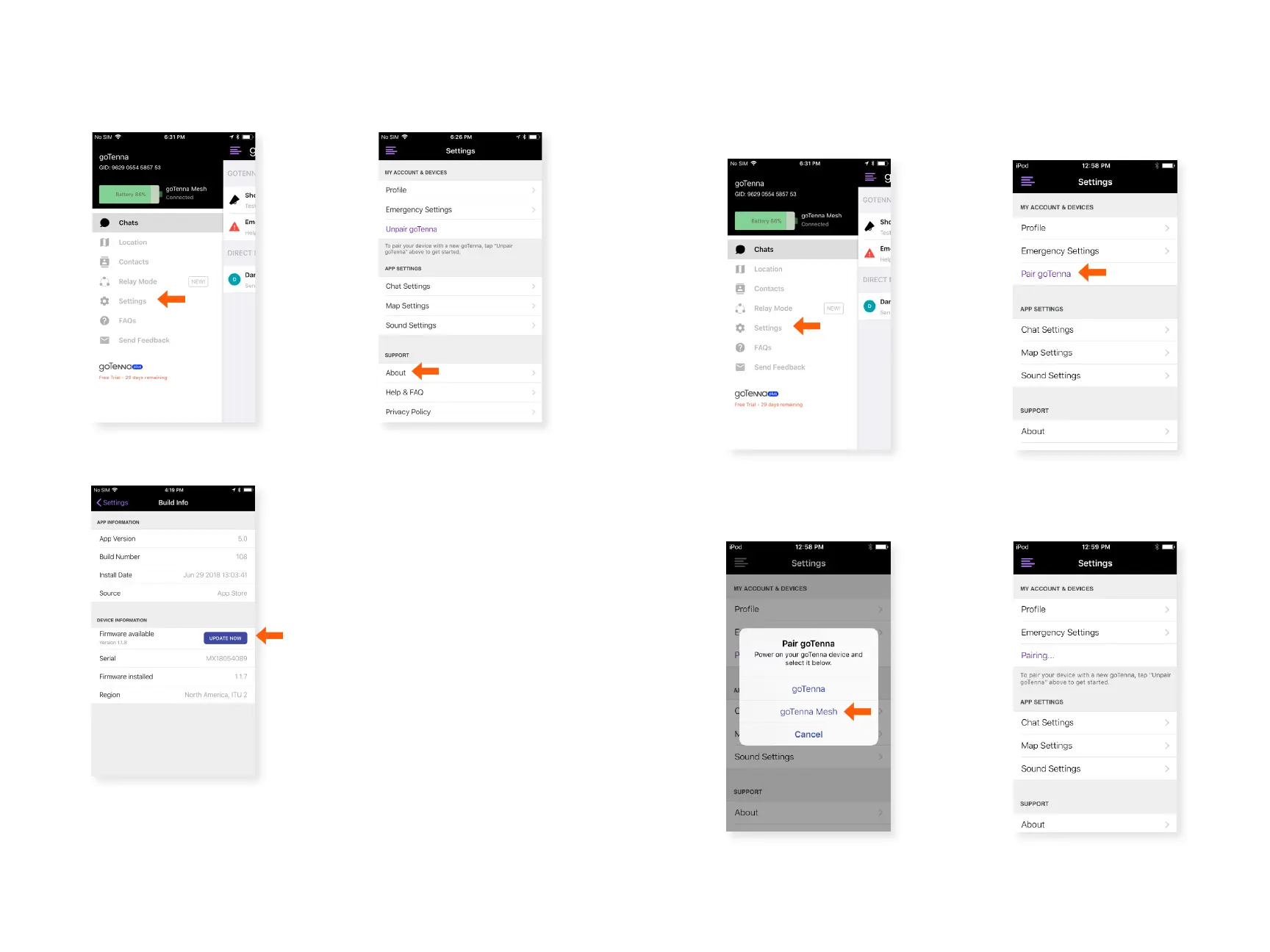
Conrm your goTenna Firmware is
Up-to-Date:
Select ‘Settings’ from the
Side Menu.
Select ‘About’.
If you need to update your
rmware, you’ll see a blue
button that says ‘UPDATE
NOW’. Select this button
to update your rmware. If
you don’t need to update,
you’ll see the latest rmware
version listed with no action
button.
Step 2
Step 4
Step 3
Pair your goTenna Mesh Device:
Select ‘Pair goTenna’.
Select ‘goTenna Mesh’. You
should only attempt to pair
one goTenna Mesh device at
a time.
Turn your goTenna Mesh device on. When the light is blinking on
your goTenna Mesh device, follow these steps:
goTenna Mesh will pair.
Step 1
Select ‘Settings’ from the
Side Menu.



 To Next Page