16 17
Shout Chat
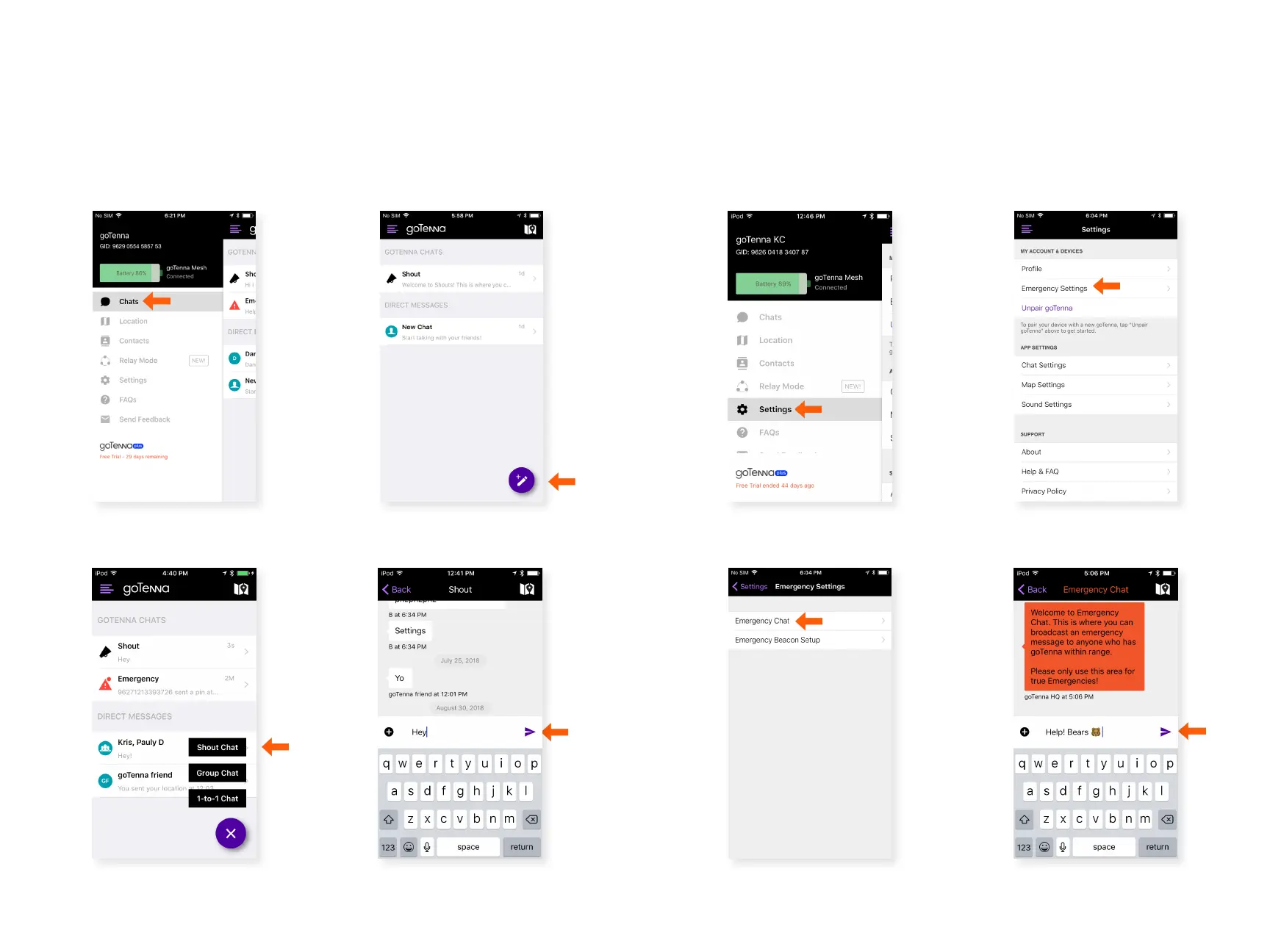
Shout Chat allows you to publicly broadcast to any goTenna
Mesh user within range. Because these messages are public,
they are not end-to-end encrypted and any user within range
will receive it. Shout Chats do not mesh.
Step 3
Step 2
Step 4
Select ‘Shout Chat’. Type your message. Send
your message. Delivery
conrmation is not
supported for Shout Chats.
Click the compose icon.
Emergency Chat transmits messages to all goTenna Mesh users
within range. These messages mesh through other goTenna
Mesh devices to extend their range. Only use Emergency
Chat during emergencies.
Emergency Chat
Step 2Step 1
Step 3 Step 4
From the Settings menu,
select ‘Emergency
Settings’.
Select ‘Settings’ from the
side menu.
Select ‘Emergency Chat’. Type and send your
message.
Step 1
Select ‘Chats’ from the side
menu.



 To Next Page