8 9
Step 7 Step 8
Step 9 Step 10
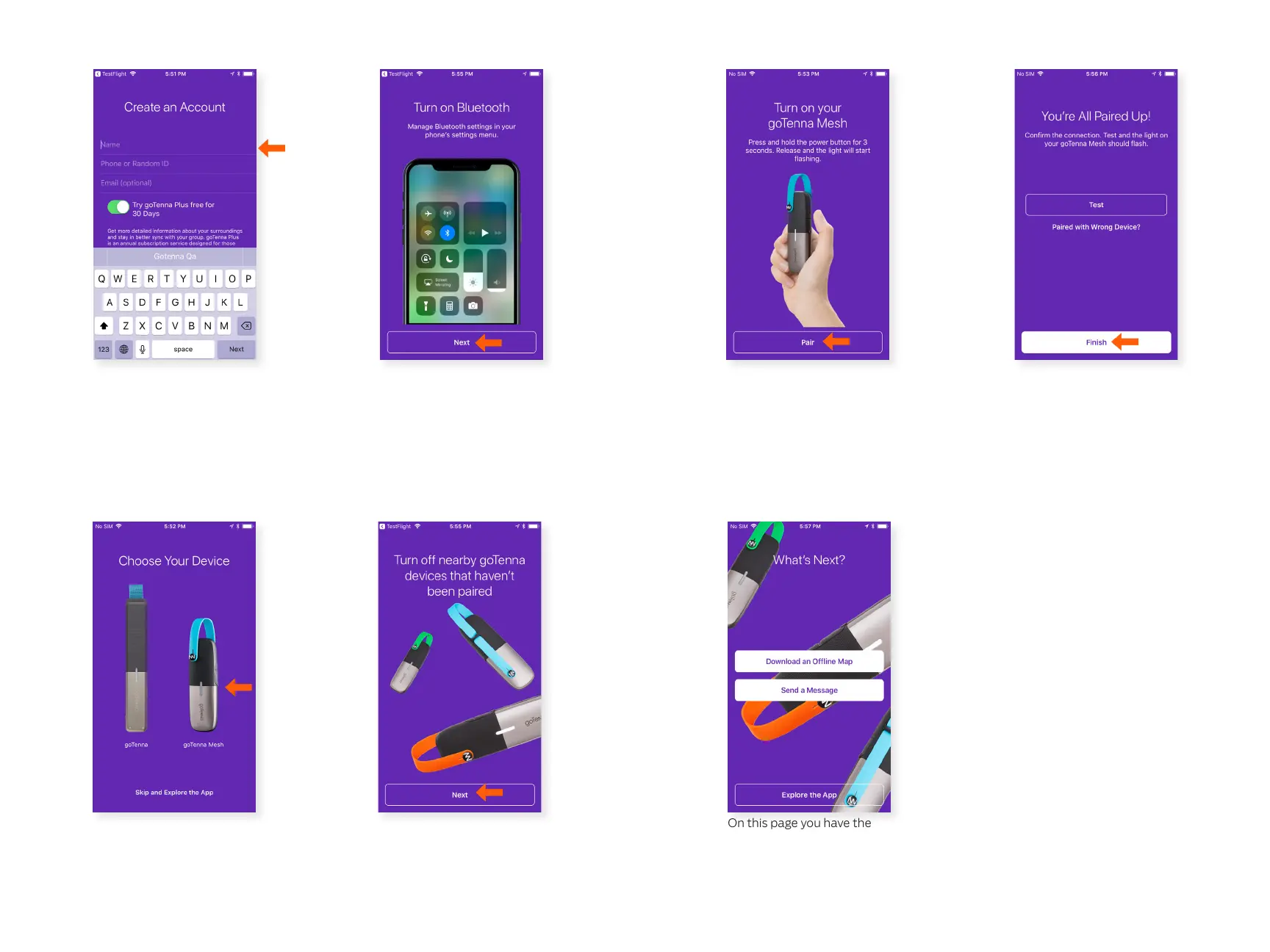
Enter your phone number
(recommended) or have
goTenna create a randomly
generated ID. If you entered
your phone number, you’ll be
asked to verify your phone
number via SMS text.
Never pair your goTenna
Mesh through your
bluetooth settings, always
pair directly through the
goTenna app. Select ‘Next’.
Hold down the power button
until the white light turns on.
Select ‘Pair’ to pair with your
goTenna Mesh device.
Once your device pairs, you
are nished. Select ‘Finish’.
On this page you have the
option to download an
oine map, send a message,
or continue exploring the
app.
Turn o nearby goTenna
devices that haven’t been
paired. In order to pair
seamlessly, you should only
pair one device at a time.
Select ‘Next’.
Select ‘goTenna Mesh’.
Step 11 Step 12
Step 13



 To Next Page