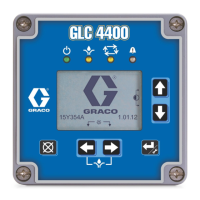
Component Identification
4 3A7031A
Component Identification
A System LED
B Low Level Status LED
C Display
D UP Arrow
EDOWN Arrow
F RIGHT Arrow / ENTER
G LEFT Arrow / Reset
H Connector
(A) System LED
(B) Low Level Status LED
(D and E) UP and DOWN Direction Arrows
Press and hold both the UP and DOWN ARROW keys
simultaneously for 3 seconds to enter SETUP.
(F) RIGHT Direction Arrow / MANUAL RUN /
ENTER
In SETUP the RIGHT Arrow saves the entry or selects a
menu choice.
When not in SETUP, the RIGHT Arrow starts the pump
for one complete lubrication event.
Holding down both the RIGHT Arrow and the LEFT
Arrow simultaneously for 3 seconds starts TEST MODE.
(G) LEFT Direction Arrow / Reset
In SETUP the LEFT Arrow moves the cursor in the
display one field to the left. It also navigates back to the
previous screen and cancels parameter change.
If the pump is lubricating, pressing this button cancels
the event and the pump stops lubricating.
In ALARM, press the LEFT Arrow once to clear the
buzzer. Press and hold for 3 seconds to clear the alarm.
For more information, see Alarms, page 17.
Holding down both the RIGHT Arrow and the LEFT
Arrow simultaneously for 3 seconds starts TEST MODE.
NOTICE
To prevent damage to soft key buttons, do not press
the buttons with sharp objects such as pens, plastic
cards, screwdrivers, or fingernails.
FIG. 1: GLC X Controller Front
Light Status
Red (solid) Normal and ON
Orange (solid) Controller is in system SETUP and
lubrication program is paused
Red (flashing) System is in alarm
Light Status
Orange (solid) Low level alert
Flashing Another alarm in addition to a low
level alert



 To Next Page