Operation
15
3 Operation
3.1 Operating Controls
3.1.1 Operating Console
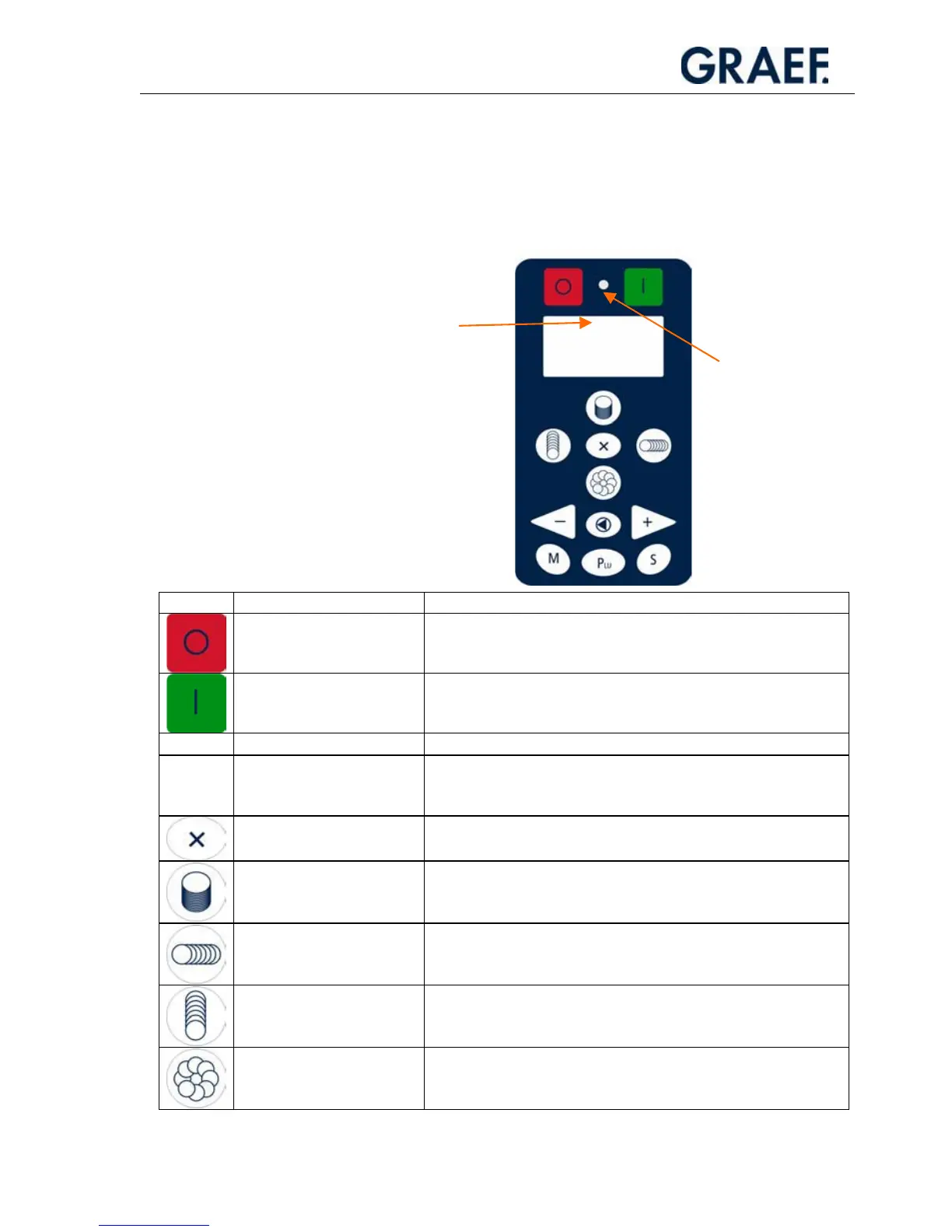
Symbol Designation Function
Main “OFF” switch
x Switches off the machine.
Main “ON” switch
x Switches on the machine. The machine is ready for slicing.
Signal lamp
x Shows that the machine is ready for operation.
Graphical display (only
display!)
x Indicates number of slices, cutting program, PLU, slice
thickness, menu program (PLU programming, maintenance
intervals etc.).
X button
x Generates 2, 3 or 4 stacks or rows.
Stacking button
x Selects the stacking function.
x Stores the set data (tray dimension, number of slices, cutting
mode, ...) when pressed until a beep is emitted.
Cross fanning button
x Selects the cross fanning function.
x Stores the set data (tray dimension, number of slices, cutting
mode, ...) when pressed until a beep is emitted.
Long fanning button
x Selects the long fanning function (press 1x briefly).
x Stores the set data (number of slices, slicing mode, ...) when
pressed until a beep is emitted.
Circular fanning button
x Selects the circular fanning function.
x Stores the set data (number of slices, slicing mode, ...) when
pressed until a beep is emitted.
Display (graphical
display)
Signal lamp


 To Next Page