日本語
English
Français Deutsch 中文 한국어 Español
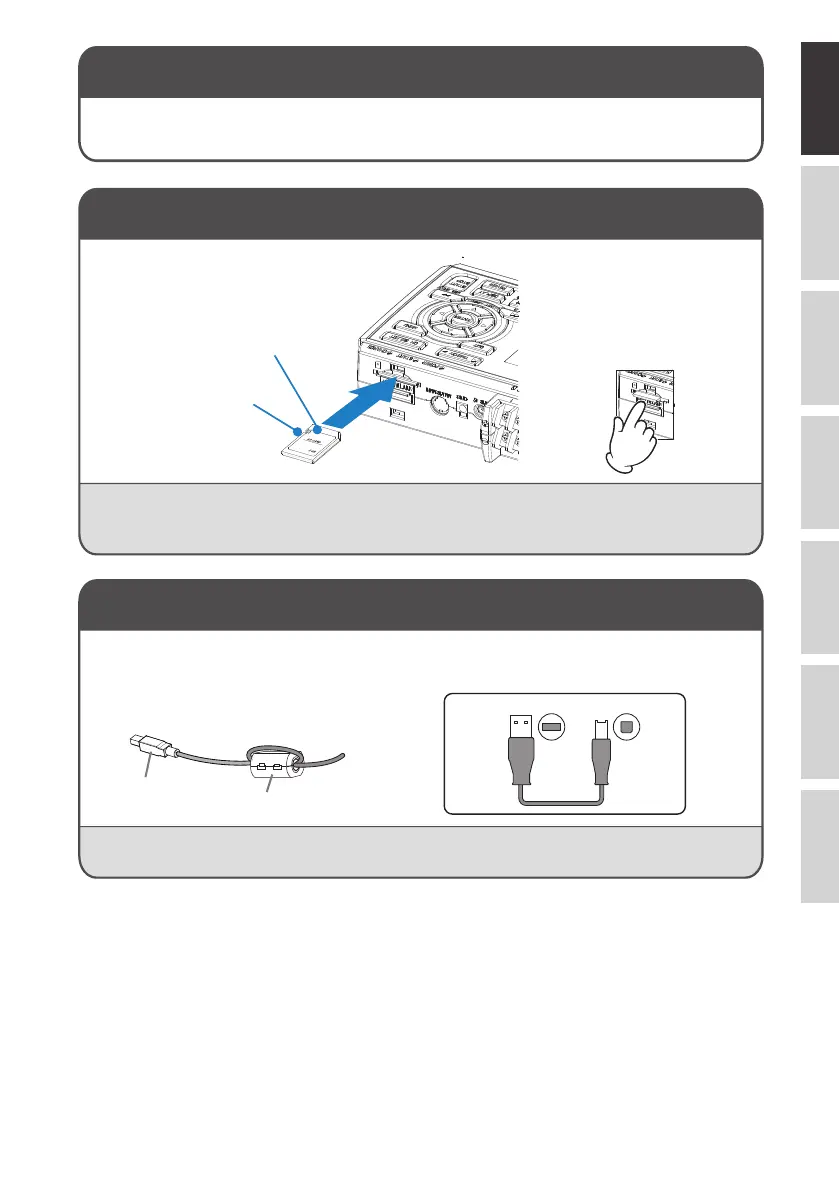
A-type connector B-type connector
To connect a PC using a USB cable,
attach the supplied ferrite core to the
USB cable as shown.
To connect GL260 and PC, use a cable with A-type and
B-type connectors.
< How to remove >
USB cable
Ferrite core (Supplied)
< How to mount >
(1) Open the protective cover to
SD memory card.
(2) Push the SD memory card
until it clicks and is locked.
* SD memory card
must be unlocked.
Internal memory
Mounting SD Card
Connect with PC
GL260 midi LOGGER complies with the EMC Directive when the supplied ferrite core is attached to a USB cable.
• The internal memory is not removable.
(1) The SD memory card is
released by pushing
gently on the card.
Then, pull to remove the
card.
CAUTION: To remove a SD memory card, push in gently to release the card before pulling.
When the optional wireless LAN unit is installed, the SD memory card cannot be mounted.
The POWER LED blinks while accessing the SD memory card.
5















 To Next Page