日本語
English
Français Deutsch 中文 한국어 Español
5
CAUTION
To remove a SD memory card, push in gently to release the card before pulling.
When the optional wireless LAN unit is installed, the SD memory card cannot be mounted.
The POWER LED blinks while accessing the SD memory card.
* SD memory card must be unlocked.
< How to mount >
(1) Open the protective cover
of the SD memory card.
(2) Push the SD memory card
until it is locked.
< How to remove >
(1) The SD memory card is
released by pushing
gently on the card.
Then, pull to remove the
card.
Mounting SD Card
Safety Guide for using GL860
Warm-up
GL860 requires approximately 30 minutes warm-up time to deliver the optimum
performance.
Unused channels
For unused CHs, turn off the input setting or short-circuit the +/- terminals.
If an unused analog input section is open, it may appear that signals are being
generated on other CHs.
SD CARD
x GB
Lock
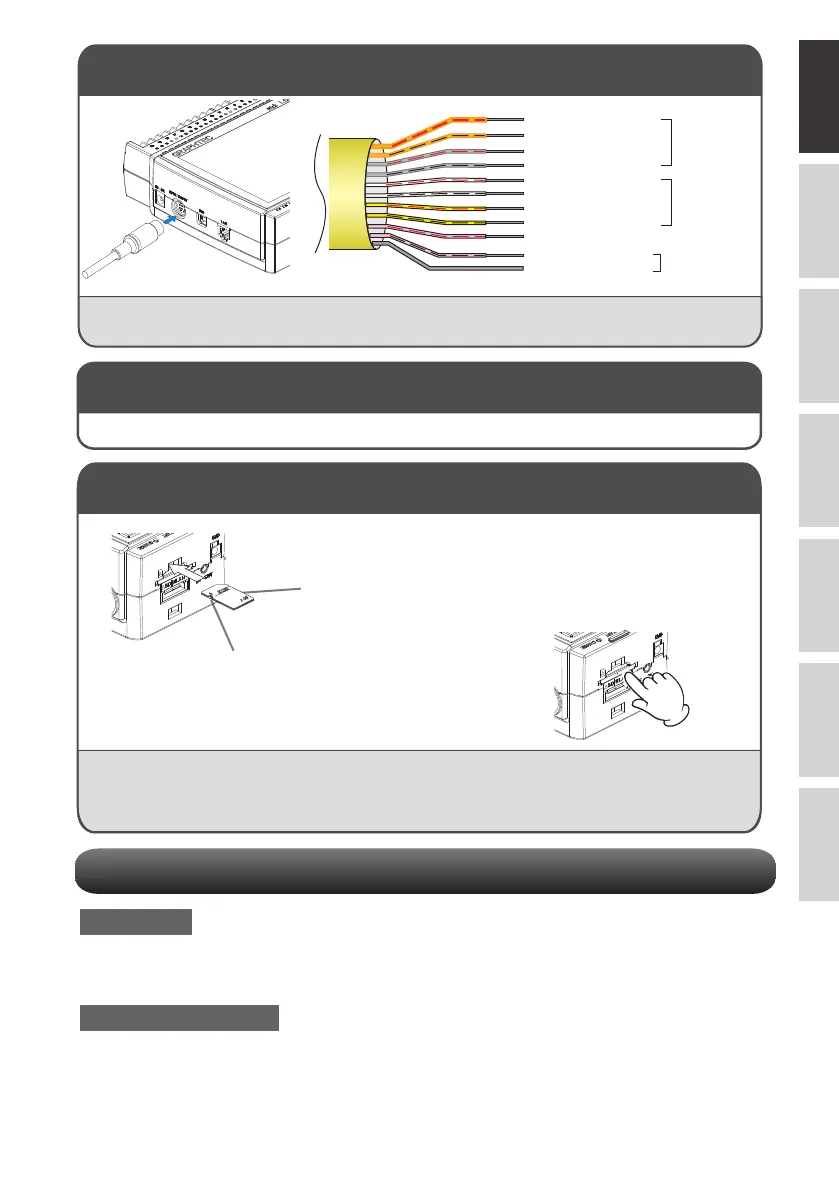
Connecting the External Input/Output Terminals
The B-513 input/output cable for the GL series (optional item) is required for connecting external
input/output signals. (logic/pulse input, alarm output, trigger input, external sampling pulse input)
Orange with red dotted line : 1
Orange with black dotted line : 2
Grey with red dotted line : 3
Grey with black dotted line : 4
White with red dotted line : 1
White with black dotted line : 2
Yellow with red dotted line : 3
Yellow with black dotted line : 4
Pink with red dotted line : Trigger input/
external sampling input
GND
Logic/pulse
input
Alarm output
< Connection Diagram >
Pink with black dotted line
• The internal memory is not removable.
Internal memory















 To Next Page