D Series Modular Air-cooled Scroll Chillers
18
y
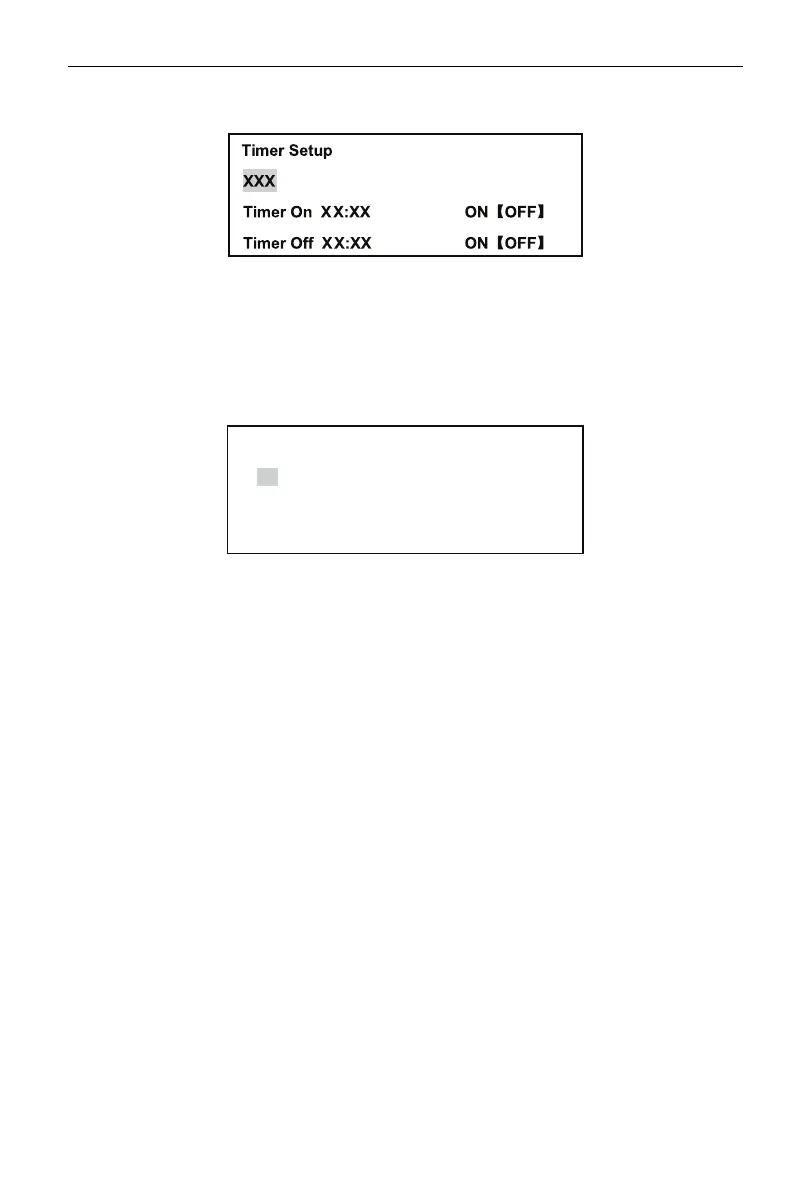
Timer Setup
Select Timer Setup and press Conrm to go to the page as shown in the following drawing:
Press Conrm to change a selected object. Press Up or Down to change value or state of a selected
object. This is timing on/off time and effective status each week. “OFF” represents the time set is invalid
and “ON” means a valid time set. Press the Exit button to quit the page and go back to the previous menu
and save set values.
y
Clock Setup
Select Clock Setup and press the Conrm button to go to the page. The following display is present on
the screen.
Clock Setup
20XX-XX-XX
XX:XX
XXX
Press the Conrm button to change a selected object. Press the Up or Down button to change value
or state of a selected object. Press the Exit button to quit the page and go back to the previous menu and
save set values.
y
Sound On set
Select Sound, press the Confirm button, and the subsequent “ON” or “OFF”, which means the
function is selected or not.
y
Backlight On Set
Select Backlight, press the Conrm button, and the subsequent “ON” or “OFF”, which means the
function is selected or not.
y
ECO.Mode Set
Select ECO.Mode, press the Conrm button, and the subsequent “ON” or “OFF”, which means the
function is selected or not.
y
Quiet Mode Set
Select Quiet Mode, press the Conrm button, and the subsequent “ON” or “OFF”, which means the
function is selected or not.
y
Memory Start Set
Select Memory Start, press the Conrm button, and the subsequent “ON” or “OFF”, which means the
function is selected or not. The function is for selecting whether the unit will memorize its operation state if
power supply is shut down.



 To Next Page