D Series Modular Air-cooled Scroll Chillers
19
(2) Module View
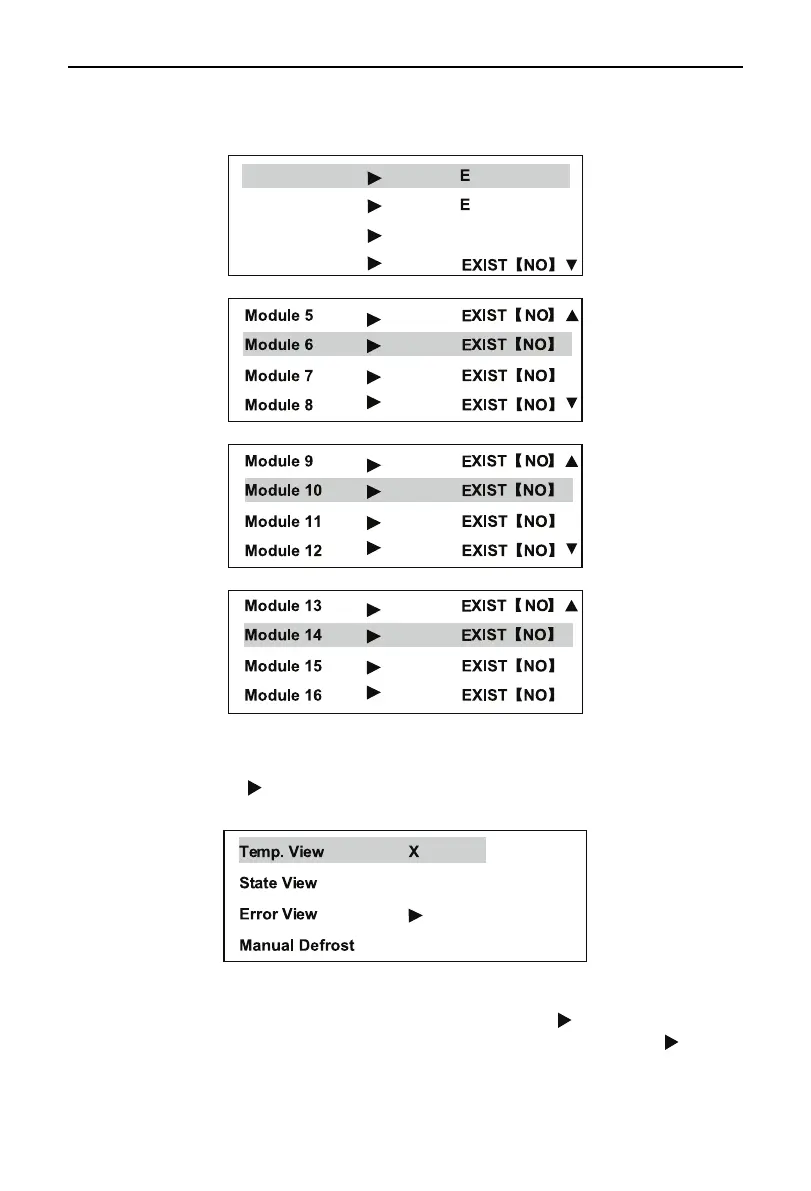
When the Main Menu is present on the screen, select Module View, press the Conrm to go to the
pages as shown in the following drawing.
Module 1 XIST【NO】
Module 2
XIST【NO】
Module 3 EXIST【NO】
Module 4
Page 1
Page 2
Page 3
Page 4
Press the Exit to quit the page and go back to the previous menu. Press the Up or Down button to
select a needed module and press the Conrm button to go to corresponding page.
A module followed with “ ” means having a failure. The following menu will display after going to the
module.
Press the Exit button to quit the page and go back to the previous menu. Press the Up or Down
selection button to select a needed function and press the Conrm to go to corresponding page. “X” stands
for one number of “1~16”, meaning number of the selected module. The “ ” following the State View
represents the module provides auto freeze protection operation or defrosting operation. The “ ” following
the Error View represents the module is at fault.



 To Next Page