Wi
Fi
Wi
Fi
Wi
Fi
Wi
Fi
7
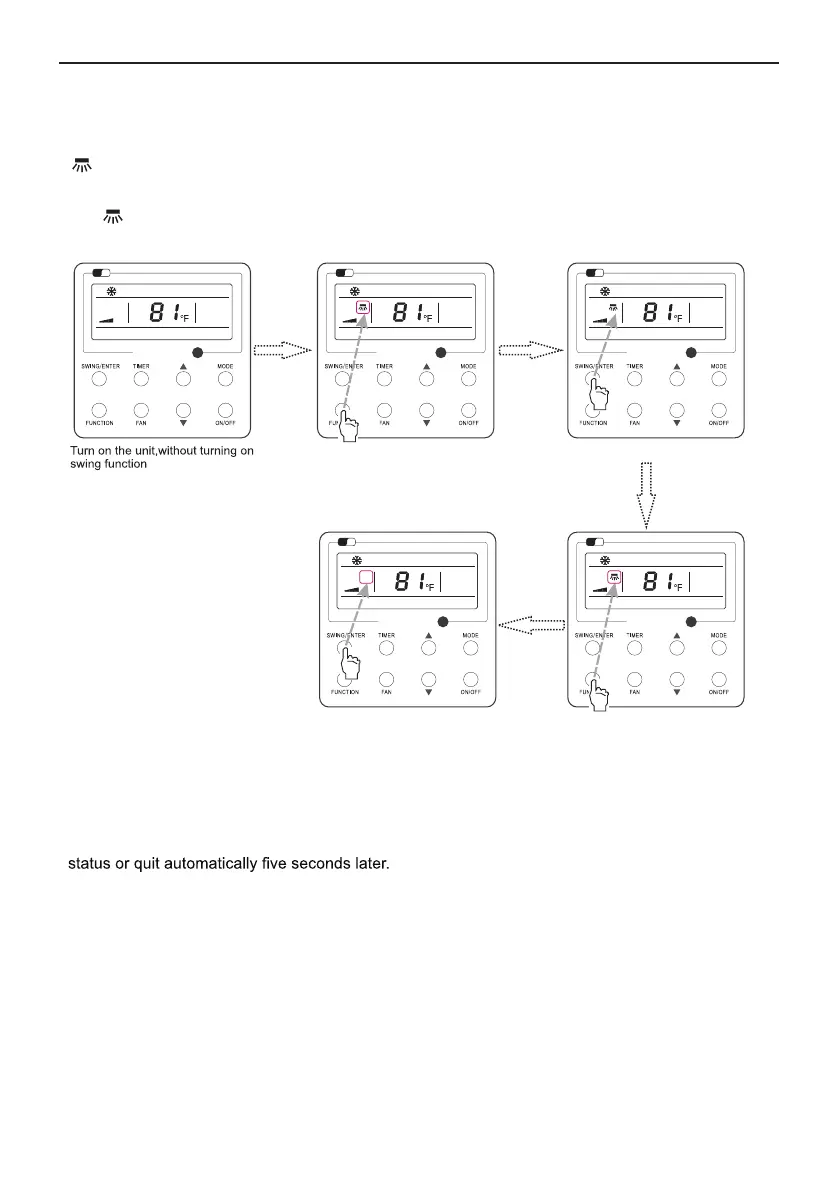
3.7 Left & Right Swing Setting
Swing setting is shown as Fig.9.
Fig. 9 Swing Setting
①
Note:
②
Wired Remote Controller XE72-44/E
with blinking. After that, press SWING/ENTER to cancel this function.
Press “FUNCTION” button into swing state
Press “FUNCTION” button into swing state
Press “SWING/ENTER” button to confirm
Press “SWING/ENTER” button to cancel
swing
Swing On: Press FUNCTION under on state of the unit to activate the swing function. In this case,
will blink. After that, press SWING/ENTER to make a confirmation.
Swing Off: When the Swing function is on, press FUNCTION to enter the Swing setting interface,
.
Sleep, Turbo or X-fan setting is the same as the Swing setting.
.
After the setting has been done, it has to press the key “SWING/ENTER” to back to the setting
Wi
Fi



 To Next Page