Wi
Fi
Wi
Fi
Wi
Fi
Wi
Fi
Wired Remote Controller XE72-44/E
8
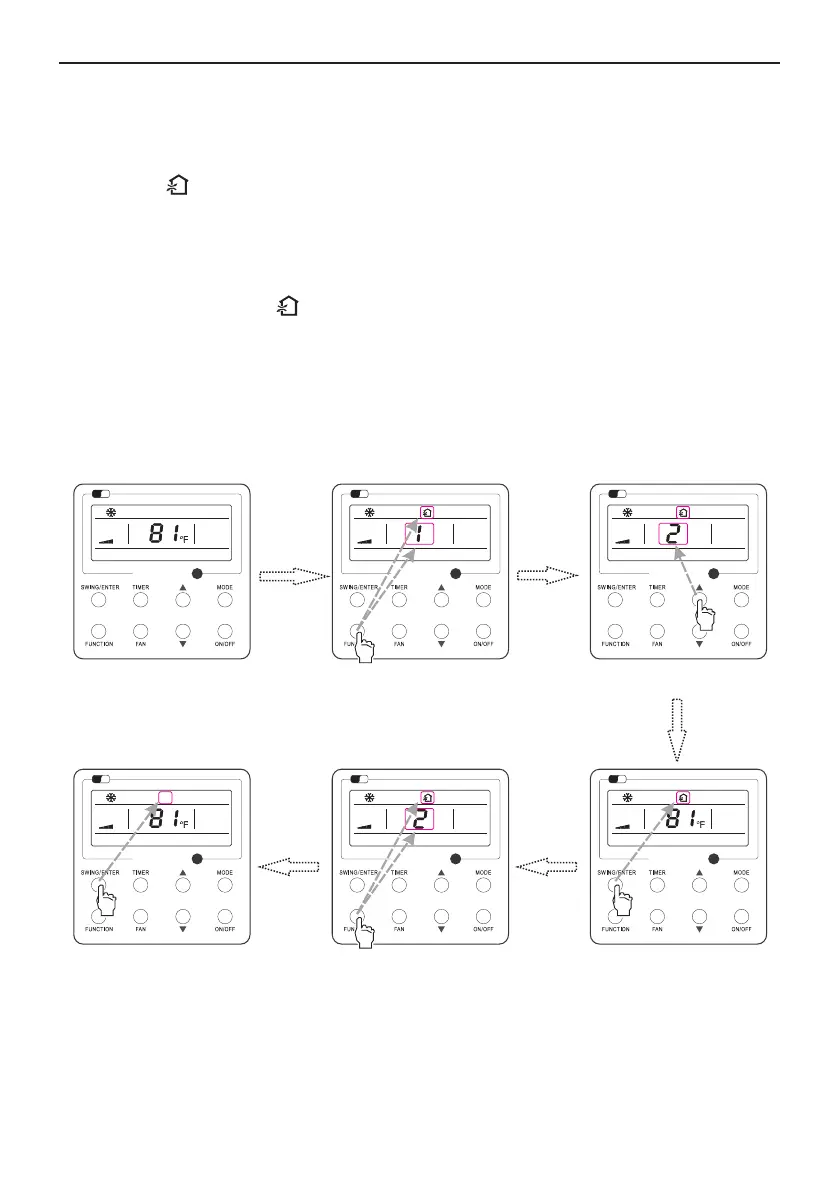
Press “FUNCTION” button to select
3.8 Fresh Air Valve Function Setting
the “Fresh Air” function option
Fig. 10 Fresh Air Function Setting
Turn on fresh air valve function:
Press “FUNCTION” button to select
the “Fresh Air” function option
Press “SWING/ENTER” button to
activate the “Fresh Air” function
Press “SWING/ENTER” button to
deactivate the “Fresh Air” function
Turn off fresh air valve function:
If fresh air valve function has been set, press FUNCTION button on the panel to select “Fresh air
Under unit on status, press FUNCTION button on the panel to select “Fresh air valve” function
option. When icon flashes, it enters fresh air valve setting mode. Previous temperature display
position will display the level of fresh air valve. Press ▲ or ▼ button to adjust the level of fresh air
valve within the range from 1 to 10. Then press SWING/ENTER button to activate this function.
valve” function option. When icon flashes, if you press SWING/ENTER button without pressing
▲ or ▼ button, fresh air valve function will be canceled; if you press SWING/ENTER button after
pressing ▲ or ▼ button, fresh air valve function will be activated.
Note:
if you press panel button to set fresh air valve function on, ventilation (ventilation 1) function will be
activated too; if you press panel button to set fresh air valve function off, ventilation function will be
canceled too.
Turn on the unit with the “Fresh Air”
function deactivated
Press ▲ or ▼ to adjust the “Fresh Air”
type



 To Next Page