Wired Remote Controller XE72-44/E
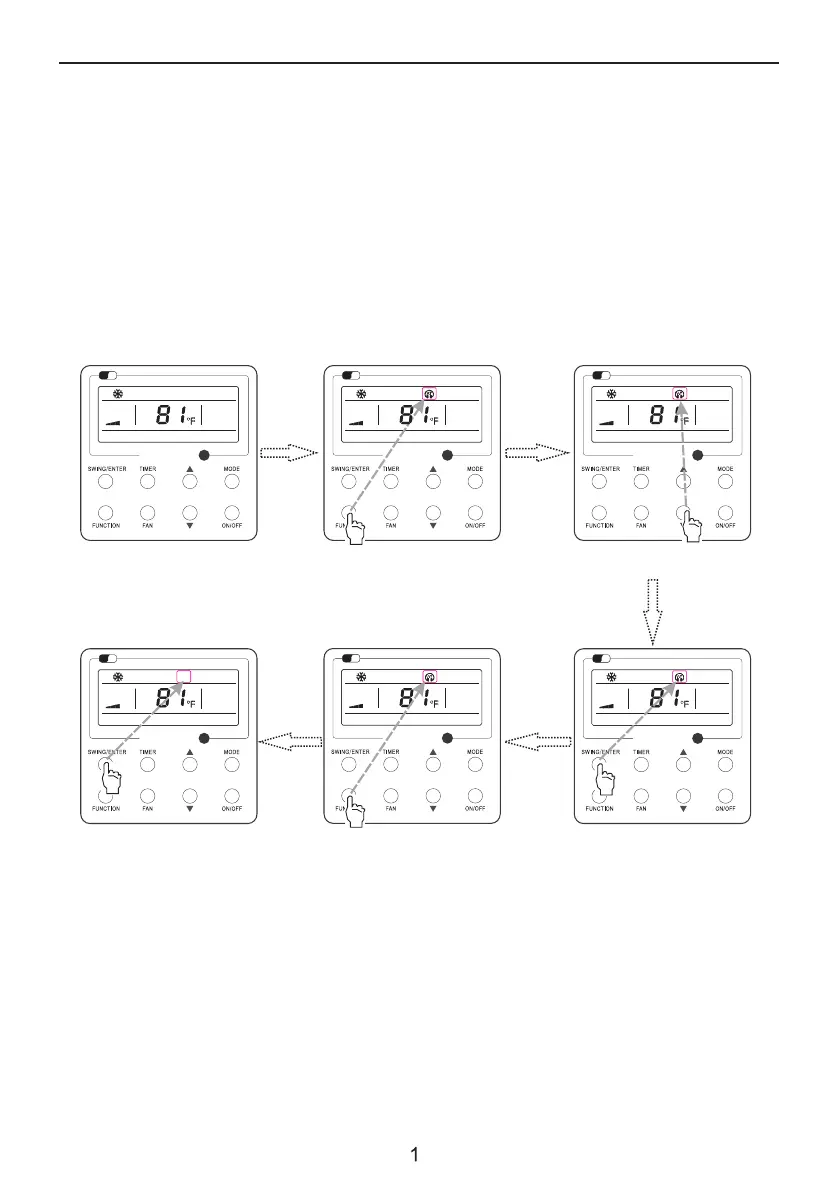
3.14 Quiet Function Setting
Press the Function button to select the
“Quiet” function option
Fig. 16 Setting of Quiet Function
Turn on quiet function:
Under unit on status, press FUNCTION button on the panel to select “Quiet” function option. When
“Quiet” or “Auto quiet” flashes, it enters quiet function setting mode. Press ▲ or ▼ button to switch
between “Quiet” and “Auto quiet” function. Then press SWING/ENTER button to activate this function.
Cancel quiet function:
If quiet function has been set, press FUNCTION button on the panel to select “Quiet” function option.
4
When “Quiet” or “Auto quiet” flashes, if you press SWING/ENTER button without pressing ▲ or ▼
button, quiet function will be canceled; if you press SWING/ENTER button after pressing ▲ or ▼
button, quiet function will be activated.
Wi
Fi
Wi
Fi
Press “FUNCTION” button to select the
“Quiet” function option
Turn on the unit with the “Quiet”
function deactivated
Press “SWING/ENTER” button to
deactivate this function
Press “SWING/ENTER” button to
activate this function
Press ▲ or ▼ to select the desired
type, “QUIET” or “AUTO QUIET”.
Wi
Fi
Wi
Fi
Wi
Fi
Wi
Fi



 To Next Page