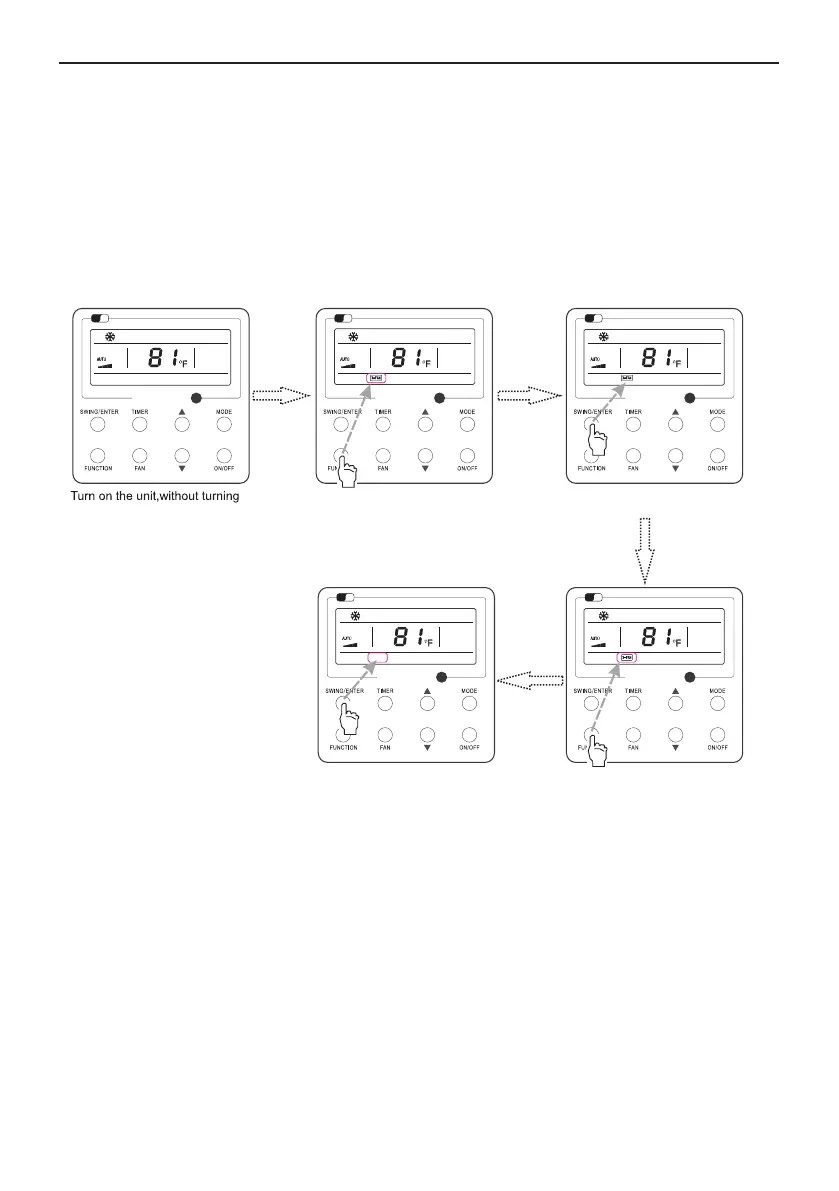
3.13 X-fan Setting
13
Notes:
①
Fig.15 X-fan Setting
②
X-fan function setting is as shown in Fig.15
Wired Remote Controller XE72-44/E
.
X-fan function is unavailable in the Fan or Heating mode.
remote controller, the indoor fan will run at the low fan speed for 2 min, with “X-FAN” displayed on
the LCD. While, if the X-fan function is deactivated, the indoor fan will be turned off directly.
Wi
Fi
X-fan function: After the unit is turned off, the water in evaporator of indoor unit will be
automatically evaporated to avoid mildew.
In the Cooling or Dry mode, press FUNCTION till the unit enters the X-fan setting interface and
then press SWING/ENTER to active this function.
When the X-fan function is activated, press FUNCTION to the X-fan setting interface and then
press SWING/ENTER to cancel this function.
.
When the X-fan function is activated, if turning off the unit by pressing ON/OFF or by the
Wi
Fi
Wi
Fi
Wi
Fi
Press “FUNCTION” button into X-fan state
on X-fan function
Press “FUNCTION” button into X-fan state
Press “SWING/ENTER” button to turn
on X-fan function
Press “SWING/ENTER” button to turn
off X-fan function
Wi
Fi



 To Next Page