Wired Remote Controller XE72-44/E
17
3.17 I-Demand Setting
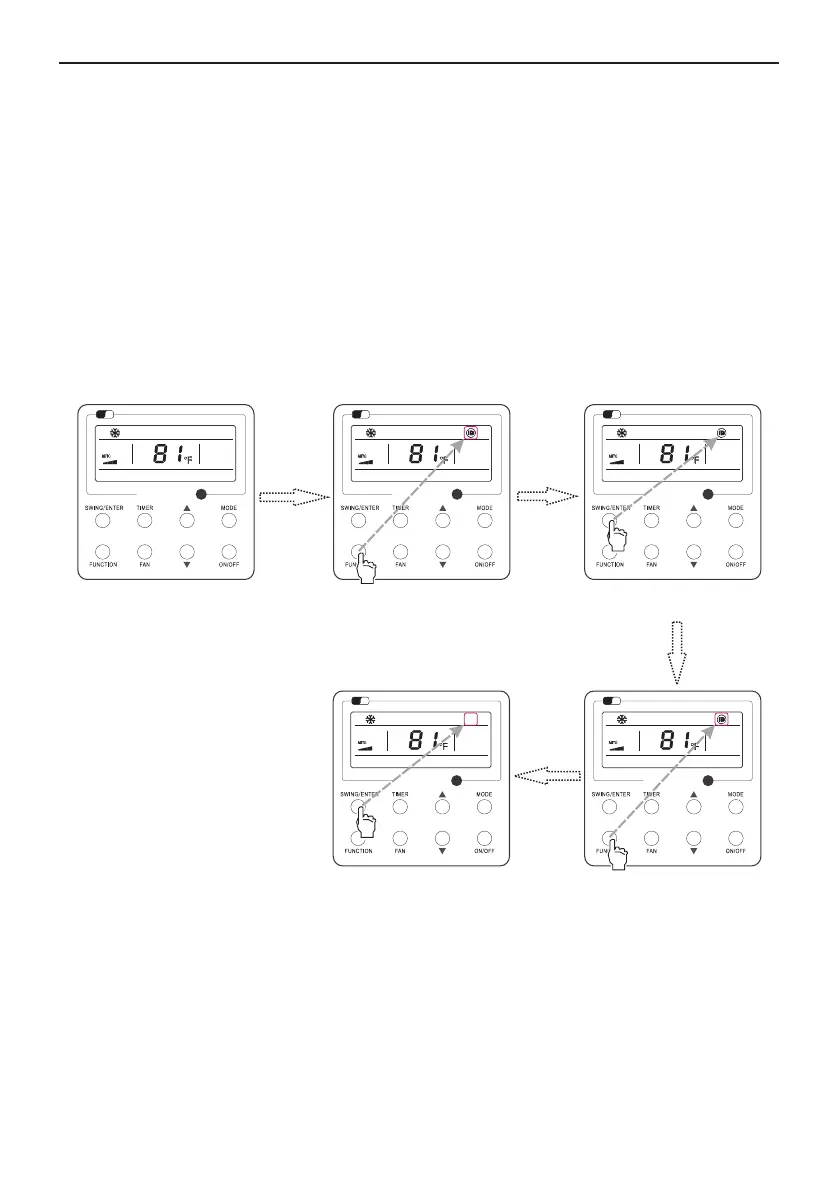
Fig. 19 I-Demand Setting
I-Demand on: Press FUNCTION under on state of the unit till the unit enters the I-Demand setting
interface. Press SWING/ENTER to confirm the setting.
I-Demand off: When the I-Demand function is activated, press FUNCTION to enter the I-Demand
setting interface. After that, press SWING/ENTER to cancel this function.
Wi
Fi
Wi
Fi
Wi
Fi
Wi
Fi
Wi
Fi
Press “FUNCTION” button into
I-demand state
Turn on the unit,without turning on
I-demand function
Press “FUNCTION” button into
I-demand state
Press “SWING/ENTER” button to turn
off I-demand function
Press “SWING/ENTER” button to turn
on I-demand function
1.This function is only available in cooling mode.
2.When this function has been set, set temperature is displayed in SE. In this case, temperature setting
and fan speed setting are shielded.
3.This function will be cancelled when switching modes.
4. This function and sleep function cannot be on simultaneously. If I-demand function is set firstly and
then sleep/quiet function is set, I-demand function will be cancelled while sleep function will be valid,
and vice versa.
Note:



 To Next Page