Service Manual
Technical Information
29
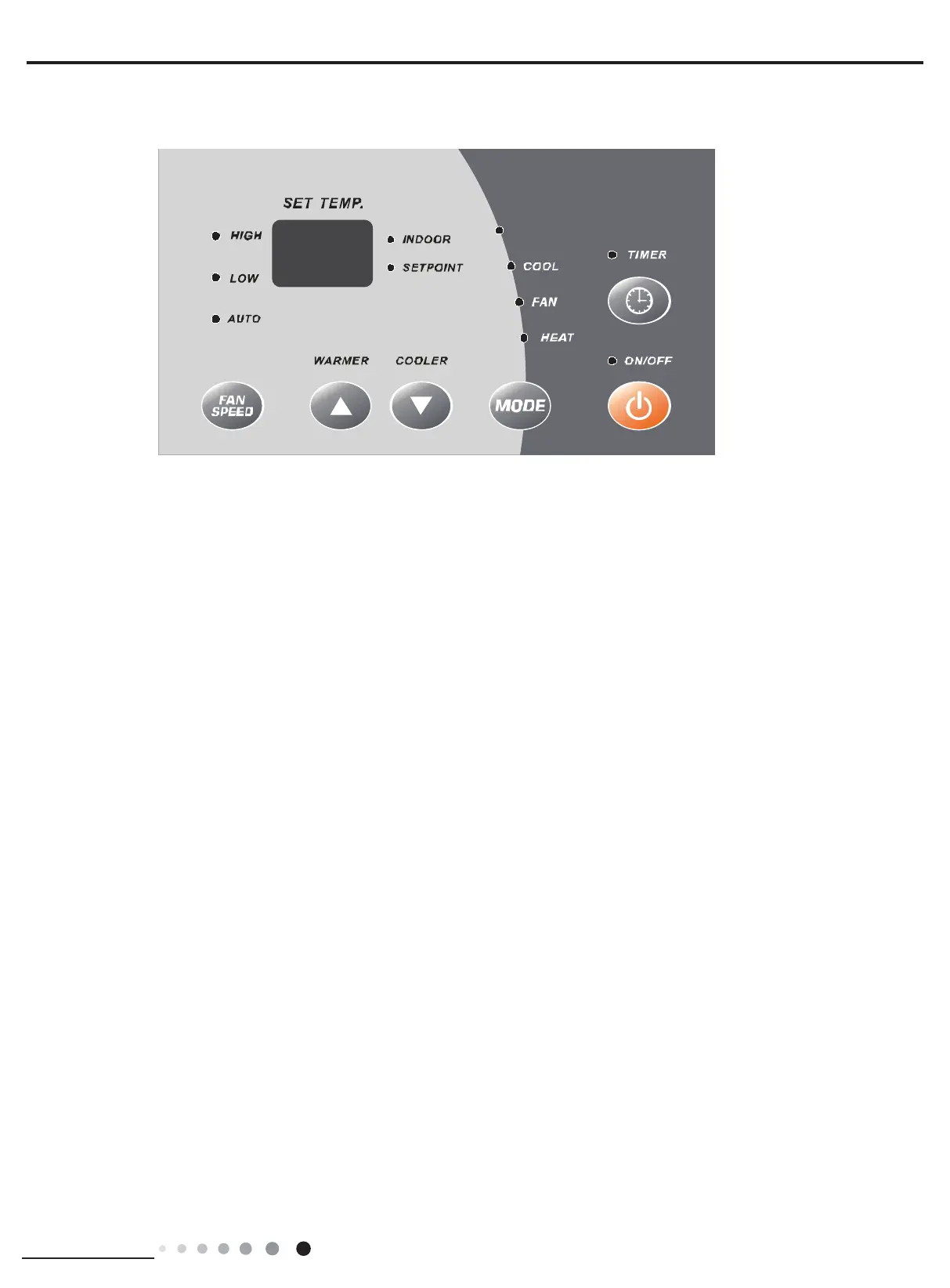
6.2 Introduction of Control Panel
DRY
ABOUT THE CONTROLS ON YOUR UNIT
There are ON/OFF, WARMER, COOLER, MODE, FAN SPEED and TIMER six buttons in all;
1. Press ON/OFF button under OFF mode to turn on the unit. If press WARDMER or COOLER button under OFF mode, the dual
8 nixie tube will display indoor temperature for 15s and then turn off. If press MODE button under OFF mode, the controller will
resume to the operation status before power-off. Operation indicator is in green.
2. Under ON status, every button is in valid
(1) ON/OFF: It is used for turning OFF the system.
(2) MODE: It is used for switching between Cool, Fan, Heat and Dry (optional).
(3) WARMER or COOLER: 1. It is used for increasing temperature or timer setting.
2. It is used for decreasing temperature or timer setting.
(4) FAN:It is used for setting high, medium, low or auto fan speed. The corresponding LED will be on.
(5) TIMER:It is used for setting timer function.
3. Timer function: It can be set either by buttons on control panel or by remote controller
(1) Timer ON: When the unit is off, timer ON can be set. Setting range is 0.5~24h. When timer ON time is reached, the system
will operate according to the set mode.
(2) Timer OFF: When the unit is off, timer OFF can be set. Setting range is 0.5~24h. When timer OFF time is reached, the
system will stop operation.
(3) Timer Setting: Press TIMER button to set timer function and Timer icon will be on. Dual 8 nixie tube will display selected time
which can be adjusted by pressing “+”or“-”buttons. The range of timer setting is from “--” to 24h. 5s after timer setting, the timer
function will be activated and TIMER LED will be on. If “--” is displayed, the system will stop timer setting.
(4) Timer Preview: when timer function has been set, press TIMER button to preview the remaining time of timer.
(5) If Timer function has been set, turning on/off the unit or power failure will cancel timer setting.
4. Sleep function: This function can be set only by remote controller. This mode will bring a more comfortable sleeping
environment. Please contact customer service center or refer to the service manual for more details.
5. DRY function: Without reducing the room temp,air conditioner can dehumidify and make the room air dry and comfortable.
6. Buzzer: optional
When controller is energized, or valid remote control signal/ button signal is received, the buzzer will give out a beep.
7. Auto fan speed
Fan speed can be automatically selected according to different modes or indoor temperature to achieve higher comfort.
8. Emergency cooling operation: Emergency cooling, Subject to your choice – allowed or rejected).
When indoor ambient temperature ≥86
o
F(30
o
C), the unit will start cooling automatically. When indoor ambient temperature
reaches 81
o
F(27
o
C), the unit will stop operation.
9. F code remote controller: optional



 To Next Page