30
17. TROUBLESHOOTINGGUIDE
FD450-TROUBLESHOOTINGGUIDE
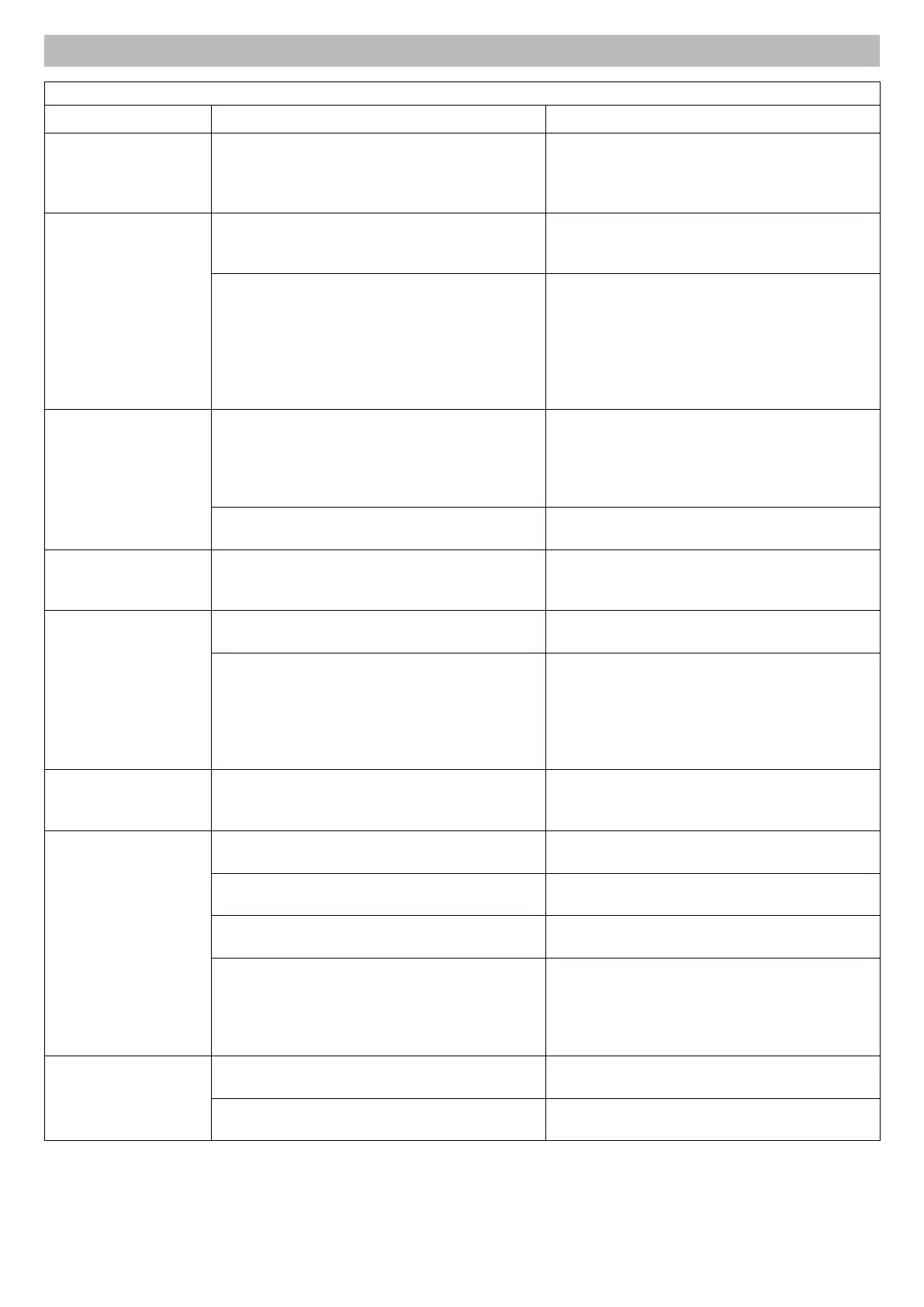
PROBLEM CAUSE SOLUTION
The warning light on the
dashboard remains off
with the key in any position
besides the STOP position.
The battery does not supply any current
- Check the connection cables
- Recharge the battery
- Check the integrity of the fuses
- Check the ground connections on the engine
The warning light on the
dashboard is switched
on, the key is in a position
other than STOP, but the
starter motor does not
rotate
Thebatterydoesnotsupplysufcientcurrent
- Recharge the battery
- The battery has no ground connection
- Check the integrity of the fuses
No start consent
- The forward/reverse pedal is not in neutral
- PTO switch on
- Sit in the driver’s seat to activate the microswitch, or
apply the parking brake
- High engine temperature
- Check for a defective microswitch
- Faulty ignition key block
Difcultstartingorirregular
engine operation
Combustion issues
- Check that the choke is applied (if the engine is cold)
- Cleanorreplacetheairlter
- Check that the carburettor jets are clean
- Check that the spark plug gives a spark
- Check that there is no air intake in the fuel circuit
Deposits or contamination in the fuel
- Checkand,ifnecessary,replacethefuellter
- Consult the engine manual
The starter motor rotates
but the engine does not
start
Nofuelow
- Check the fuel level in the tank
- Check(andreplaceifnecessary)thefuellter
Dropinmotorefciency
during cutting
High forward speed in relation to cutting height
- Reduce the forward speed
- Place the cutting deck in a higher cutting position
Cutting deck transmission
- Check the integrity of the bearings and belt tensioners
of the cutting deck
- Lubricate the cutting deck using the grease nipples
indicated
- Check the cleanliness of the loading chute and the
cutting deck
The motor switches off
when the blades are
activated
- Blades
- Belt tensioners
- Check the integrity of the bearings and belt tensioners
of the cutting deck
- Check the blades and transmission for obstructions
Irregular cutting and
insufcientcollection
Incorrect inclination of the cutting deck
- Check tyre pressure
- Restore the correct inclination of the cutting deck
Bladeinefciency
- Checkthecorrectttingoftheblades
- Sharpen or replace the blades
High forward speed in relation to cutting height or lawn
conditions
- Reduce the forward speed
- Place the cutting deck in a higher cutting position
Clogging of the loading chute
- Remove the cutting deck and empty the chute from
grass
- Check the engine revs
- Clean the grass catcher grid
- Adjust the full grass catcher microswitch
Vibrations during operation
Unbalanced blades
- Balance or replace blades if damaged
- Check the integrity of the bearings and belt tensioners
Accidental knocks on kerbs, walls, etc.
- Checkblade,frameandenginexingboltsandtighten
any loose bolts



 To Next Page