EasyManua.ls Logo

Groen Vortex 100 Series - User Manual

Groen Vortex 100 Series
14 pages
Print Icon
To Next Page IconTo Next Page
Loading...
This manual provides information for:
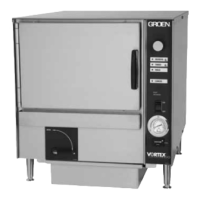
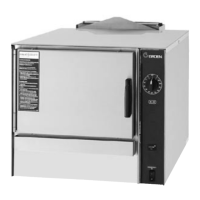
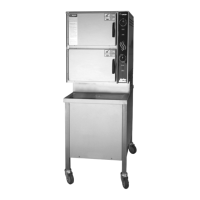
MODELS VRC-3E
& VRC-6E
Domestic
VORTEX100
®
CONNECTIONLESS
STEAMER
· Self Contained
· Electric Heated
· Capacity: VRC-3E=3 Steamer Pans Per Cavity
VRC-6E=6 Steamer Pans Per Cavity
OPERATOR MANUAL
IMPORTANT INFORMATION, KEEP FOR OPERATOR
PART NUMBER 148673, REV. G (09/07)
1055 Mendell Davis Drive
Jackson, MS 39272
888-994-7636, fax 888-864-7636
groen.com
THIS MANUAL MUST BE RETAINED FOR FUTURE REFERENCE.
READ, UNDERSTAND AND FOLLOW THE INSTRUCTIONS AND
WARNINGS CONTAINED IN THIS MANUAL.
FOR YOUR SAFETY
Do not store or use gasoline or other flammable vapors
and liquids in the vicinity of this or any other appliance.
NOTIFY CARRIER OF DAMAGE AT ONCE
It is the responsibility of the consignee to inspect the container upon receipt of
same and to determine the possibility of any damage, including concealed dam
-
age. Unified Brands suggests that if you are suspicious of damage to make a
notation on the delivery receipt. It will be the responsibility of the consignee to file
a claim with the carrier. We recommend that you do so at once.
Manufacture Service/Questions 888-994-7636.
Information contained in this document is known to be current and accurate at the time
of printing/creation. Unified Brands recommends referencing our product line websites,
unifiedbrands.net, for the most updated product information and specifications.
PART NUMBER 148673, REV. H (5/08)


Questions and Answers

  • L
    Lisa HodgesAug 9, 2025
    What to do if my Groen Vortex 100 Kitchen Appliances have no power?
    • B
      Brad PetersonAug 9, 2025
      If your Groen Kitchen Appliance has no power, first check the wall circuit breaker. If the problem persists, you should call a service technician.
  • K
    Karen MartinezAug 14, 2025
    What to do if my Groen Vortex 100 is showing any unusual operation?
    • D
      Dana AndrewsAug 15, 2025
      If your Groen Kitchen Appliance is operating unusually, try pressing the ON/OFF rocker switch to turn the steamer off, and then press it again to turn the steamer back on. If the unusual operation continues, call a service technician.
  • A
    Ashley ReedAug 20, 2025
    What to do if Groen Vortex 100 Kitchen Appliances door pops open?
    • J
      Jonathan ClarkeAug 21, 2025
      If the door of your Groen Kitchen Appliance keeps popping open, make sure the drain and vent are not blocked. Also, ensure that no more than two units are connected to a single drain line. Check the door pin adjustment. If problems persist, call a service technician.
  • P
    Patrick GibsonAug 27, 2025
    What to do if HI TEMP Indicator (error code 6) is displayed on Groen Vortex 100?
    • T
      Tamara HuangAug 27, 2025
      If the HI TEMP indicator (error code 6) is displayed on your Groen Kitchen Appliance, wait 30 minutes for the unit to cool down. The fault display should then disappear. Turn the unit on. If the problem continues, call a service technician.
  • M
    Micheal WallaceSep 1, 2025
    Why dial gage will not read 212 on Groen Kitchen Appliances?
    • M
      Melissa TrujilloSep 2, 2025
      If the dial gauge on your Groen Kitchen Appliance will not read 212, this may be normal. Altitude and water purity can affect the temperature reading on the gauge.

Summary

Equipment Description

Inspection and Unpacking

Installation and Start-Up

Electrical Supply Connection

Connection of the unit to the electrical supply, adhering to codes.

Branch Circuit Protection

Requirement for separate branch circuit protection and grounding for each unit.

Water Connection

Procedure for manual filling or connecting the autofill water supply.

Drain Connection and Line Installation

Guidance on manual draining and installing drain lines for units.

Stacking Units Instructions

Steps for securely stacking multiple steamer units.

Steam Vent Assembly Instructions

How to attach the steam diverter assembly to the unit's steam outlet.

Operation

Controls Overview

Overview of operator controls and indicator lights on the unit's front panel.

Push Button Operations

Explanation of the functions of the unit's push buttons and indicator lights.

Operating Procedure

Step-by-step guide for filling, heating, loading, and draining the steamer.

Cleaning

Suggested Tools

List of recommended tools for cleaning the steamer unit.

Exterior Cleaning Procedure

Steps for cleaning the exterior surfaces of the steamer.

Interior Cleaning Procedure

Instructions for cleaning the interior cavity and components.

Maintenance

Troubleshooting

Water Drain Kit Installation Instructions

Pan Racks for Single Stands Only Installation Instructions

Groen Vortex 100 Series Specifications

General IconGeneral
BrandGroen
ModelVortex 100 Series
CategoryKitchen Appliances
LanguageEnglish

Related product manuals