Setting Auto-Closing Operation / Courtesy Light / Buzzer Responses
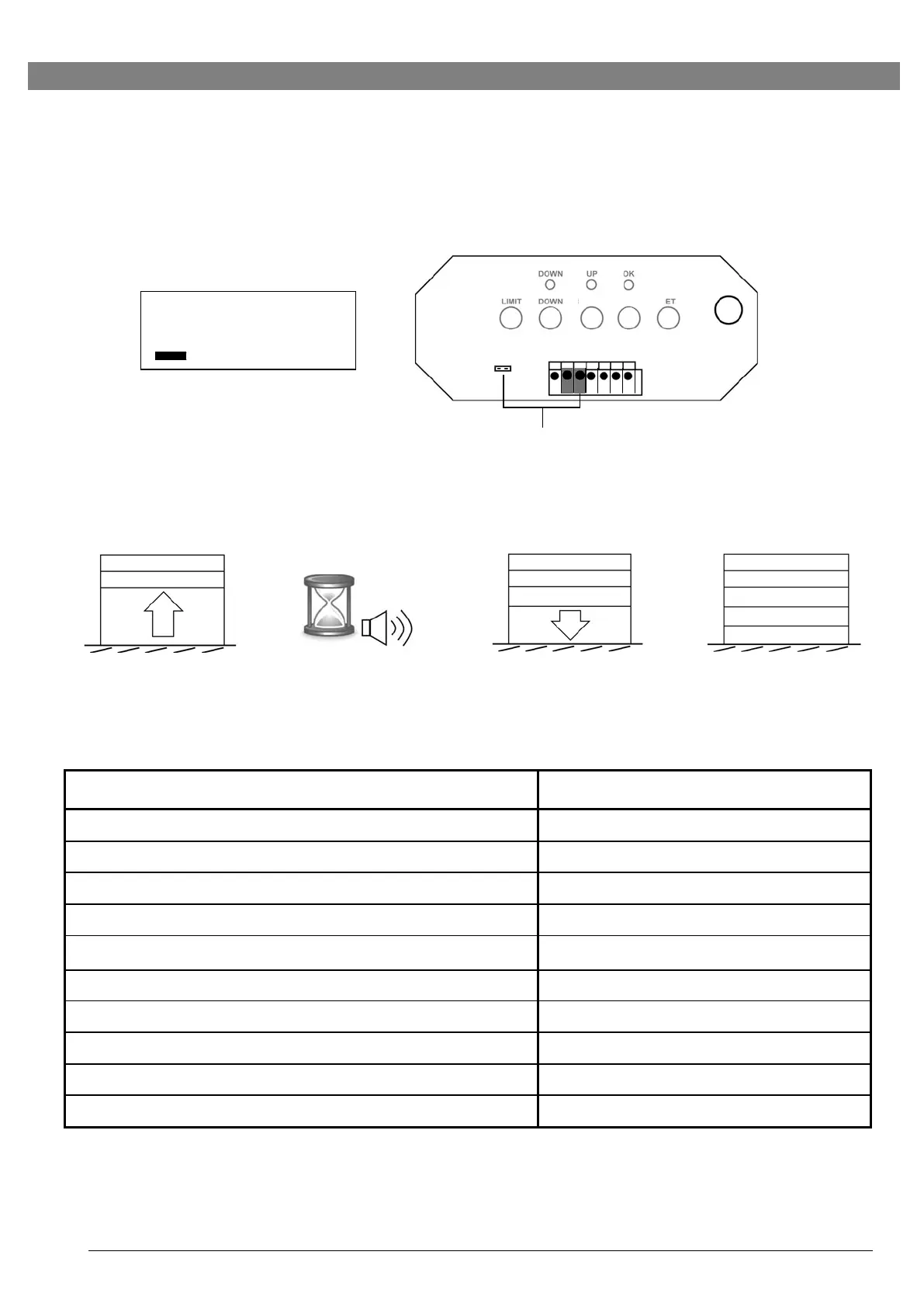
Auto-closing timer is turned off as default (the screw control is at fully “-”)
1.
Optional Photo Eye* must be selected and properly connected and aligned to enable Auto
-Closing Operation. (* Contact your local operator supplier)
2.
Turn the screw towards ‘+’ position to set to appropriate delay time (max. 2-1/2 minutes)
for the door to auto-close after fully opened.
Photo Eye must be selected and connected
3.
When the delay time is reached within the door at fully open position, the operator beeps
twice and closes the door automatically.
1
2
3
x2
Courtesy Light / Beeper Responses
Courtesy Light / Beeper Responses
Operator is initially plugged-in (no travel limits stored)
Reconnecting power (with travel limits stored)
“RADIO SET” button is pressed
Upon activation by remote transmitters
Beep x 1, Light On for 2.5 minutes
Remote Transmitter / Keyless Entry PIN code accepted
Operator is triggered without programming
Door travels with abnormal speed
Beep x 12 (1 beep / second)
Photo Eye System is obstructed during door-closing
The door is obstructed during travel
Photo Eye Selection
Jumper off — Selected
Jumper on — Unselected


 To Next Page