13
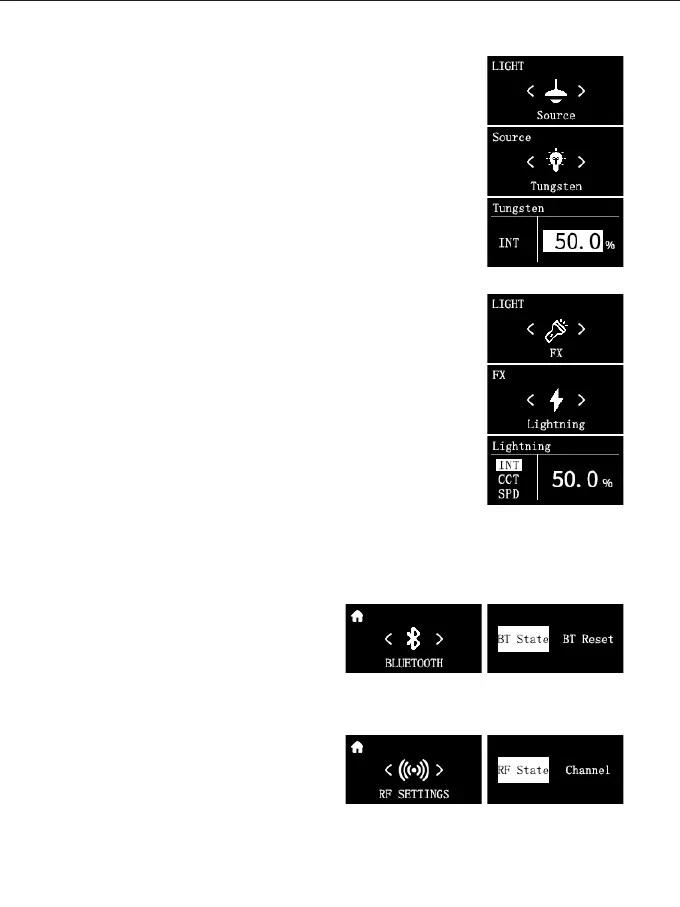
Light source match mode:
In this mode you have 12 types of light sources to choose from:
Tungsten, HMI5600, HMI6000, Studio Lamps, Sodium Lamp,
Halogen, Arc Lamp, Candle, Sunset/Sunrise, Daylight, Overcast
Sky, CFL Cool White.
Source: Short press and turn the knob to select the light source.
INT: After selecting the light source, rotate the knob to adjust
the brightness.
Light effect mode:
In this mode there are 16 light effects to choose from: Lightning,
CCT Loop, Candle, Bad Bulb, TV, Paparazzi, Explosion, Pulsing,
Disco, Cop Car, Party, Hue Loop, Fireworks, Fire Engine,
Ambulance, SOS.
Effect: Short press and turn the knob to select light effect.
INT: After selecting the light effect, rotate the knob to adjust the
brightness.
CCT: Short press and rotate the knob to adjust the color
temperature.
HUE: Short press and rotate the knob to select and adjust the
hue.
SAT: Short press and rotate the knob to select and adjust
saturation.
SPD: Short press and rotate the knob to select and adjust the
speed of effects.
② BLUETOOTH:
You can view/switch/reset the current
Bluetooth status.
③ RF SETTINGS:
You can view/switch the current RF status,
the RF channels can be set from 1-12.



 To Next Page