12
DEUTSCHENGLISH FRANÇAIS ITALIANO ESPAÑOL NEDERLANDS
PORTUGUÊS
SVENSKA
© HAAG‑STREIT AG, 3098 Koeniz, Switzerland ‑ HS‑Doc. No. 1500.7221019.04030 / 2024 – 04
6.4 Field of view
WARNING!
The images and videos should only be used for documentation pur-
poses. Only the image in the eyepiece may be used for diagnosis.
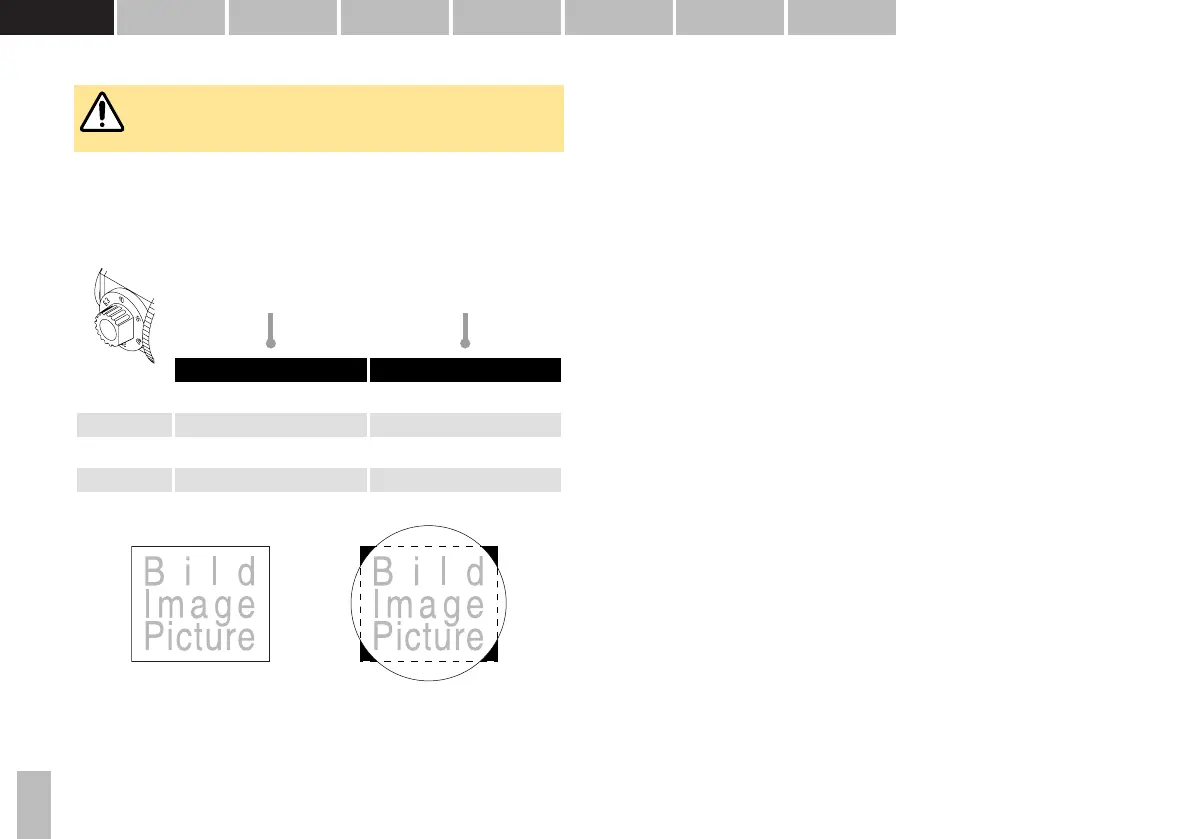
Field of view of the object, see table
Circle: The field of view of the object observed through the microscope's
eyepiece.
Rectangle: Surface area of the sensor:
Object image section in the
eyepiece (mm)
Object image section in the
camera
12.5 × Recording mode 5:4
6.3 × ø 33 24.4 × 29.2
10 × ø 20 15.4 × 18.4
16 × ø 12.7 9.7 × 11.7
25 × ø 8 6.1 × 7.4
40 × ø 5.1 3.9 × 4.7
6.5 Image & video capture mode
• When setting the beam splitter switch (7) to the camera symbol the camera will
automatically start and the live-stream image of the camera (mounted in the
right optical path) will be displayed.
• Image capture: By pressing the release key (76) an image will be captured.
• Video capture: A long press on the release key (76) starts video capturing.
Pressing the menu button (75) will stop the recording function. During video cap-
turing images can still be taken by pressing the release key (76).
• By resetting the beam splitter switch (7) the option to end the current examina-
tion or continue with the existing examination appears if 'End Examination Mode'
is enabled.
6.5.1 Exposure mode
By default the system operates in auto exposure mode thus the exposure is selec-
ted by the system. If you want to change the exposure manually, you have the fol-
lowing options:
• Brighter: By pressing the outer key (73) of the release module RM03 the image
brightness level will be increased.
• Darker: By pressing the inner key (74) of the release module RM03 the image
brightness level will be decreased.
• Restore auto exposure mode: By pressing the inner key (74) and outer key (73)
simultaneously the mode will switch to auto exposure mode.
6.5.2 Aperture priority mode
• When an aperture is selected manually the camera will operate in the aperture
priority mode. Exposure and gain will continue to operate automatically but the
aperture is fixed.


 To Next Page