EasyManua.ls Logo

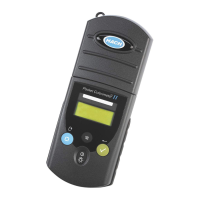
Hach POCKET COLORIMETER II - User Manual

Hach POCKET COLORIMETER II
116 pages
Print Icon
To Next Page IconTo Next Page
Loading...
59571-88
POCKET COLORIMETER™ II
ANALYSIS SYSTEMS
INSTRUCTION MANUAL
Bromine (Br)
Chlorine Dioxide (ClO
2
)
Chlorine (Cl
2
) / pH
© Hach Company, 2004–2006. All rights reserved. Printed in the U.S.A. te/dk 9/06 4ed

Table of Contents

Other manuals for Hach POCKET COLORIMETER II

Questions and Answers

  • H
    henrykaylaJul 27, 2025
    What to do if the Hach Measuring Instruments reading flashes?
    • Z
      Zachary GilesJul 27, 2025
      If the reading is less than the instrument range, ensure the instrument cap is fully installed over the cell holder. Measure a blank; if it's not zero, set the instrument to zero again. Alternatively, light blockage in the cell holder may be the issue; check for and remove any blockage. Dilute the sample and re-run the test. For factory-calibrated programs, note that maximum and minimum values cannot be changed.
  • J
    Johnny GrayAug 1, 2025
    Why does my Hach POCKET COLORIMETER II show E-1 error?
    • G
      goodmanalisonAug 1, 2025
      The E-1 error indicates ambient light is present in the cell holder. Ensure the instrument cap is fully installed over the cell holder to resolve this.
  • L
    Luis ColeAug 6, 2025
    What to do if Hach POCKET COLORIMETER II shows E-2 error?
    • E
      Edward MccallAug 6, 2025
      The E-2 error means the LED (light source) is out of regulation. Replace the batteries and ensure the LED in the cell holder illuminates when pushed.
  • M
    mgarciaAug 11, 2025
    How to fix E-6 error on Hach POCKET COLORIMETER II Measuring Instruments?
    • L
      Lauren BanksAug 11, 2025
      The E-6 error appears when the absorbance value is incorrect, or the user-entered calibration curve has fewer than two points. Enter or measure the absorbance value again to fix this.
  • G
    Gregory JacksonAug 16, 2025
    What to do if Hach Measuring Instruments shows E-7 error?
    • M
      Molly KeithAug 16, 2025
      The E-7 error indicates the standard solution concentration matches another already in the user-entered calibration curve. Enter the correct standard concentration to resolve this.
  • C
    Christopher WashingtonAug 21, 2025
    How to resolve E-0 error on Hach POCKET COLORIMETER II Measuring Instruments?
    • D
      Donald MeyersAug 21, 2025
      The E-0 error occurs in user calibration mode when a standard solution was measured before setting the instrument zero. To fix this, measure a blank solution to set the instrument to zero.

Summary

Safety Precautions

Laboratory Safety Guidelines

Guidelines for safe practices when handling reagents and chemicals in a laboratory setting.

Instrument Keys and Display Overview

Bromine Total Low Range (LR) Measurement

Bromine LR Sample Measurement Tips

Key considerations and best practices for accurate bromine measurements using the LR method.

Bromine Total High Range (HR) Measurement

Bromine HR Sample Measurement Tips

Key considerations and best practices for accurate bromine measurements using the HR method.

Chlorine Free and Total High Range (HR)

Chlorine HR Sample Measurement Tips

Key considerations for accurate measurement of free and total chlorine in high range samples.

Chlorine Dioxide Measurement

Chlorine Dioxide Sample Measurement Tips

Key considerations for accurate measurement of chlorine dioxide, including sample stability.

pH Measurement

pH Sample Measurement Tips

Key considerations for accurate pH measurements, including buffer use and range limits.

pH Standard Calibration Adjustment

Guidance on adjusting the pH calibration curve using a standard buffer.

Instrument Operation Procedures

Instrument Key Functions Overview

Description of the functions for each key on the instrument.

Instrument Menu Navigation

How to navigate through the instrument's menu options.

Instrument Range Switching

Procedure for switching between different measurement ranges on the instrument.

Instrument Battery Installation Guide

Step-by-step guide for installing or replacing batteries in the instrument.

Instrument Error Codes and Messages

Troubleshooting Instrument Error Messages

Details on error codes displayed by the instrument and how to resolve them.

Standard Calibration Adjustment Procedure

User-Entered Calibration Process

User Calibration Overview and Capabilities

Introduction to user-defined calibration curves for the instrument.

User Calibration: Standard Preparation Procedure

Steps for preparing standards and performing calibration using prepared standards.

Entering a Predetermined Calibration Curve

Procedure for entering a calibration curve using predefined data pairs.

Hach Product Warranty Details

Hach POCKET COLORIMETER II Specifications

General IconGeneral
Measurement MethodColorimetric
DisplayLCD
Operating Temperature0 to 50 °C
Storage Temperature-40 to 60 °C
Waterproof RatingIP67
Weight0.23 kg
Light SourceLED
RangeVaries by parameter
WavelengthVaries by parameter
Battery LifeApproximately 2000 tests

Related product manuals