30
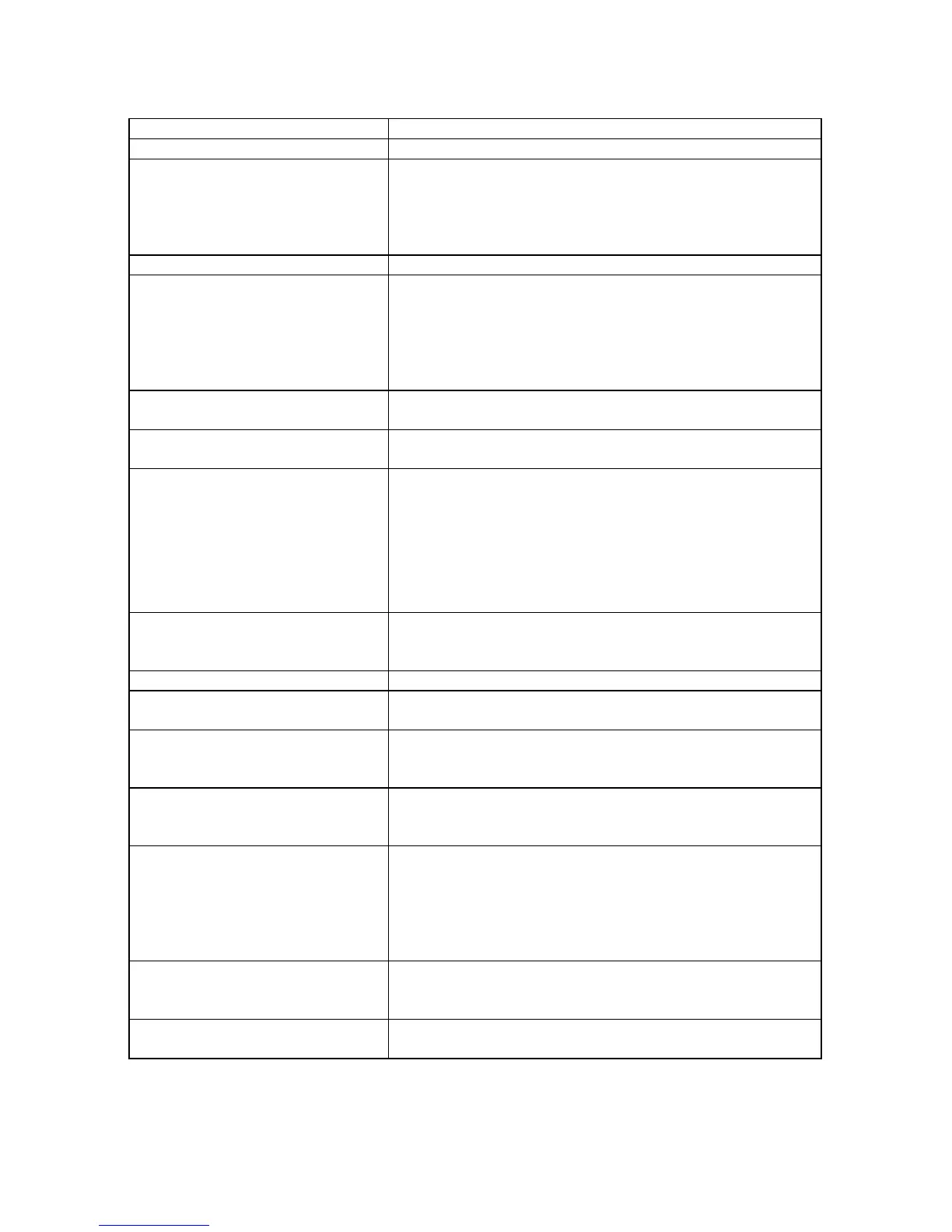
Symptom (Common) Remedy
No power. Insert the AC adaptor securely into the power outlet.
- Play fails to start even when
PLAY is pressed.
- Play starts but then stops
immediately.
- Condensation has formed: wait about 1 to 2 hours
to allow the player to dry out.
- This player cannot play a disc other than DVD and CD.
- The disc may be dirty and may require cleaning.
- Ensure that the disc is installed with the label side up.
No picture. Ensure that the equipment is connected properly.
- No sound.
- Distorted sound.
- Ensure that the equipment is connected properly.
- Ensure that the input setting for the TV and stereo
system are correct.
- Adjust the master volume to a suitable volume by
press the VOL-/VOL+ button on the main unit or
remote control.
Picture is distorted during rapid
advance or rapid reverse.
The picture will be somewhat distorted at times: this is
normal.
No rapid advance or rapid
reverse play
Some discs may have sections which prohibit rapid
advance (or rapid reverse.)
No operations can be performed
with the remote control unit.
- Check the batteries are installed with the correct polarities.
- The batteries are exhausted: replace them with new ones.
- Point remote control at the remote control sensor and
operate.
- Operate the remote control unit at a distance of not
more than 6 m from the remote control sensor.
- Remove the obstacles between the remote control and
remote control sensor.
No key operation (by the main
unit and/or the remote control
unit) is effective.
Disconnect the power adaptor and then reconnect it.
(The player may not be operating properly due to
lightning, static electricity or some other external factor.)
Symptom [DVD] Remedy
Play does not start even
when title is selected.
Make sure a proper DVD in used refer to P.32
Audio soundtrack and/or subtitle
language is not in the initial
settings.
If the audio soundtrack and/or subtitle language does
not exist on the disc, the language selected at the initial
settings will not be seen/heard.
No subtitles. - Subtitles appear only with discs which support them.
- Subtitles are cleared from the TV monitor, Perform the
steps to display the subtitles.
Alternative audio soundtrack
(or subtitle) languages fail to
be selected.
- An alternative language is not selected with discs
which do not contain more than one language.
- In the case of some discs, the alternative language can
not be selected by operating the LANGUAGE or
SUBTITLE button. Try selecting it from the DVD menu
if one is available.
Angle cannot be changed. This function is dependent on software availability. Even
if a disc has a number of angles recorded, these angles
may be recorded for specific scenes only.
The password for rating level
has been forgotten.
Please contact your local sales dealer.



 To Next Page