6
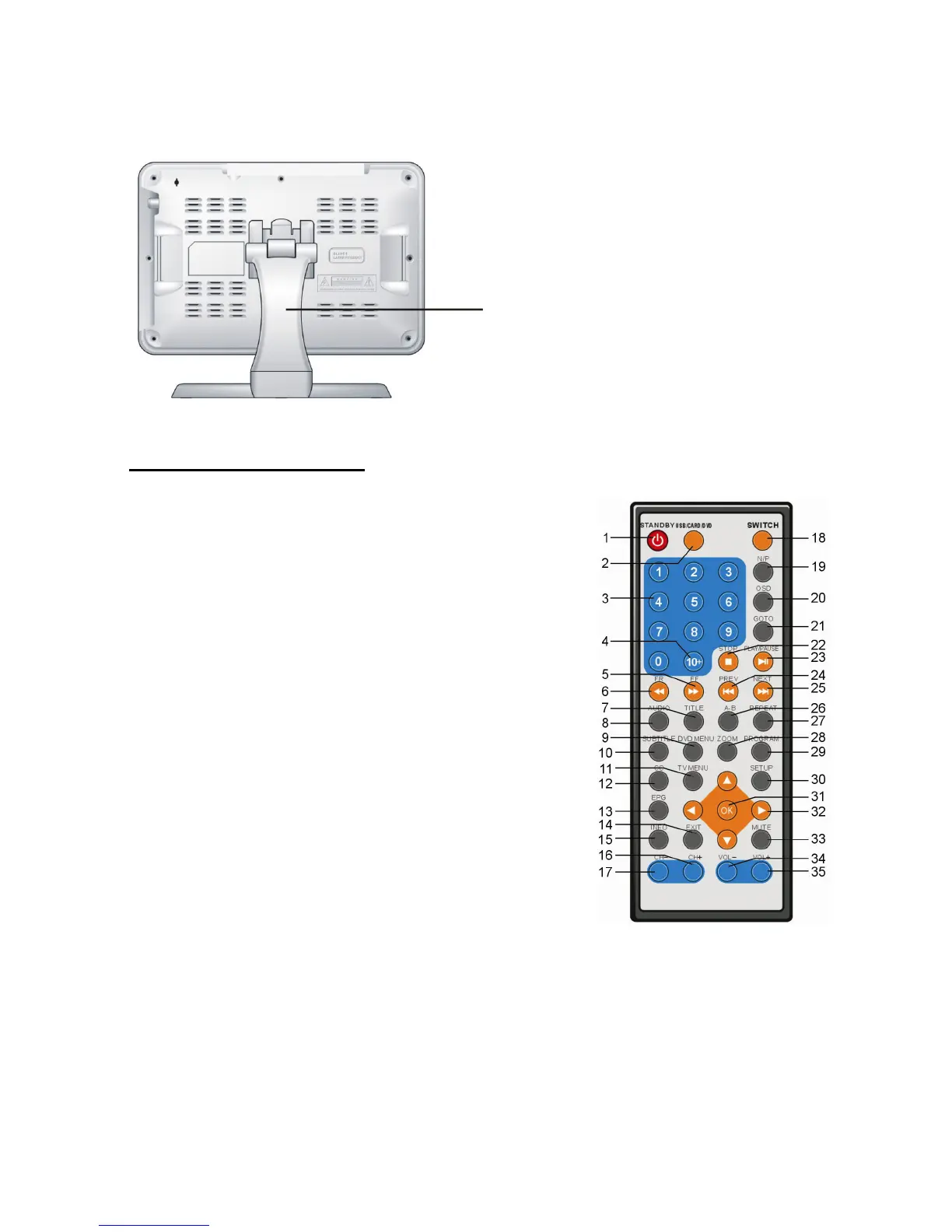
BACK VIEW
NOTE: You must connect external antenna to the unit before TV receiver is operation.
REMOTE CONTROL
1. STANDBY-To set the unit in standby mode or switch the unit on.
2. USB/CARD/DVD BUTTON-To switch the mode from
USB/CARD/DISC mode.
3. NUMERIC BUTTONS-To input the numeric information,
such as channel number and so on.
4. 10+ BUTTON-Program and numeric button.
5. FF button-Press this button to play the disc forward at
speeds: x2,x4,x8,x20 (in DVD mode).
6. FR button-Press this button to play the disc backward at
speeds:x2,x4,x8,x20 (in DVD mode).
7. TITLE button-Press this button to return to title menu (for
DVD).
8. AUDIO-To select the audio mode (in DVD mode).
9. DVD MENU button-Press this button to enter DVD main
menu (in DVD mode).
10. SUBTITLE button-Press this button to change and play
subtitle language (for DVD only).
11. TV MENU button-Press this button to enter TV main
menu (in TV mode).
12. CC-To set the caption mode (in TV mode).
13. EPG-Display the program information of current day or
latter days (in TV Mode).
14. EXIT-To exit the menu page (in TV mode).
15. INFO-To display current program information, such as
channel number, soundtrack mode, subtitle language and so on (in TV mode).
16. CH+-To select next channel (in TV mode).
17. CH--To select previous channel (in TV mode).
18. SWITCH button-To switch the mode among TV/DVD/AV IN mode.
19. N/P button-Press this button to select NTSC or PAL system (for DVD only).
20. OSD button-Press OSD button continuously during playback, the screen will display the
playing information, such as elapsed time, remaining time and so on (in DVD mode).
21. GO TO button-Press this button to set the player to play disc starting at a certain point.
22. STOP button-Press this button to halt playing.
20. Stand Holder



 To Next Page