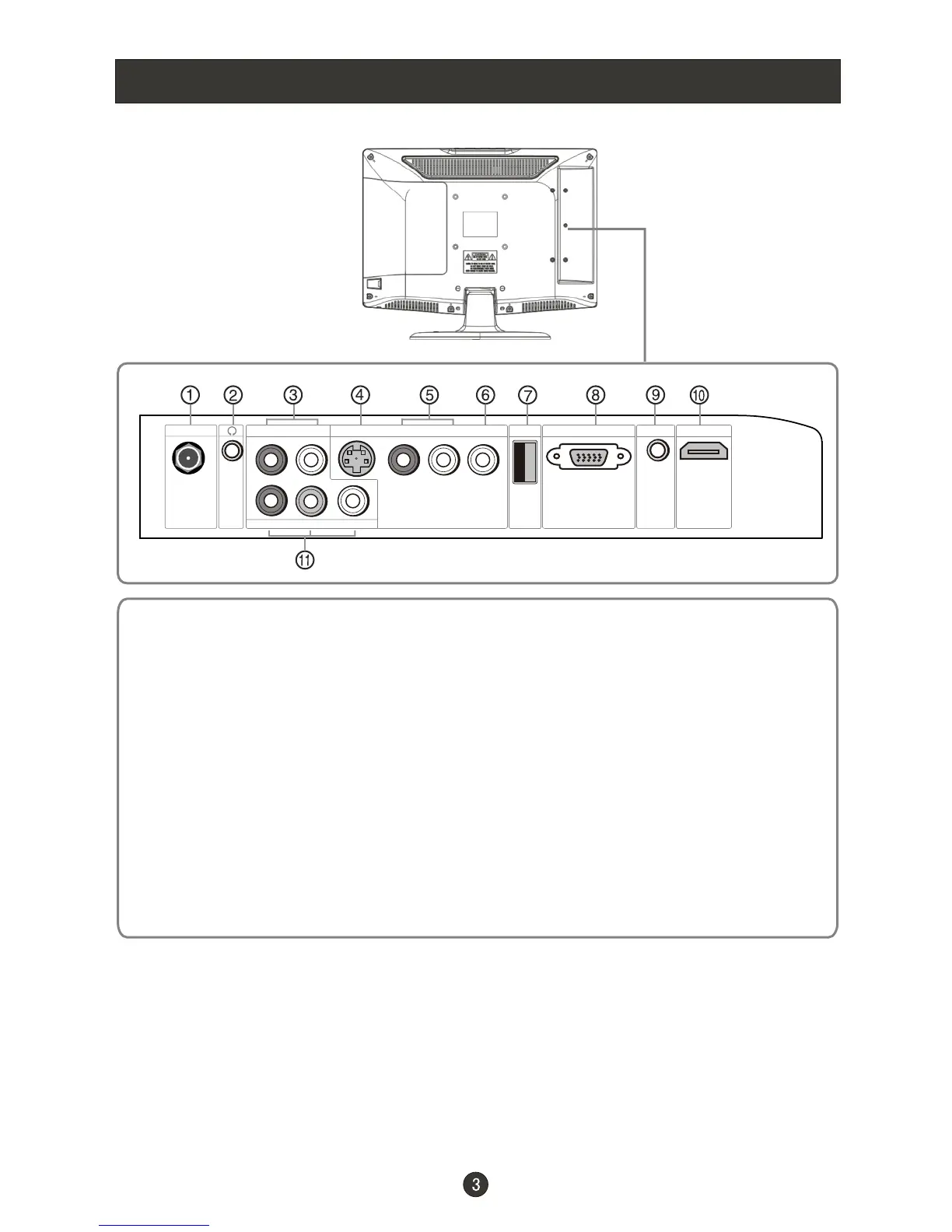
COMPONENT IN
Pr Pb Y
ATN IN R-AUDIO-L R-AUDIO IN-L
PC AUDIO IN
VGA INUSB HDMI
S-VIDEO IN
VIDEO
Connection Options
1.ANT IN(Antenna Input) Connect cable or antenna signals to the TV,
either directly or through your cable box.
2.Headphone jack : Headphone audio output terminal.
3.Audio in Connect audio output from an external device to these jacks.
4.S-VIDEO Connect S-Video out from an S-Video device to the jacks.
5.Audio in Connect audio output from an external device to these jacks.
6.Video in Connect video output from an external device to this jack.
7.USB input Connect a USB flash drive to view JPEG images or listen to MP3
songs.
8.VGA Connect to the VGA 15PIN analog output connector of a PC
graphics card to use set as a PC display.
9.PC audio in Connect the audio output from the pc to the PC audio input port.
10. HDMI: Connect a HDMI device to receive digital audio and uncompressed
digital video.
11. Component Input Connect a component video device to these jacks.



 To Next Page