TV OPERATION
SPDIF
【 】/【 】
【 】/【 】
SPDIF Delay
【 】/【 】
【 】/【 】
Achieve better surround sound effect.
【 】/【 】
【 】/【 】
After the opening screen is not displayed only plays sound
【 】/【 】
【 】/【 】
Press ▼ ▲ button to select , then press
◄ ► button to choose OFF/RAW/PCM.
Press ▼ ▲ button to select , then
press ◄ ► button to adjust.
Surround
Press ▼ ▲ button to select Surround, then press
◄ ► button to choose ON/OFF.
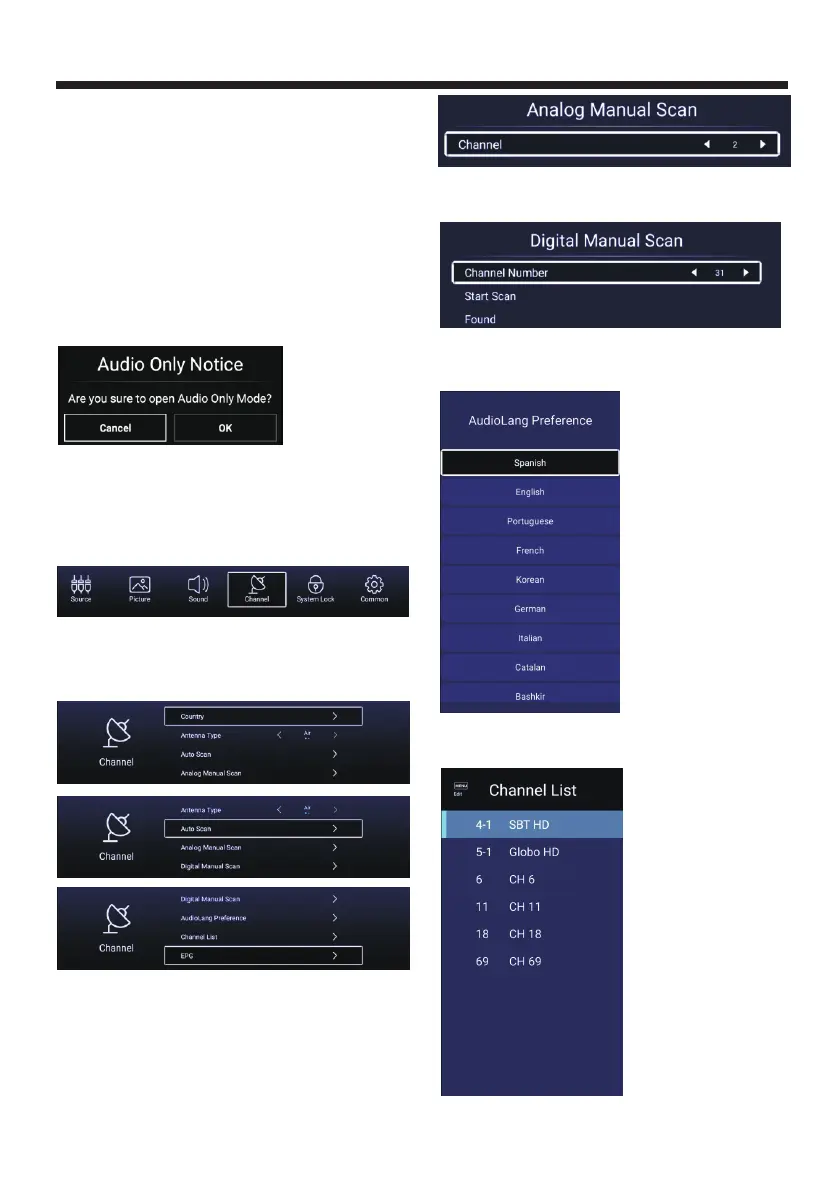
Audio Only
Press ▼ ▲ button to select Audio Only, then
press ◄ ► button to choose ON/OFF.
SPDIF
SPDIF Delay
Channel
Press ▼ ▲ button to select.Press OK
◄ ► to enter.
【 】/【 】
【 】/【 】
/
Press MENU button to display the main menu. Press
◄ ► button to select CHANNEL in the
main menu.
【 】/【 】
Antenna Type-Air
Select the Air/Cable to tune.
Auto Scan
Auto Scan,
searching the program automatically.
Analog Manual Scan
Analog Manual Scan,
Scan.
Press ▼ ▲ button to select p
OK
Press ▼ ▲ button to select
p OK
【 】/【 】 ress
to start
【 】/【 】
ress to start
Digital Manual Scan
Press ▼ ▲ button to select
p OK
【 】/【 】
ress to start
Digital Manual Scan,
Scan.
AudioLang Preference
AudioLang
Preference to select the audio language.
Press ▼ ▲ button to select 【 】/【 】
Channel List
Channel List to list,
press MENU button edit the channel (Skip /Delete /Fav).
Press ▼ ▲ button to select 【 】/【 】
Country
Select the country.
-21-



 To Next Page