TV OPERATION
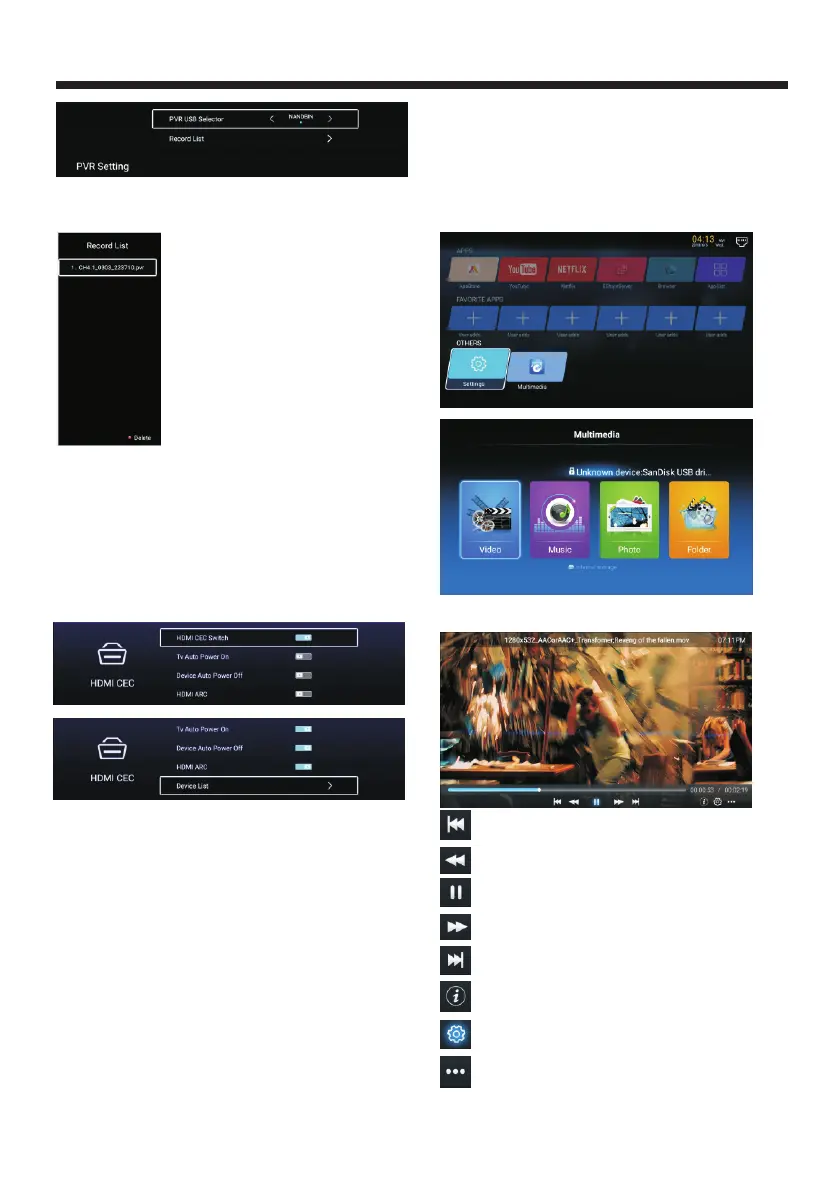
HDMI CEC
HDMI CEC.Press ▼ ▲ button to select 【 】/【 】
HDMI CEC Switch
ON/OFF.
TV Auto Power On
ON/OFF.
Device Auto Power Off
ON/OFF.
HDMI ARC
ON/OFF.
Device List
Device List to open list.
Press ▼ ▲ button to select
Press ▼ ▲ button to select
Press ▼ ▲ button to select
Press ▼ ▲ button to select
Press ▼ ▲ button to select
【 】/【 】
【 】/【 】
【 】/【 】
【 】/【 】
【 】/【 】
Store mode
Press【▼ 】/【▲】button to open Store Mode.
Media
Press ▼ ▲ ◄ ► button to select
Media .
【 】/【 】/【 】/【 】
in HOME page
Video
Press ◄ / ► to select video.
Press to play previous movie.
Press to play fast backward.
Press to stop/play the movie.
Press to play fast forward.
Press to play next movie.
Press to view the information of the movie.
(Resolution/Size/Deration/Bittrate)
Press to set the Audio Track/Select Subtitle/
Region Language/Play Mode/Aspect Ratio.
Press to select the movie to play.
Blue Screen
Blue Screen, Press ▼ ▲ button to select
Press ◄ ► to select ON/OFF.
【 】/【 】
【 】/【 】
Closed Caption
Press【▼ 】/【▲】button to select Closed Caption.
Press 【◄】/【►】to select ON/OFF.
Press【◄】/【►】to select record file.
Press [ok] to play record file.
Press [red] button to delete selected file.
Menu Reset
Menu Reset.Press ▼ ▲ button to select
Press ◄ ► to select Cancel/ok to reset the
previous setting.
【 】/【 】
【 】/【 】
-23-



 To Next Page