-22-
Wireless Display
Wireless Display function enable to share the screen of your smart phone on the TV.
1. Press key to enter (Smart TV) launcher mode and use keys to select Setting, then press the OK key.
2. Press key to select Wi-Fi, and press the OK key to conrm.
3. Turn on Wi-Fi.
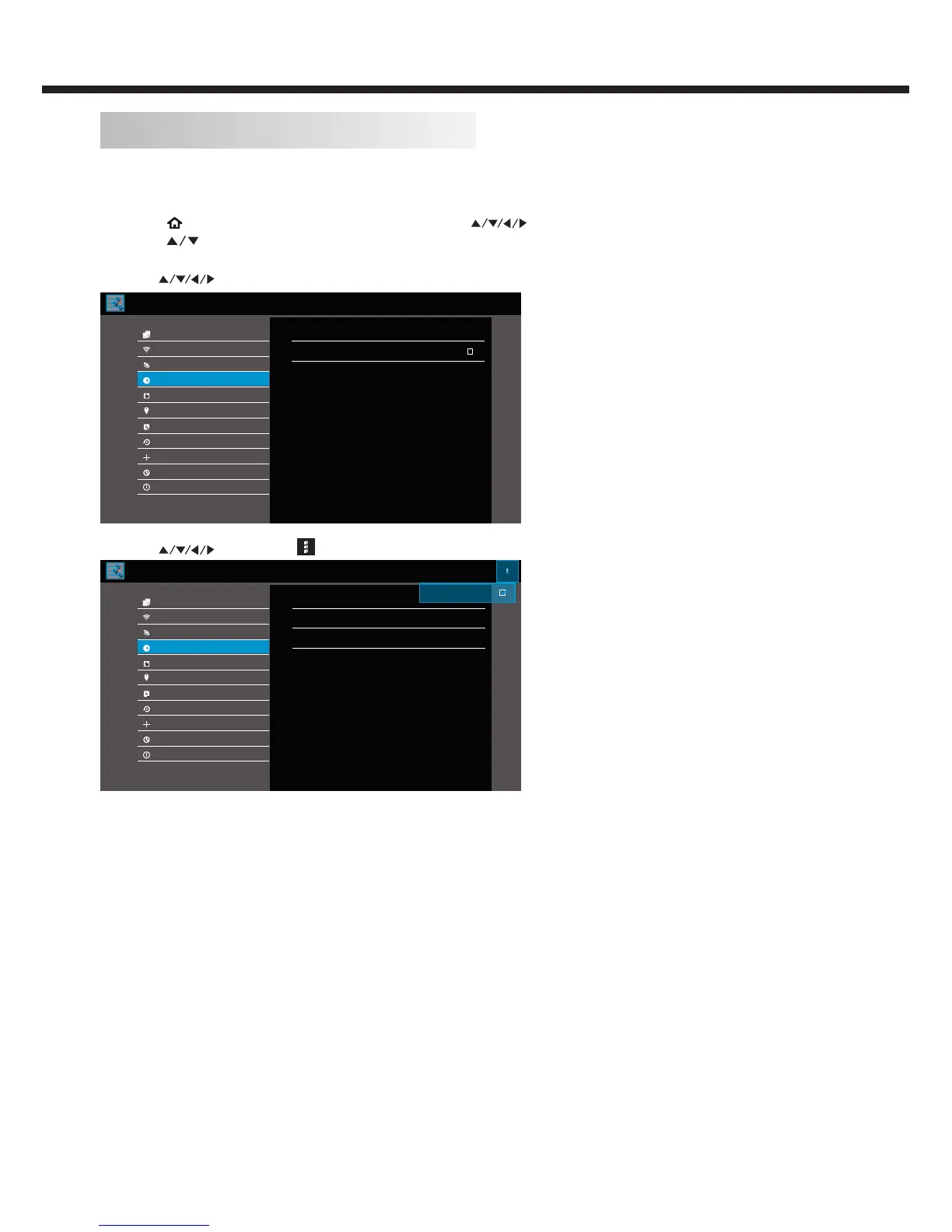
4. Use keys to select Display, and press the OK key to conrm. Then, enter Cast screen.
Display
Wi-Fi
Wi-Fi Hotspot
Display
Location
Language & input
Update & reset
Date & time
Add account
About TV
Ethernet
Cast screen
Deta media controller
Apps
Set DMR Service On/Off
5. Use keys to selet , and check [Enable wireless display].
SONY Z2
MIUI 2S
Display
Wi-Fi
Wi-Fi Hotspot
Display
Apps
Language & input
Update & reset
Date & time
Add account
About TV
Ethernet
Enable wireless display
Samsung Galaxy Note3
Wireless display
Wireless display
Wireless display
Location
6. Choose your prefered smart phone to connect.
Note:
This function recommended to connect to the smart phone as follows: SONY Z2, Samsung Galaxy J, Samsung Galaxy Note3,
MIUI 2S or MIUI 3.
TV OPERATION



 To Next Page