47
* Timer function
In this product, setting the timer allows you to control the time during which hot air is blown.
Either of the following two modes is selectable by parameter setting: Open Timing in which count is
started from the time when temperature reaches the set temperature and Closed Timing in which count is
started upon start. The timer setting range is 001 to 999 seconds.
(When not using the timer function, select “---”. When set in the timer setting “000” , don't work. )
In addition to the procedure described remove above, HAKKO FR-702 (Hot air) includes a preset mode
allowing the selection of temperature, time, and airflow from the options you define (up to 5 temperature/
time/airflow settings can be programmed). Enter the parameter setting to change the mode.
(Please refer to [21. PARAMETER SETTING (Hot air)].)
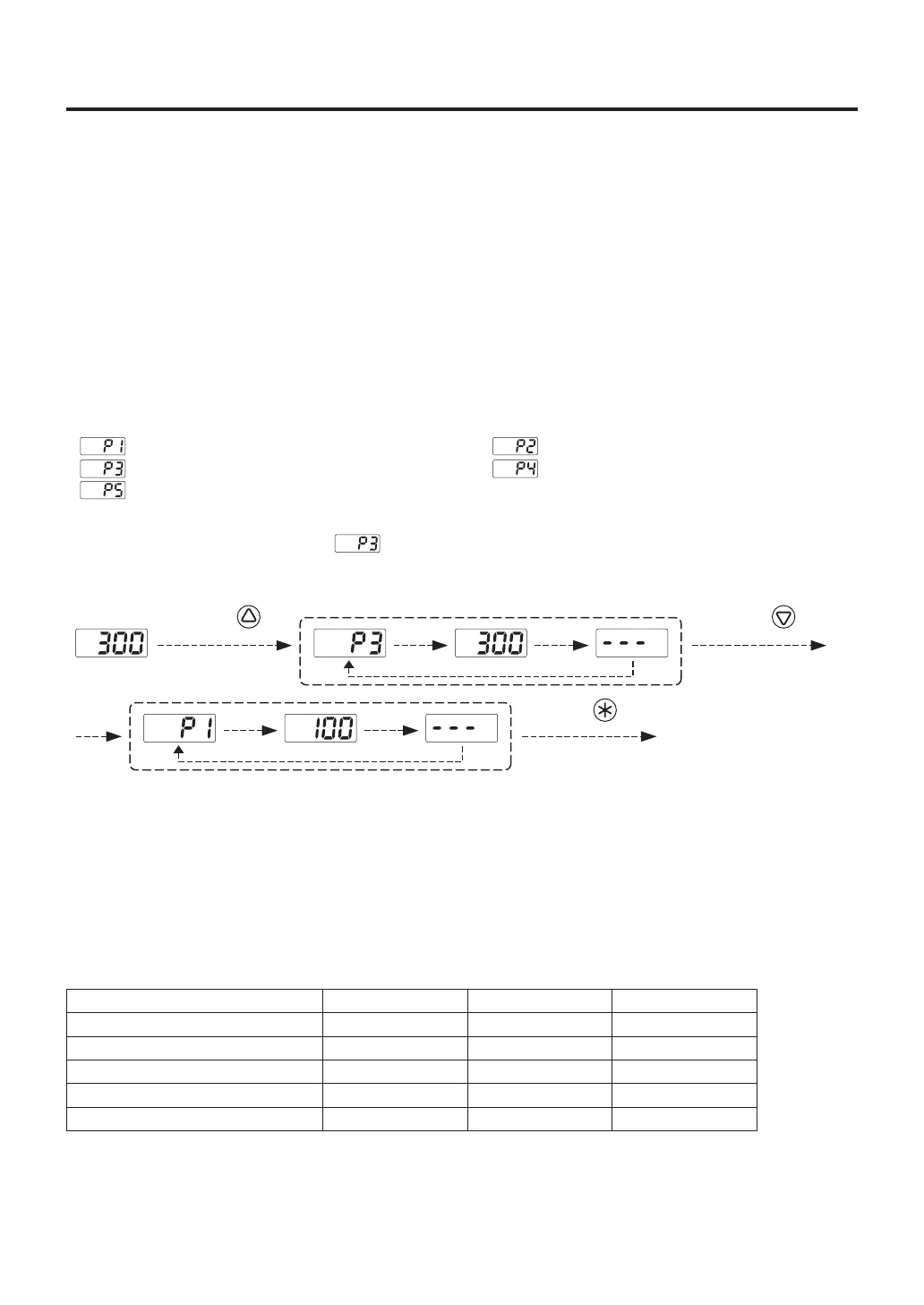
Initial preset settings:
The initial number of active presets is set to 5 at the factory.
The default selected preset is set to at the factory.
Example : Changing preset selection from preset No. 3 to No. 1.
Control will begin with new preset setting.
The procedure for making changes to the preset temperatures, timer and air flow is the same as the
“Setting/Changing the Temperature and Timer” and “Setting of the air flow”.
● Preset mode
Temp. : 100℃ Timer : “−−−” Air flow : 5
Temp. : 300℃ Timer : “−−−” Air flow : 5
Temp. : 500℃ Timer : “−−−” Air flow : 5
Temp. : 200℃ Timer : “−−−” Air flow : 5
Temp. : 400℃ Timer : “−−−” Air flow : 5
*Preset selection screen
Press the
button once.
Press the
button twice.
Press the
button.
● Restriction on setting changes (Password function)
It is possible to restrict certain setting changes to the unit.
There are three choices for the password setting.
Enter the parameter settings to change the mode.
○ : You can make changes without entering a password.
△ : You can choose whether or not a password is needed to make changes.
×: A password is required to make changes.
Switch to the parameter setting mode
Switch to the temperature setting mode
Switch to the preset selection mode
Switch to the offset setting mode
Make airflow adjustments
0 : Open
○
○
○
○
○
1 : Partial
×
△
△
△
△
2 : Restricted
×
×
×
×
×



 To Next Page