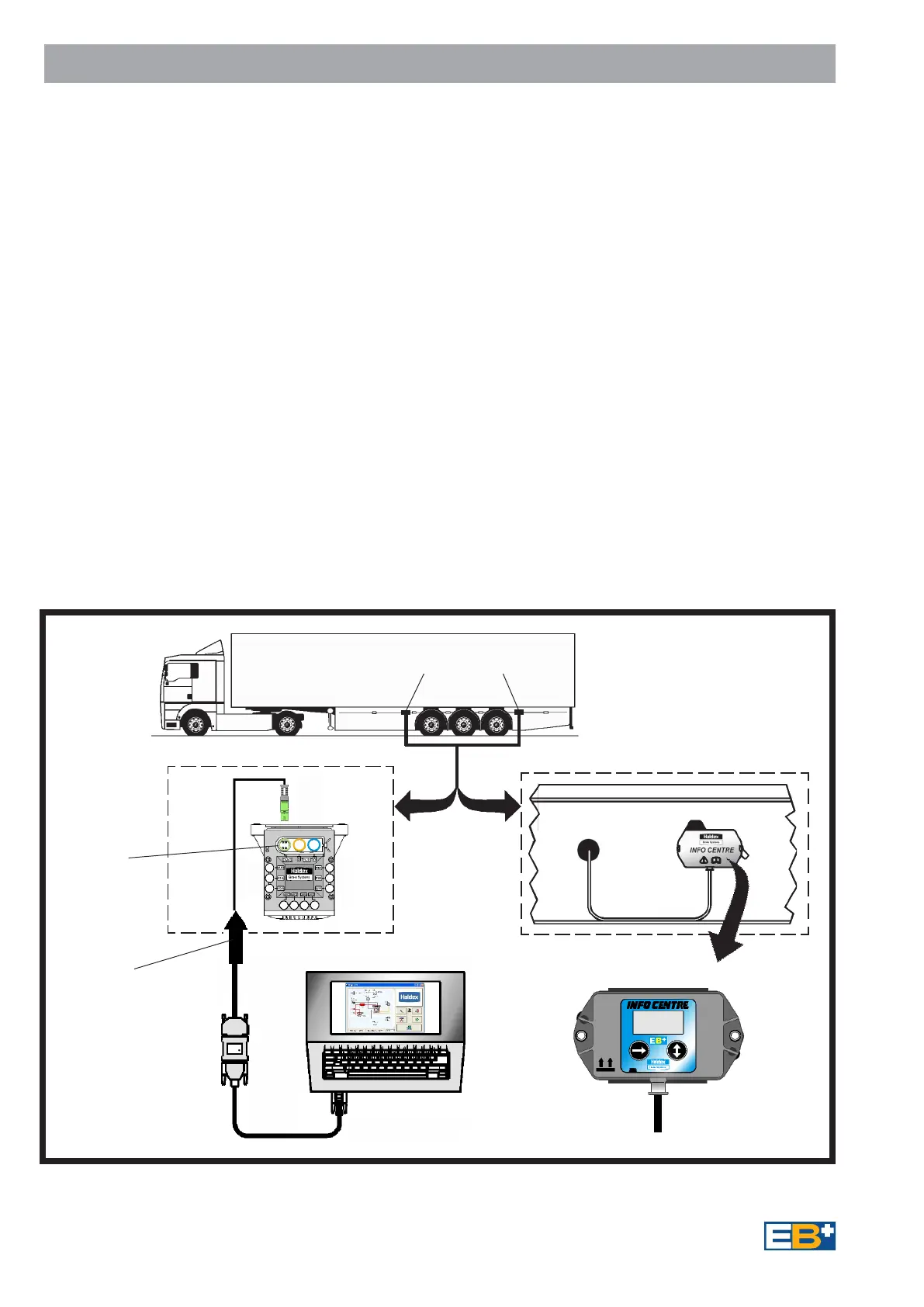
Fig 7
ALTERNATIVE - Directly Connected to ECU or
Side of Vehicle connection
Diagnostic
connection
'DIAGN'
on ECU
ALTERNATIVE POSITIONS
An important feature of the
EB
+
system is that it provides
an extensive on board diagnostic
capability. The system displays a
range of codes, which allow rapid
diagnosis of the problem should
one occur.
Diagnostic communication is in
accordance to ISO 11898 using
Keyword (KWP2000) protocol
and is accessed by the
ISO 7638 - 7 pin connector which
uses pin 6 and 7 as a CAN data
bus. Any suitable device connected
to this CAN data bus may read
diagnostic information.
6
PC INTERFACE
System Diagnostics
A Haldex PC based program
DIAG
+
may be used for more
advanced diagnosis. This also
allows configuration with system
parameters to be entered and an
End-of-Line Test to be carried out.
An EB
+
INFO CENTRE can be
connected permanently to the ECU's
diagnostic 'DIAG' connection. While
the ECU is powered information is
transferred to the Info Centre's
memory, which can be recalled. Power
is supplied from the vehicle system via
the ECU diagnostics connector.
The EB
+
INFO CENTRE provides a
multi-digit display of:
EB
+
INFO CENTRE
Changes:
Service distance
Service interval
Wheel scale factor
Clock (time and date)
Options-on/off (parameter updating /
backlight)
Password (PIN number)
Unlock Info Centre (PIN number
Un-known)
Testing:
Load
Wheels (sensor / cabling check)
Pressure
Plate (Load plate data)
Auxiliaries
Brake Test
Lining Wear Indication
Information:
Read Diagnostic Trouble Code (DTC)
Clear DTC
Configuration
ECU software version number
ECU serial number
Vehicle Ident Number (VIN)
Manufacturer OEM
Info Centre software version number
Distance:
Odometer - Total distance
Trip distance (1st and 2nd)
Service distance
Wheel scale factor
Clock (time and date)
Clear Trip 1 and 2
Connect
to ECU
directly
or via a Side
of Vehicle
connector


 To Next Page