ADMINISTRATOR MANUAL
12
PAGE
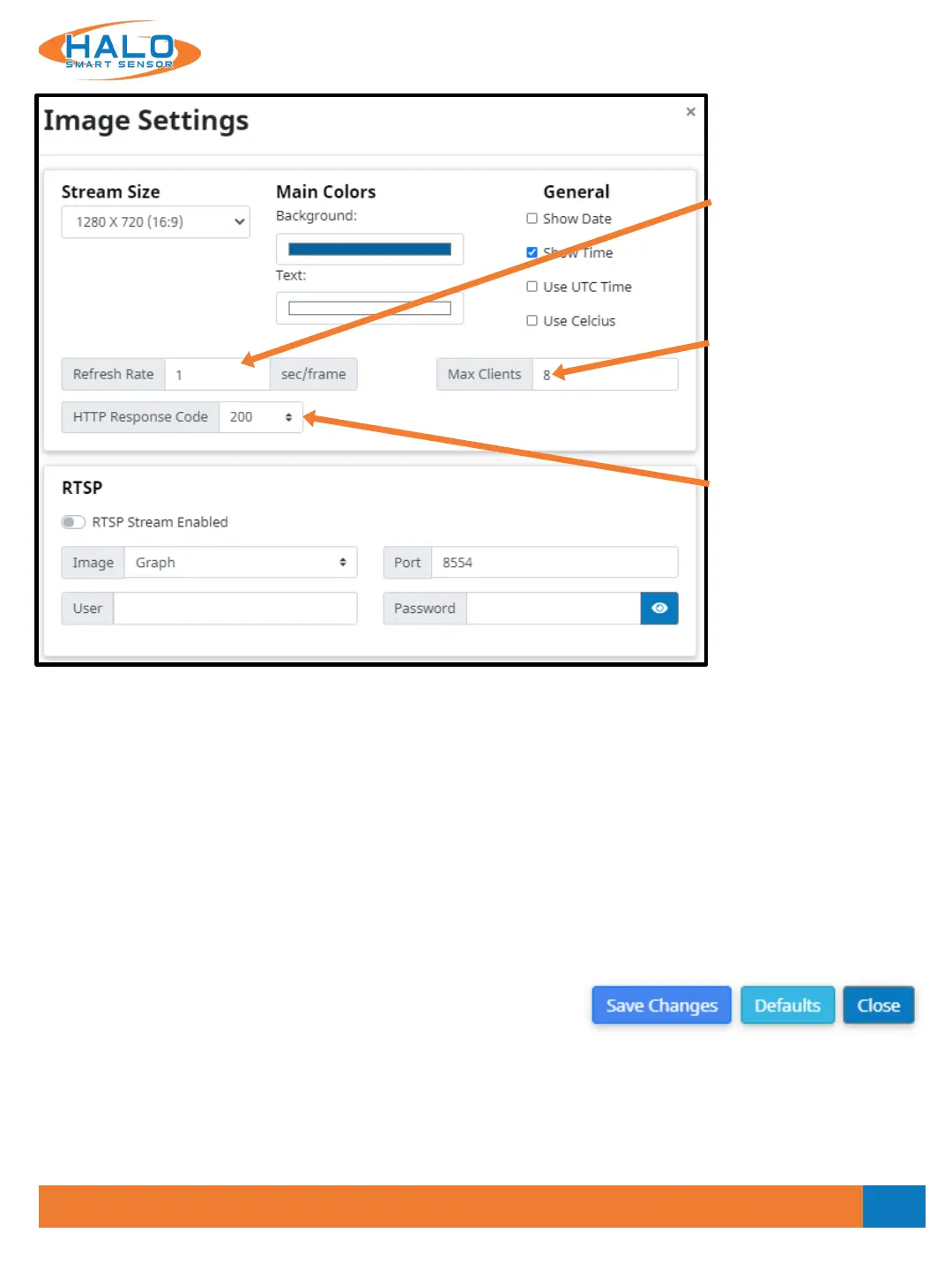
Refresh Rate
Takes numerical characters,
indicates how many
seconds per frame
displayed.
Max Clients
Takes whole numerical
characters, indicates how
many clients or users can
be logged in concurrently.
HTTP Response
Code
Indicate whether an HTTP
request has been
successfully completed.
RTSP
RTSP (Real Time Streaming Protocol) can be used to stream the Live View to an RTSP supported platform.
• Click the button for “RTSP Stream Enabled” to turn on this feature.
• Select from the “Image” drop down menu either “Graph” or “Dashboard”. This will select the stream that
will be sent over RTSP.
• Select a port number that is not already in use, default is “8554”.
• If authentication is desired, choose a “User” and “Password”.
Saving Setting Changes
All setting changes performed in this section are committed by
clicking the "Save Changes" button. Settings can be restored to
their default values by clicking the "Defaults" button.
V2.2 - 9/09/2020


 To Next Page