ADMINISTRATOR MANUAL
13
PAGE
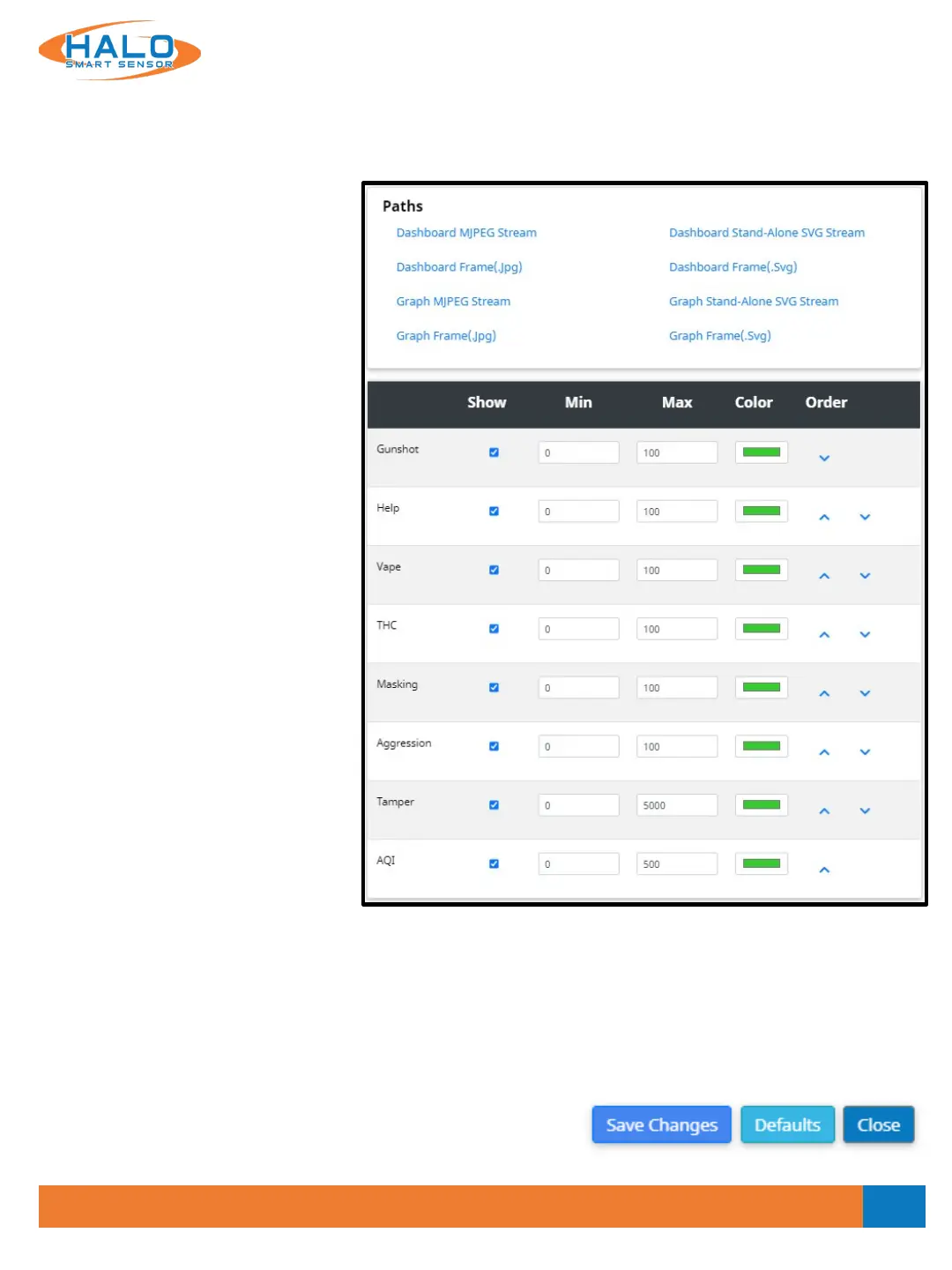
Paths
The defined paths will create a new tab in the web browser that will include the indicated stream or frame.
These file paths can be used for streaming to other locations or devices. They include the links below:
• Dashboard MJPEG Stream
• Graph MJPEG Stream
• Stand-Alone Dashboard SVG Stream
• Stand-Alone Graph SVG Stream
• Dashboard Frame (.Jpg)
• Graph Frame (.Jpg)
• Dashboard Frame (.Svg)
• Graph Frame (.Svg)
Saving Setting Changes
All setting changes performed in this section are committed by
clicking the "Save Changes" button. Settings can be restored to
their default values by clicking the "Defaults" button.
V2.2 - 9/09/2020
Live View Graph Display
Signatures can be shown or hidden by selecting the checkbox in the "Show" column. Graph "Min" and "Max"
determine the scale for the graph to represent the values of the event signature. This range must include the
threshold value of the individual signature. Color of the individual signature graph can be selected, and the
signatures can be sorted using the "Order" column sending the selected signature up or down from its
current position.



 To Next Page