30
7.7.5 ADVANCED SETTINGS Mode – COOLED RF SETTINGS State
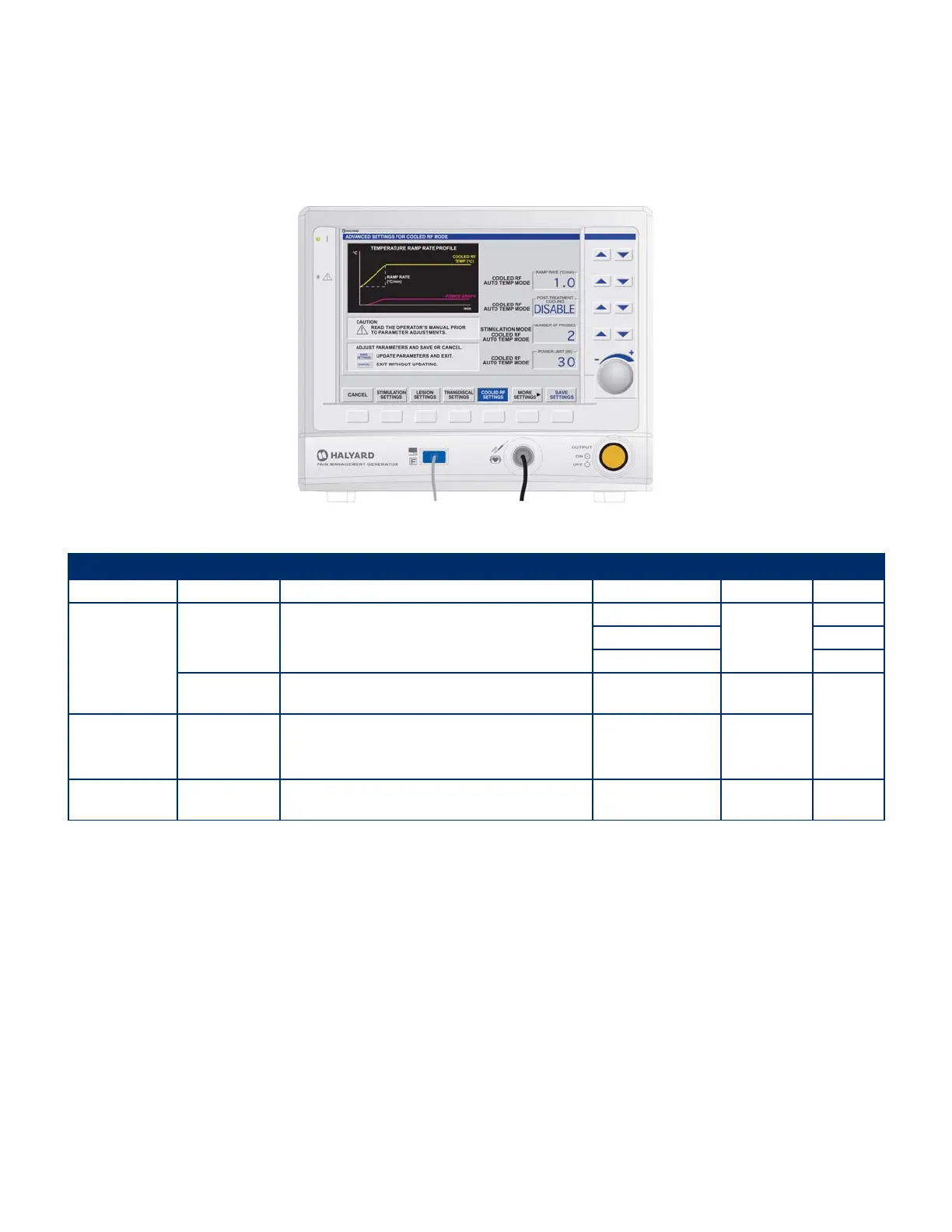
The following screen appears when COOLED RF SETTINGS is selected from the ADVANCED SETTINGS Mode:
• This screen allows adjustment of the RAMP RATE used by the COOLED RF mode to attain the SET TEMPERATURE.
• The option to use POST TREATMENT COOLING after the active treatment has ended can be accessed by toggling the ENABLE/DISABLE Post Treatment Cooling control.
• The option to use one or two probes is accessible by adjusting NUMBER OF PROBES.
• The maximum amount of power available can be adjusted by rotating the dial to change SET POWER LIMIT.
Figure 7-26 ADVANCED SETTINGS Mode – COOLED RF SETTINGS Display
Settings
Aected Mode Parameter DESCRIPTION Range/Units Default Value Increment
Cooled RF Auto
Temp Mode
RAMP RATE
Rate at which temperature increases from the INITIAL TEMP to
the SET TEMP.
0.5° – 5°C/min
80°C/Min
0.1°C/Min
5° – 10°C/min 5°C/Min
10° – 200°C/min 10°C/Min
POST TREATMENT
COOLING
Select to enable or disable the option to go into POST TREATMENT
COOLING after treatment.
ENABLE/DISABLE DISABLE
N/A
Stimulation Mode
Cooled RF Auto
Temp Mode
NUMBER OF
PROBES
Number of Cooled RF Probes used. 1, 2 1
Cooled RF Auto
Temp Mode
POWER LIMIT Maximum power available for temperature control. 1–50 W 25 W 1 W
Avanos Exhibit 2069 Page 30
Medtronic, Inc. v. Avanos Medical Sales, LLC
Case IPR2020-0089


 To Next Page