'Operation
"^'^'^
1
Adjusting
and
turning
on
the fan
A
WARNING:
Do
not
use
this
product
in
windows,
as
a
risk
of
eiectricai
shock
exists
and
serious
personal
injuiy
and/or
property
damage
may
occur.
NOTE:
Unplug
the
product
from
the
eiectricai
outlet
when
It
is
not
In
use or
Is
left
unattended.
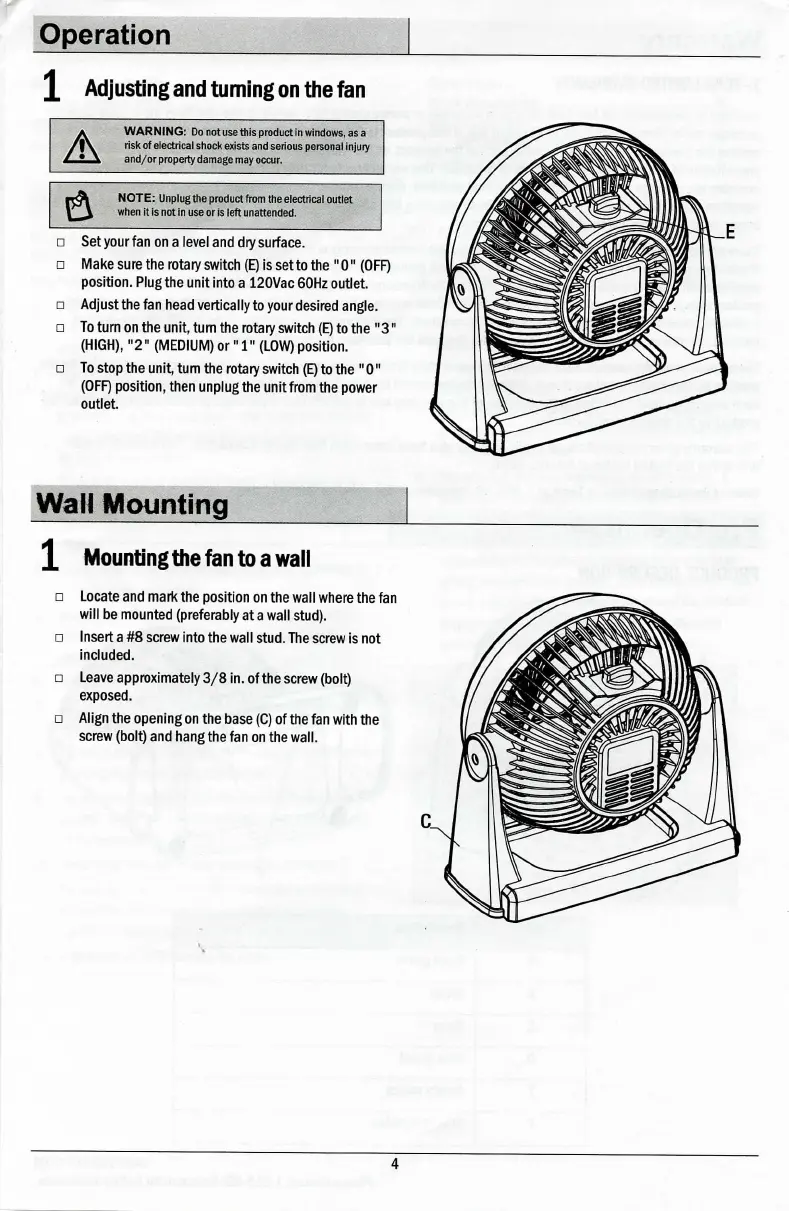
Set
your
fan on a level and dry surface.
Make sure the
rotary
switch (E) is set to the
"0"
(OFF)
position. Plug the unit
Into
a
120Vac
60Hz outlet.
Adjust the fan head vertically to
your
desired angle.
To
turn
on the unit, tum the
rotary
switch (E) to the
"3"
(HIGH),
"2"
(MEDIUM)
or
"1"
(LOW) positron.
To
stop the unit, tum the
rotary
switch (E) to the
"0"
(OFF) position, then unplug the unit
from
the
power
outlet.
Wall Mounting^
X Mounting
the
fan
to
a
wall
Locate and mark the position on the
wall
where
the fan
will he
mounted
(preferably at
a
wall
stud).
Insert
a
#8 screw
Into
the
wall
stud.
The screw
Is
not
Included.
Leave approximately
3/8
In.
of
the
screw (holt)
exposed.
Align
the opening on the base (C) of the fan
with
the
screw (holt) and hang the fan on the
wall.
4



 To Next Page