EasyManua.ls Logo

HAMPTON BAY TF-810S - Maintenance; Changing the Fuse

HAMPTON BAY TF-810S
6 pages
Print Icon
To Next Page IconTo Next Page
To Previous Page IconTo Previous Page
Loading...
Maintenance
CHANGING
THE FUSE
A
WARNING:
Risk
of
fire.
Do
not
replace
the
attachment
plug.
It
contains
a
safety
device
(fuse)
that
should
not
be
removed.
Discard
this
product
if the
attachment
plug
is
damaged.
A
WARNING:
Risk
of
fire
can
result
from
using the
wrong
fuse
rating.
Replace
the
fuse
only
with
a
2.5
Amp,
125
Volt
rating.
m
IMPORTANT;
Plug
the
fan
into
a
120Vac60Hz
outlet,
if it
is
not
running,
unplug
this
product
RRST,
and
replace
the
plug
fuse
to
remove
tiie
fault
1.
Grasp the plug
and
remove
from
the
receptacle
or
other
outlet
device.
Do
not yank the
cord
to
unplug.
2.
Select
a
suitable
tool
such as a
small
flat screwdriver or
travel
scissors.
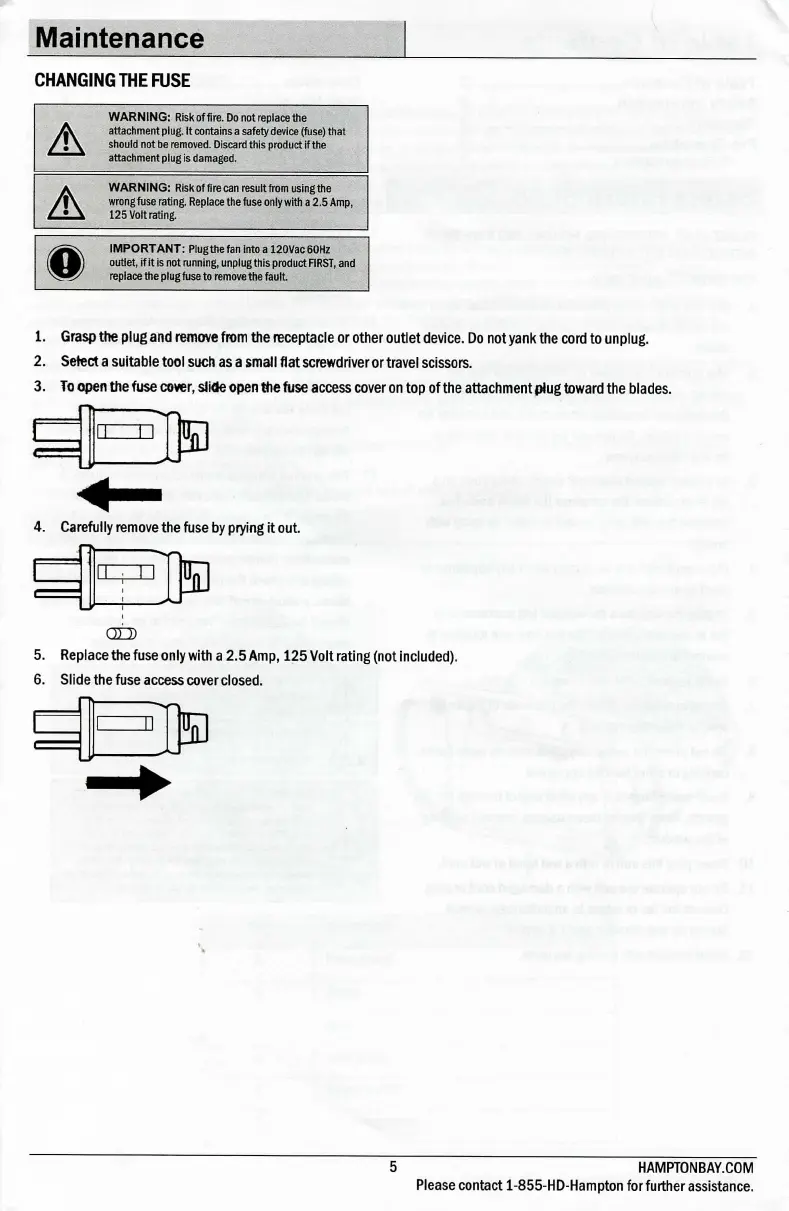
3.
To
open
the fuse
cover,
slide
open
the fuse
access
cover
on
top
of the attachment plug
toward
the blades.
C
5D
4.
Carefully
remove
the fuse by
prying
It out.
OLD
5.
Replace
the fuse
only
with
a
2.5
Amp,
125
Volt
rating
(not
Included).
6.
Slide
the fuse
access
cover
closed.
B
5
HAMPT0NBAY.COM
Please
contact 1-855-HD-Hampton
for
further
assistance.

Related product manuals