20 | Use of the scooter
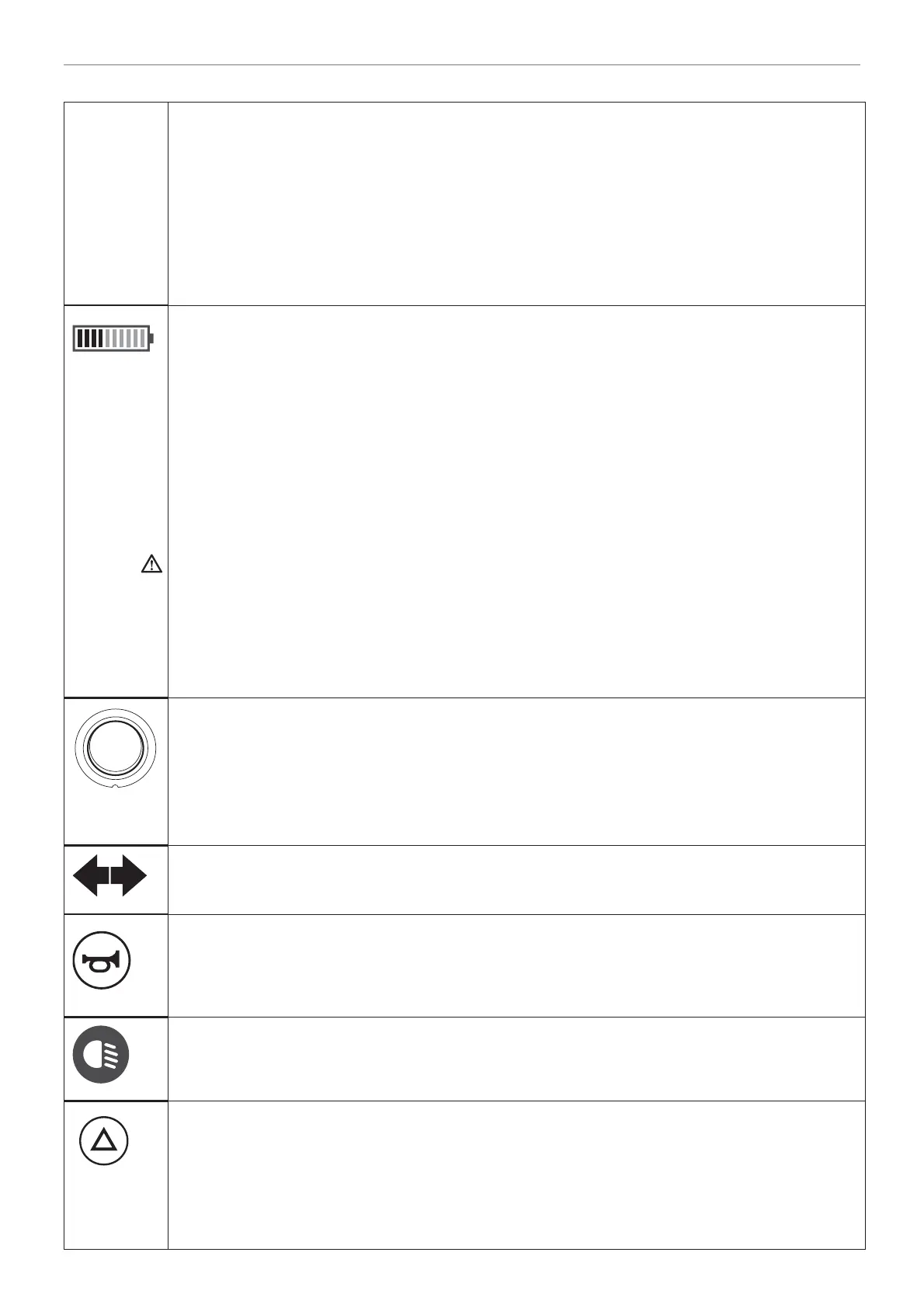
A. Indicator handles, left / right
On moving the handle (on the left or right-hand side) the indicator light starts fl ashing in
order to indicate that you are going to change direction:
• Move left handle downwards or right handle upwards for turning left
• Move left handle upwards or right handle downwards for turning right.
A bleeping sound can be heard when the indicator is switched on (if programmed).
To turn off the indicators, press the same handle in the same direction again or wait 12
seconds.
B. Battery indicator
The battery indicator provides a general indication of the state of the batteries. The
batteries are fully charged when all the lights are illuminated. As the battery runs
down, the lights go out one by one and changes into red, when it becomes critical. The
indicator lights indicate the battery voltage available for the control unit. It is normal for
the lower indicator to go out when the scooter accelerates. This is because extra power
is needed momentarily, leading to a decrease in available voltage. This momentary
dip is not a true indication of the battery capacity. When the scooter is used for the fi rst
time, the battery indicator may show that the batteries are fully charged, even if this is
not the case. This is a feature of the batteries. Therefore, the most accurate indication
of the battery level is to be obtained when driving on a fl at surface.
If the RE D lights are illuminated on the battery indicator, then it is important that the
batteries be recharged as soon as possible. Ensure that the batteries never run down
completely; this reduces the lifespan of the batteries and can damage them.
When lights are continuously moving, it indicates that the batteries are charging. The
battery indicator gives also error messages from the controller. Dealer can analyse with
the help of this fault-code message, the problem.
C. Speed regulator
This knob allows you to set in 10 steps the desired maximum speed for your scooter.
The maximum speed is increased by turning the knob in a clockwise direction. Turning
the knob in an anti-clockwise direction decreases the maximum speed. Adjust the
speed regulator before driving. Adjust the maximum speed to the surroundings and to
traffi c conditions (to a limited amount of space or to a room full of people, for example).
D. Indicator for hazard lights / indicator lights
E. Horn switch
By pressing one of the horn keys, a warning sound is emitted to warn others of
hazardous situations.
The horn continues to sound as long as the key is pressed.
F. Indicator for lights
This indicator is activated when lights are switched on.
G. Hazard lights switch
Pressing this key turns on the hazard lights.
The hazard lights should be used if you suspect that you will not be seen by other road
users, or if the scooter is at a standstill due to a defect.
Pressing this key once more turns off the hazard lights. A bleeping sound is emitted
when the hazard lights are turned on (if programmed).


 To Next Page