EasyManua.ls Logo

Harris DataSmart 763 - User Manual

Harris DataSmart 763
58 pages
Print Icon
To Next Page IconTo Next Page
Loading...
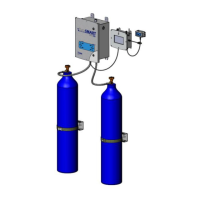
Model 763 DataSmart
Programmable Fully Automatic Manifold w/Telemetry
Installation & Operation manual

Questions and Answers

  • B
    barbaraphelpsAug 2, 2025
    How to fix Harris DataSmart 763 when system does not boot up?
    • C
      Courtney GarciaAug 2, 2025
      If your Harris Industrial Equipment system does not boot up, first ensure the control box is properly plugged in. Then, check all cable connectors to confirm they are securely engaged. Finally, inspect the fuse and replace it if it's blown.
  • B
    bcalderonAug 7, 2025
    What to do if Harris Industrial Equipment lost WiFi connection?
    • K
      Karina GreerAug 7, 2025
      If you're experiencing a loss of WiFi connection with your Harris Industrial Equipment, the first thing you should do is check the signal strength. If the signal is weak, try reconnecting to a stronger network.
  • R
    Robert EsparzaAug 11, 2025
    What to do if Harris DataSmart 763 system does not switch over?
    • J
      John AndersonAug 11, 2025
      If your Harris Industrial Equipment system does not switch over, the first step is to program both the right and left side switchover pressures. If the pressures are already programmed, check the switchover pressure settings and adjust them accordingly, because they might be set too low.
  • T
    teresabellAug 15, 2025
    How to troubleshoot no gas flow through manifold in Harris Industrial Equipment?
    • B
      Brittany WardAug 15, 2025
      If there is no gas flow through the manifold of your Harris Industrial Equipment, check the flow direction arrows on all flexible hoses to ensure they are assembled correctly. Also, make sure to adjust the outlet regulator to your desired outlet pressure.
  • D
    dbishopAug 20, 2025
    Why does Harris DataSmart 763 system switches back and forth?
    • A
      Amanda HensleyAug 20, 2025
      If your Harris Industrial Equipment system is switching back and forth, it might be due to switchover pressures not set properly. Ensure the switchover pressures are not set too high. It also could be that the system is not correctly sized for liquid dewars, and more cylinders may be needed.
  • S
    Stacey ScottAug 25, 2025
    What to do if error message when programming switchover pressures on Harris DataSmart 763?
    • D
      Danny CastilloAug 25, 2025
      If you receive an error message when programming switchover pressures on your Harris Industrial Equipment, it's likely because the pressure differential between the right and left side switchover exceeds 150 psi. Readjust the pressures to ensure they are within this range.
  • S
    Sarah BrownAug 28, 2025
    How to fix frozen LCD screen on Harris Industrial Equipment?
    • T
      Thomas ShermanAug 28, 2025
      To resolve a frozen LCD screen on your Harris Industrial Equipment, reboot the system.

Summary

Safety and Responsibility

General Safety Precautions

Essential safety guidelines for installation, operation, and handling of gas cylinders and equipment.

Safety Standards and Regulations

Lists relevant ANSI, NFPA, OSHA, and CGA standards for gas handling and safety.

User Responsibility

Defines user responsibilities regarding product modification, maintenance, and potential damages.

System Overview and Features

Key Features

Lists key features of the Model 763 DataSmart, including connectivity, control, and telemetry.

Operational Features

Explains Check Back and Economizer functions for efficient gas management.

Installation and Initial Setup

Installation Guidelines and Mounting

Covers reference material, mounting dimensions, prerequisites, and general installation guidelines.

Attaching Cylinders

Safety guidelines and instructions for attaching gas cylinders to the manifold system.

Multi-Cylinder Manifold Setup

Explains the modular header system and its component parts for attaching multiple cylinders.

DataSmart Initial Setup Steps

Step-by-step guide for initial configuration: Wi-Fi, registration, telemetry, and user features.

System Operation and Configuration

Connecting to Power and Pressurizing

Instructions for connecting to power and safely pressurizing the manifold system.

System Parameters Configuration

Configuring units, system priority, gas sources, and switchover pressures for each bank.

Operation Mode and Authentication

Displays operational status and graphics for each bank, requiring authentication for edits.

System Management and Maintenance

Editing System Parameters

Allows authenticated users to modify system priority and individual bank configurations.

System Configuration Menu

Access to settings like Machine Name, Wi-Fi, Username/Password, and Telemetry.

Firmware Update

Instructions for downloading, installing, and completing firmware updates for the system.

Appendices

Appendix A: Cloud Architecture and Data

Details the cloud-based system, security, data storage, access, and network capacity.

Appendix B: Wiring Diagram

Provides a detailed wiring diagram for the DataSmart system components.

Appendix C: Troubleshooting

Lists common problems, possible causes, and solutions for the DataSmart system.

Appendix D: P&ID Diagram

Presents the Piping and Instrumentation Diagram for the system.

Document Information

Fonts and Colors

Details the fonts (Eurostile) and colors (Blue, Grey) used in the manual.

Harris DataSmart 763 Specifications

General IconGeneral
BrandHarris
ModelDataSmart 763
CategoryIndustrial Equipment
LanguageEnglish

Related product manuals