28
HARTING Electric GmbH
29
Management Software Ha-VIS mCon Series / Edition 2.4
System SettingsUser Manual Ha-VIS mCon Switch Management Software
Function Description
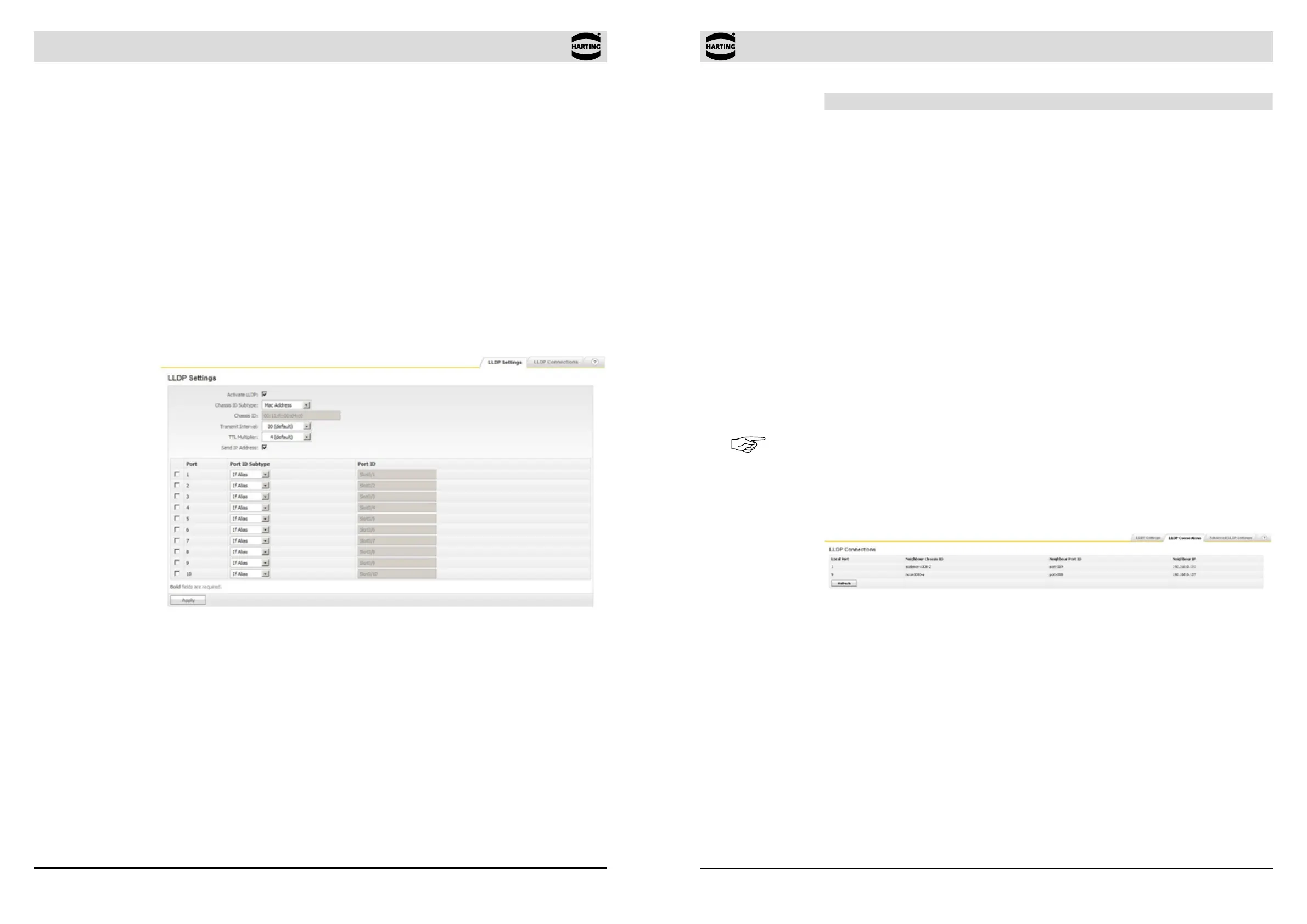
Activate LLDP Select whether to disable or enable LLDP globally on the switch.
Range of value: Enable / Disable
Default value: Disable
Chassis ID Subtype Select the Chassis ID Subtype which should be included in the LLDP
packets.
Range of value: MAC Address / Interface Alias /
Network Address / Custom
Default value: MAC Address
Chassis ID Select the Chassis ID which should be included in the LLDP packets.
Transmit Interval The interval at which LLDP frames are transmitted on behalf of
this LLDP agent. The default value for the Transmit Interval is 30
seconds.
Range of value: 5, 10, 30, 60, 120 sec
Default value: 30 sec
TTL Multiplier Time-to-live value expressed as a multiple of the Transmit Interval
Range of value: 2, 3, 4, 5, 10
Default value: 4
Send IP Address Option to transmit switch’s IP adress with every LLDP packet
Range of value: Enable / Disable
Default value: Disable
Table description Via the table, the Port ID can be set for each port individually.
Note
The interval between to LLDP PDUs is calculated using the following algorithm:
LLDP Interval = Transmit Interval x TTL Multiplier
8.5.2 LLDP Connections
Figure 8-9 LLDP Connections (Network Discovery section)
The LLDP Connections table shows all directly connected neighbours and the corresponding
information. The Refresh button allows you to refresh your view of neighbouring chassis IDs, port
IDs, and IP addresses. The following information are shown:
• Local Port Local port where the information was learned
• Neighbour Chassis ID Chassis ID of the neighbour device
• Neighbour Port ID Port ID of the neighbour device
• Neighbour IP IP address of the neighbour device
8.5 Network Discovery
This section allows you to activate and congure LLDP (Link Layer Discovery Protocol). LLDP
can be used to determine the capabilities of devices on your network. It allows the switch to
announce its capabilities and other media-specic conguration information to the local area
network.
The LLDP allows systems on an Ethernet LAN to advertise their key capabilities and to learn
about the key capabilities of other systems on the same Ethernet LAN. Consequently, this
promotes a unied network management view of the LAN topology and connectivity to support
network administration and trouble-shooting. The station and capabilities information is conveyed
in protocol frames called Link Layer Discovery Protocol Data Units (LLD PDUs). In general, a
network administration station can be connected to one single switch getting access from there
to the connectivity information of the complete network within an enterprise. The switch also
provides notications in form of SNMP traps to alert the operator about changes in the network
topology.
8.5.1 LLDP Settings
Figure 8-8 LLDP Settings tab (Network Discovery section)
The Refresh button at the bottom of this window allows you to refresh your view of neighbouring
chassis IDs, port IDs, and IP addresses.


 To Next Page