
 Need help?
Do you have a question about the HARTING mCon 3000 and is the answer not in the manual?
Details safety instructions for operating the switch management software and the Ethernet switch.
Explains symbols, typographical conventions, and provides additional information sources.
Outlines the various methods for accessing and configuring the switch, including web and SNMP.
Details how to access the switch's web interface, log in, and manage sessions.
Explains the requirements and process for configuring the switch using SNMP.
Describes the web interface's overall structure, including task bars, menus, and active windows.
Explains how to apply and permanently save configuration changes made in the interface.
Describes the two pre-defined user modes: Guest and Admin, for accessing the switch.
Provides an overview of the switch and port settings, including device information.
Covers general device settings like name, contact, location, and IP addressing.
Allows configuration of switch Ethernet ports, including enabling/disabling and speed.
Enables user creation, management, and password changes for admin and guest accounts.
Configures SNMP settings for network management, supporting versions 1, 2c, and 3.
Activates and configures LLDP for determining network device capabilities and topology.
Sets the system time manually or automatically via an SNTP server or PTP.
Configures DHCP relay agent settings for IP address assignment, including Option 82.
Allows file transfers for configurations and firmware using TFTP or HTTP.
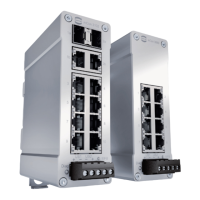
The HARTING Ha-VIS mCon family of managed Ethernet switches is designed for creating robust Ethernet, Fast Ethernet, and Gigabit Ethernet networks (up to 1000 Mbit/s) in industrial environments. These switches are suitable for distributed star or nodal points where high operational reliability is paramount. Equipped with up to ten ports, the Ethernet switch can be mounted directly in the field, facilitating convenient networking of Ethernet devices.
The Ha-VIS mCon Ethernet Switch comes with an embedded web server and a user-friendly web interface, making switch management intuitive and efficient. Configuration and maintenance can also be performed using SNMP versions 1, 2, and 3, or via the Command Line Interface (CLI) using Telnet or SSH. The software supports various functionalities for configuring and setting up the network, accessible through a graphical HTTP-based user interface, SNMP software, or the CLI.
The switch management software allows users to view and change switch settings and statistics. It provides an overview of the switch and its main port settings, though changes cannot be made directly in the overview window. Basic port settings can be altered in the System Settings → Port Settings menu section.

 To Next Page
 General