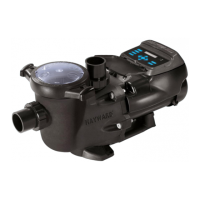
The Hayward 1.85 THP VS Pump Family is a variable speed pump designed for swimming pools and spas, offering energy efficiency and advanced control features. It is suitable for both new installations and as a replacement for existing pumps.
Function Description
The primary function of this device is to circulate water in swimming pools and spas. Its variable speed capability allows for precise control over water flow, which contributes to significant energy savings compared to single-speed pumps. The pump is equipped with a totally enclosed, permanent magnet motor and an advanced hydraulic design, optimizing its performance and efficiency.
The pump can operate in a "Stand-Alone Mode" using its built-in programmable 24-hour clock and up to eight custom speed and timer functions. This allows users to schedule specific operating speeds and durations for different pool activities, such as daily filtration, heating, or operating water features. For enhanced pool management, the pump can also be integrated with Hayward or third-party pool and spa control platforms, eliminating the need for additional accessories.
The digital control interface is a key feature, providing an easy-to-use platform for programming and monitoring the pump. This interface can be mounted in four different positions on the pump itself or removed and wall-mounted for greater user convenience and accessibility. The motor drive includes built-in protection mechanisms for high temperatures and voltage fluctuations, ensuring reliable operation and durability. It is also designed to withstand freezing temperatures without issue.
Usage Features
The Hayward 1.85 THP VS Pump Family offers several features that enhance its usability and adaptability:
- Programmable Speeds and Timers: Users can set up to eight custom speeds and corresponding timer functions. This allows for optimized energy consumption by running the pump at lower speeds for routine filtration and higher speeds for specific tasks like backwashing or operating water features. The interface provides "Preset Speeds" (Speed 1-4) that can be quickly adjusted and saved.
- Digital Control Interface: The intuitive digital display allows for easy navigation through menus for configuration, timers, preset speed setup, and diagnostics. The interface includes "Menu/navigation buttons" (MENU, <, >, +, -) for scrolling, selecting parameters, and changing settings.
- Flexible Mounting Options: The digital control interface can be rotated to four different positions on the pump or detached and wall-mounted, providing flexibility for installation and user access.
- Remote Control Capability: The pump can be controlled remotely through Hayward pool and spa controls (OmniLogic™, ProLogic®, ECommand®, OnCommand®, OmniHub, S3 Omni, OmniPL) or via third-party controls using relay contacts. This allows for seamless integration into existing automation systems.
- Remote Stop Switch: An optional remote stop switch can be installed to immediately halt pump operation, useful for maintenance or emergencies.
- Quick Clean Mode: This mode is specifically designed for pool cleaning with a suction-side vacuum. It runs the pump at the maximum allowed speed for a set duration (default 60 minutes, extendable up to 360 minutes), ensuring efficient cleaning.
- Low Temp Operation: The pump can be configured to activate automatically when ambient temperatures drop below a set point (e.g., 4°C or 39.2°F). In this mode, the pump primes and runs at the maximum allowed speed for 8 hours, offering a measure of protection against freezing, though it is not a primary freeze protection system for the entire plumbing.
- Password Protection: The control interface can be password-protected to prevent unauthorized changes to settings. A password timeout feature locks the system after a period of inactivity.
- Diagnostic Menu: This menu provides valuable information such as firmware revisions, drive serial number, and an event log. The event log records the last twenty error/trip conditions and status messages, along with the elapsed time since they occurred, aiding in troubleshooting.
- Communication Loss Behavior: The pump can be configured to respond in specific ways (e.g., continue running at a certain RPM) in the event of communication loss with an external control system, ensuring continued operation.
Maintenance Features
Regular maintenance is crucial for the longevity and optimal performance of the pump. The manual outlines several maintenance aspects:
- Strainer Basket Cleaning: The strainer basket should be cleaned regularly to prevent debris buildup, which can restrict flow and impact pump efficiency. Users are advised not to strike the basket.
- Cover Gasket Inspection: The strainer cover gasket should be inspected regularly and replaced if necessary to ensure a tight seal and prevent air leaks.
- Lubrication: Hayward pumps feature self-lubricating motor bearings and shaft seals, eliminating the need for external lubrication.
- Motor Cleanliness: The motor should be kept clean, and its air vents must be free of obstructions to prevent overheating and damage. Users are advised not to hose off the motor with water.
- Shaft Seal Replacement: Occasionally, shaft seals may need replacement due to wear or damage. The manual provides detailed "Shaft Seal Change Instructions," emphasizing careful handling of the seal components and proper reassembly. It also specifies using genuine Hayward seal assembly kits.
- Winterization/Storage: For periods of freezing temperatures or long-term storage, the pump and piping should be drained of all water. The manual warns against using compressed air for purging due to explosion risk and advises using low-pressure, high-volume blowers if air purging is necessary. Only propylene glycol should be used as antifreeze in the pool/spa system, as other types can damage plastic components. The motor should be kept dry and covered during storage to prevent condensation and corrosion.
- Troubleshooting Guide: The manual includes a comprehensive troubleshooting section for general problems (e.g., motor not starting, pump humming, pump not priming, low flow, noisy pump) and system messages (e.g., DC voltage errors, drive overheating, pump stalled, communication failures). This guide helps users diagnose and resolve common issues, often indicating when professional assistance is required.
- Error Reset: Most errors can be manually reset by pressing the Stop/Resume button or by cycling power to the pump. This feature allows users to quickly restore pump operation after resolving an issue.

 Need help?
 General



 To Next Page