3
Helpful Videos – www.hzsupport.com Helpful Answers – 1-800-858-8501
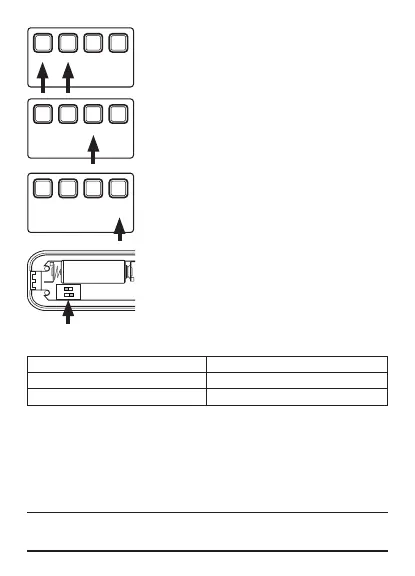
Tune Setting Table
Push Button Tune
Switch 2 - ON (Back Door) Ding
Switch 2 - OFF (Front Door) Selected Musical Tune
Volume Control
The chime has adjustable volume levels. Press and
release the “VOL +” or “VOL –” buttons to increase or
decrease the chime volume.
Light Color Selection
The chime will blink whenever the push button is
pressed. The color of the light is selectable. Press and
hold the “Light” button until the chime glows. While the
chime is glowing, press and release the “Light” button
to select the desired color. Press the push button to
lock in the desired color.
Tune Selection
The chime has ten pre-loaded selectable “front door”
tunes. Press and release the “Sync/Music” button until
the desired tune is heard. While the desired tune is play-
ing, press the push button to lock in the selected tune.
Note: Each push button can be assigned its own
unique tune.
Note: To listen to the selected tune, press and release
the “Sync/Music” button.
Note: All chime models are designed to work with up
to 5 push buttons (sold separately).
VOL
+
VOL
–
Light Sync
Music
VOL
+
VOL
–
Light Sync
Music
VOL
+
VOL
–
Light Sync
Music
Tune Selection Guide
Front Door
Ding-Dong Birthday Celebration
Traditional Westminster Auld Lang Syne
Traditional Whittington Beethoven’s 5th
Bell Whittington We Wish You a Merry Christmas
Short Westminster Star Spangled Banner
Back Door
Ding
ON
1 2



 To Next Page