Helpful Videos – www.hzsupport.com Helpful Answers – 1-800-858-8501
2
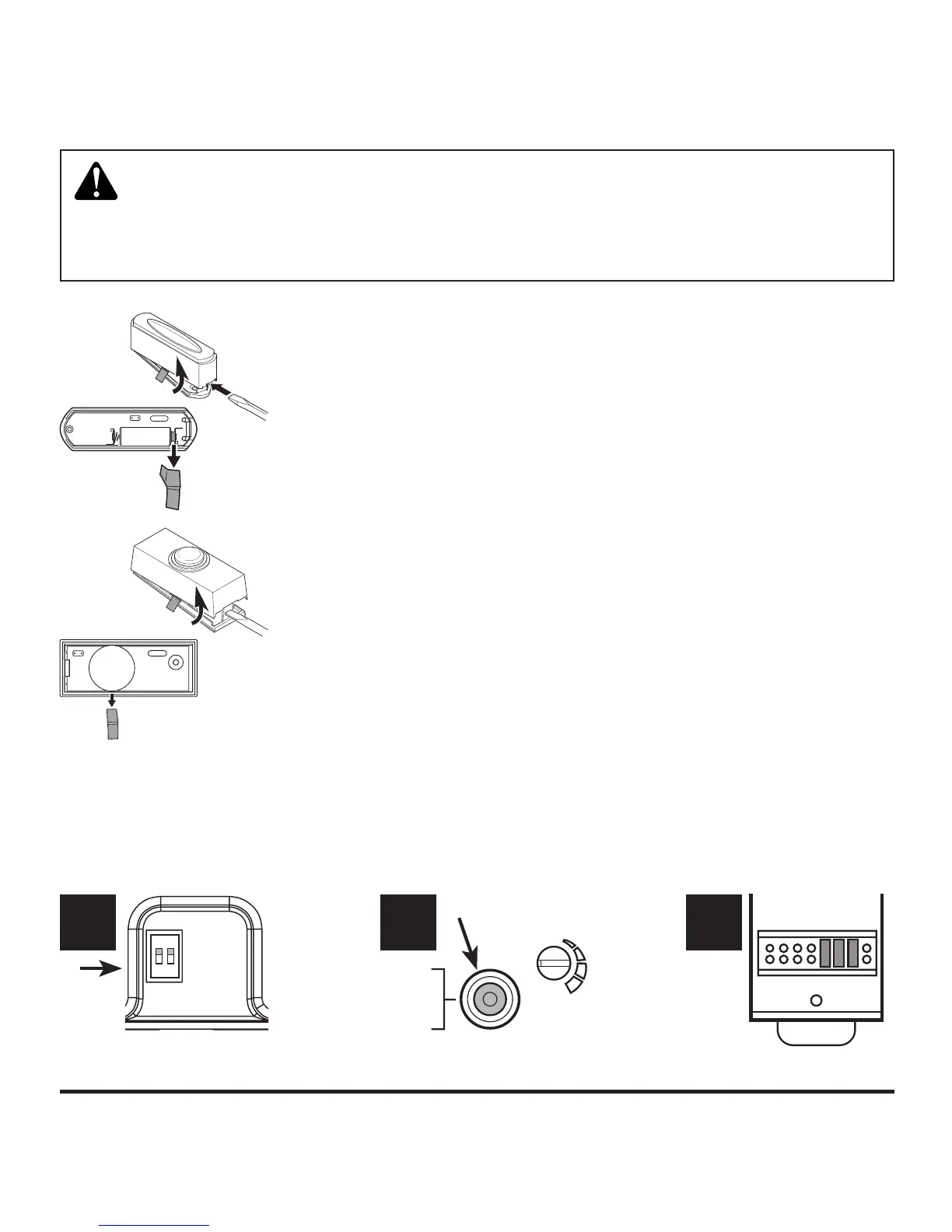
Figure 1
WARNING: To prevent possible SERIOUS INJURY or DEATH:
• NEVER allow small children near batteries.
• If battery is swallowed, immediately notify doctor.
Figure 2
1 2 3 4 5 6 7 8
CB
TUNE – HOLD
1 SECOND.
SYNC – HOLD
3 SECONDS.
RESET – HOLD
10 SECONDS.
C
H
I
M
E
V
O
L
ON
1 2
1. Remove orange battery tab from push button. Remove
back of case by pushing in tab on bottom with a small
screwdriver (see Figure 1). Remove orange battery tab.
2. Determine chime type. Look at the chime and determine
which type of chime will be connected to the push button
(see Figure 2).
• Chime < A > (2 Switches): The chime has only two
switches.
• Chime < B > (1 Button): The chime has a multi-function
button (“Tune/Sync/Reset” or “Sync/Reset”).
• Chime < C > (7 or 8 Jumpers or Switches): The chime
has a row of 7 or 8 jumpers or switches.



 To Next Page