EasyManua.ls Logo

Heathkit SW-7800 - Page 19

Heathkit SW-7800
47 pages
Print Icon
To Next Page IconTo Next Page
To Previous Page IconTo Previous Page
Loading...
Heathkit
Page
107
about
.2
MHz
(200
kHz). NOTE:
When
you
have
uned
an
LSB
signal
correctly, the
display
will indi-
cate
a
frequency
that
is
about
1
to
2
kHz.
(.001
to
002 MHz)
lower
than the
frequency
of
the
transmit-
ting
station.
On
USB
and
CW,
the
display
will indi
cate
a
frequency
that
is
about
1
to
2
kHz
higher.
On
AM
WIDE
or
NAR(narrow),
the
readout will
be
the
same
as
the
transmitting
station’s
frequency
PHONES.
Allows
you
to
use
high-
or
low-impedance
head-
phones
for
private
listening
or use an
external
speaker.
Automatically disconnects
the
speaker
REC
Provides
you
with
an
easy-access
connection
for
a
recorder
to
tape
received
material.
The
amplitude
at
this
jack
is
unaffected
by
the
setting
of
the
VOL.
UME
control
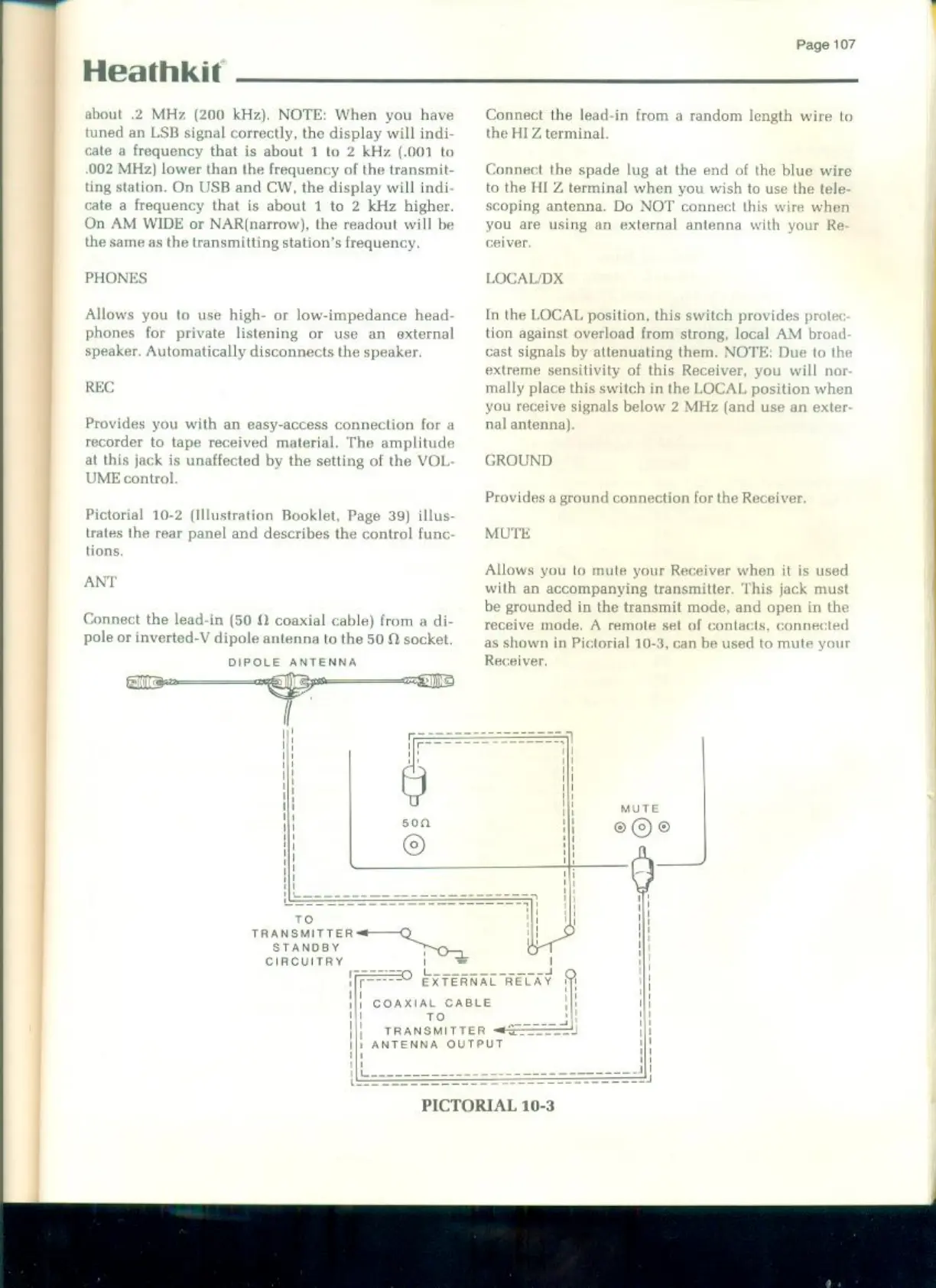
Pictorial
10-2
(Illustration
Booklet,
Page
39)
illus-
trates
the
rear panel
and
describes
the
control
func
tions,
ANT
Connect
the
lead-in
(50
0
coaxial
cable)
from
a
di-
pole
or
inverted-V
dipole
antenna
to
the
50
socket.
DIPOLE
ANTENNA
si
3-——=aD
TO
TRANSMITTER
<—Q_
ANDBY
CIRCUITRY
Connect
the
lead-in
from
a
random
length
wire
to
the
HIZ
terminal.
Connect
the
spade
lug
at
the
end
of
the
blue
wire
to
the
HI
Z
terminal
when
you
wish
to
use
the
nect
this
scoping
antenna,
Do
NOT
cor
you
are
using
an
external
antenna
with
your
Re
LOCAL/DX
In
the
LOCAL
position,
this
switch
provides
protec
tion
against
overload
from
strong,
local
AM
broad
cast
signals
by
attenuating
them.
NOTE:
Due
to
the
extreme
sensitivity
of
this Receiver,
you
will
nor
mally
place
this
switch
in
the
LOCAL
position
when
receive
signals
below
2
MHz
(and
use
an
exter
antenna),
GROUND.
Provides
a
ground
connection
for
the
Receiver
MUTE,
Allows
you
to
mute
your
Receiver
when
it
is
used
with
an
accompanying
transmitter.
‘This
jack
must
be
grounded
in
the
transmit
mode,
and
open
in
th
receive
mode,
A
remote
set
of
contacts,
connected
as
shown
in
Pictorial
10-3,
can
be
used
to
mute
your
Receiver.
PICTORIAL
10-3

Related product manuals