ENDE
Operating Instructions • Bench Mount Kit AT2000 CPK • 03/2020 • 106-29020
Installation and initial operation
9
5.4 Installing the bench mount kit at the workplace
The screws for fastening the base plate to the base
surface are not included in the scope of delivery.
The operator must use screws that are suitable for the
base surface.
121
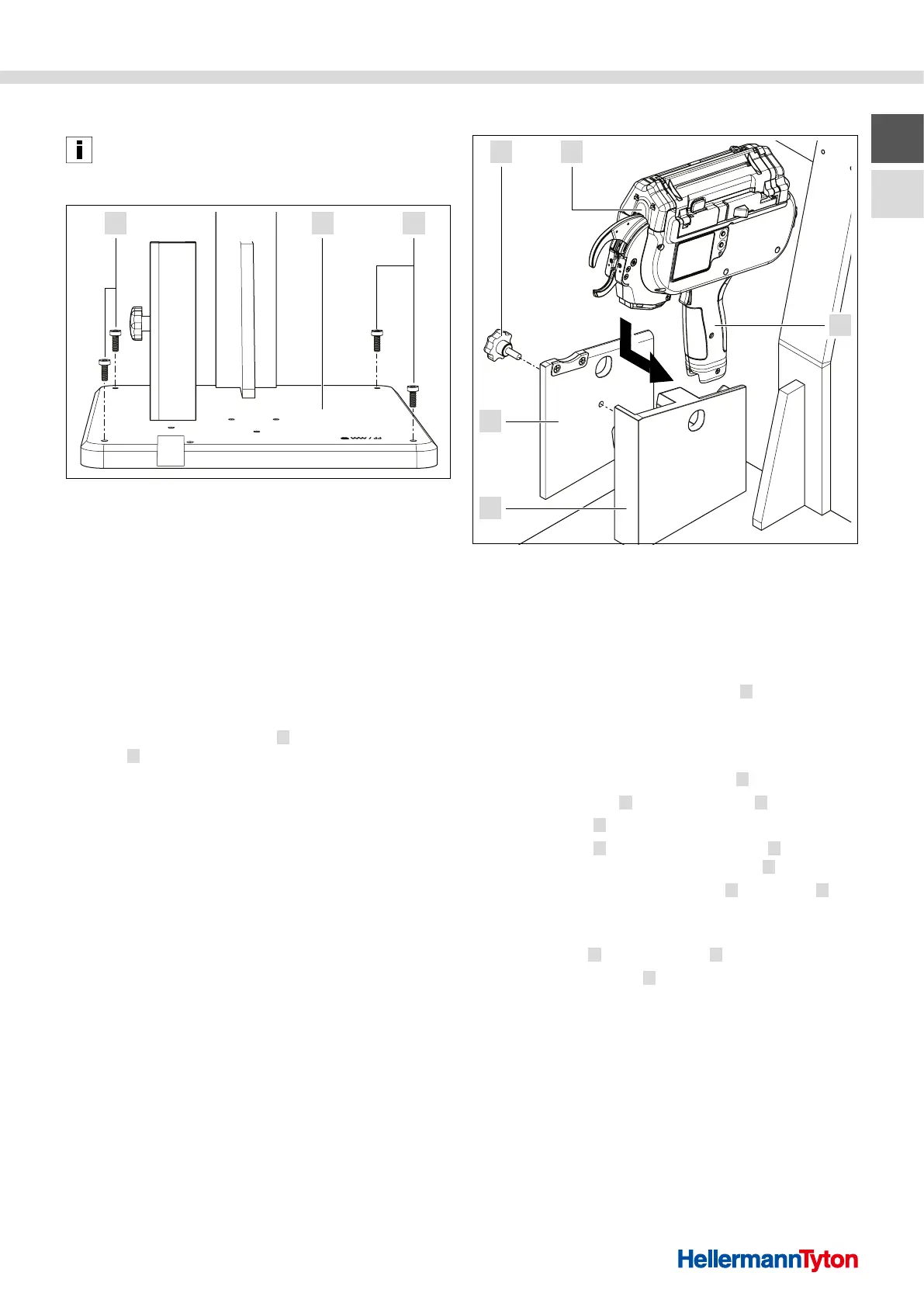
Fastening the bench mount on the base surface
1 Screws
2 Base plate
1 Check the workplace at the operation site.
f Observe the requirements for a suitable workplace.
à„Suitable workplace“ auf Seite 8
f Observe the technical weight and dimensions data of
the bench mount. à„Technical data“ auf Seite 13
2 Fasten the pre-assembled bench mount on a suitable
base surface.
f Align the bench mount.
f Insert the four fixing screws
1 through the base
plate 2 into the base surface and tighten by hand.
f Check that the bench mount is tightly fastened.
; The bench mount is installed at the workplace.
5.5 Using the tool
54
3
1
2
Using the tool
1 Handle system
2 Housing of the tool mount
3 Cover for the tool mount
4 Screw knob
5 Autotool2000CPK tool
1 Remove the waste bin from the tool 5 .
f Observe the operating instructions for the
Autotool2000CPK.
2 Open the tool mount.
f Loosen and remove the screw knob
4 .
f Remove the cover
3 from the housing 2 .
3 Insert the tool
5 .
f Insert the tool
5 with the handle system 1 from the
side into the housing of the tool mount 2 .
f Make sure that the handle system
1 of the tool 5 is
set flush.
4 Close the tool mount.
f Put the cover
3 on the housing 2 .
f Insert the screw knob
4 and tighten by hand.
; The tool is inserted in the tool mount.



 To Next Page