Helmer Scientic i.Series
®
and Horizon Series
™
Refrigerator - Upright Operation Manual
360372/B 17
6 Horizon Series Operation
6.1 Initial Power Up
1. Plug the power cord into a grounded outlet that meets the electrical requirements on the product specication label.
2. Turn the AC power switch ON.
3. Install 9 V back-up battery located on top of unit.
4. Press Down Arrow (Mute) if high temperature alarm sounds.
5. Turn alarm key switch to ON position to enable audible alarms.
Notes
• For models equipped with optional Access Control, the back-up battery is turned ON with a key switch.
• If an alarm condition other than High Temperature occurs, refer to the service manual for troubleshooting.
J
K
L
M
N
A
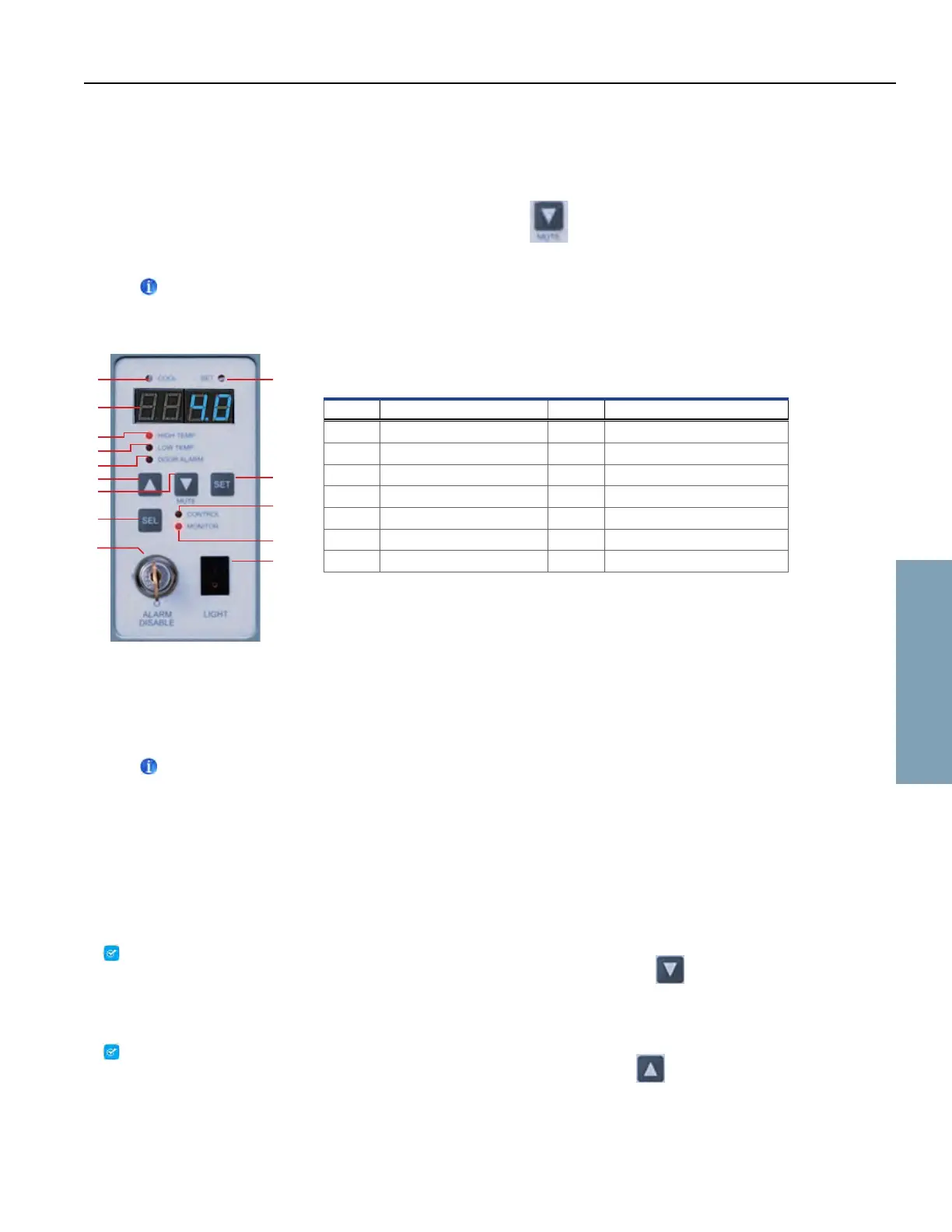
Monitor and Control Panel
6.2 Display Minimum and Maximum Monitor Temperature Recordings
Notes
• This feature is standard on Horizon Series™ models with serial numbers of 2015494 or higher. Some exceptions may
exist. For conrmation on your unit, please contact Helmer Technical Service.
• This feature only applies to the Monitor temperature probe.
• Units which do not include the minimum and maximum recording feature will not display ˚C or ˚F when entering the
program mode.
The minimum and maximum recording feature allows the user to view a minimum temperature occurrence and a maximum
temperature occurrence within a given period of time. The timer provides a time reference in which those temperatures occurred.
View minimum temperature recording
1. Press and hold the Down Arrow button for 1 second and listen for a single beep.
2. The display will alternate between LO and a valid temperature value ve (5) times followed by a single beep to indicate
exit back to the temperature display.
View maximum temperature recording
1. Press and hold the Up Arrow button for 1 second and listen for a single beep.
2. The display will alternate between HI and a valid temperature value ve (5) times followed by a single beep to indicate
exit back to the temperature display.
Label Description Label Description
A COOL lamp H SEL button
B LED Display I ALARM DISABLE key switch
C HIGH TEMP lamp J SET lamp
D LOW TEMP lamp K SET button
E DOOR ALARM lamp L CONTROL lamp
F UP ARROW button M MONITOR lamp
G DOWN ARROW button N LIGHT switch
B
C
D
E
F
G
H
I
Horizon Series Operation



 To Next Page