Helmer Scientic i.Series
®
and Horizon Series
™
Refrigerator - Upright Operation Manual
360372/B 19
6.4 Set Parameter Values
1. Press and hold the Up and Down Arrows simultaneously for 3 seconds to enter program mode.
2. The LED Display will show .C or .F to indicate Celsius or Fahrenheit.
3. Press and release SEL button to scroll through the parameters.
4. Once the desired parameter is selected, press and hold the SET button while pressing the Up or Down Arrow to select
the desired value.
5. Release SET button. The new setting is saved.
6. Press and hold the Up and Down Arrows simultaneously for 3 seconds to exit program mode.
Note
Contact Helmer Technical Service to set Hysteresis values.
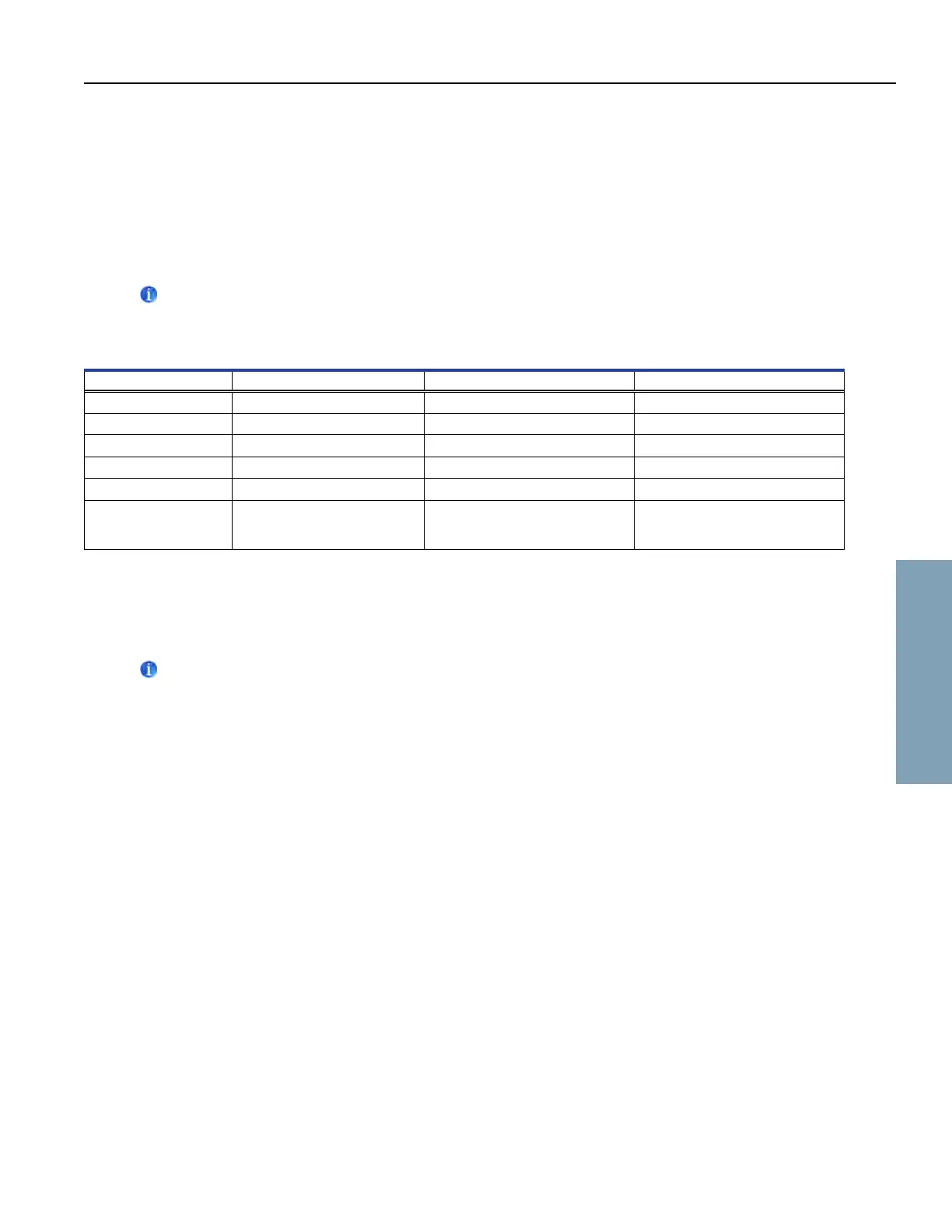
Table 3. Parameter Values
Parameter Visual Indicator Range Default
Celsius or Fahrenheit None ˚C, ˚F ˚C
High Temperature MONITOR Lamp & HIGH Lamp -40.0 to 25.0 (˚C) -40 to 77 (˚F) 5.5 ˚C
Low Temperature MONITOR Lamp & LOW Lamp -40.0 to 25.0 (˚C) -40 to 77 (˚F) 1.5 ˚C (HB); 2.0 ˚C (HLR & HPR)
Monitor Offset MONITOR Lamp -10.0 to 10.0 (˚C) -18 to 18 (˚F) Varies
Control Offset CONTROL Lamp -10.0 to 10.0 (˚C) -18 to 18 (˚F) Varies
Hysteresis CONTROL Lamp 0.5 to 2.5 (˚C) 1 to 5 (˚F) 2.0˚C (111)*
1.0˚C (120, 125)
1.5˚C (245, 256)
* Hysteresis for 11 cu ft units prior to serial number 2044369 in low humidity mode = 0.8 ˚C.
6.5 Set Temperature Units
Note
If temperature units are changed, the temperature setpoints, offsets and alarm settings must be recalibrated.
1. Press and hold the Up and Down Arrows simultaneously for 3 seconds to enter program mode.
2. The LED Display will show ˚C or ˚F to indicate Celsius or Fahrenheit.
3. Press and hold the SET button while pressing the Up or Down Arrow to select the desired temperature unit.
4. Release SET button. The new setting is saved.
5. Press and hold the Up and Down Arrows simultaneously for 3 seconds to exit program mode.
6.6 Temperature Calibration Offsets
Temperature calibration offsets indicate an acceptable margin of error between the actual temperature value and the desired
temperature value.
Monitor Offset
♦ Adjust if temperature displayed on the monitor is outside of your range when compared to a calibrated reference
thermometer in the same probe bottle.
♦ Value is factory-set to match a calibrated reference thermometer.
♦ Refer to the service manual for instructions regarding changing the Monitor Offset.
Horizon Series Operation



 To Next Page