PN/CAN Gateway, PROFINET/CANopen Slave | Version 2 | 1/26/2021 22
6.2 Configure Gateway
6.2.1 Install GSDML file
The GSDML file is available in the download area of the PN/CAN Gateway
CANopen Slave at www.helmholz.de.
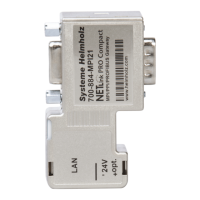
Install the GSDML file in the TIA Portal in the menu "Options" / "Manage general
station description files (GSD)".
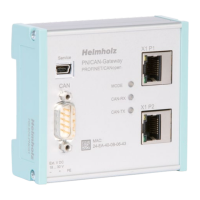
The PN/CAN Gateway can be found in the hardware
catalog under "Other field devices PROFINET IO
Gateway Helmholz PN/CAN Gateways".
Insert the "PN/CAN Gateway CO Slave" into the
project and connect it to your PROFINET network.


 To Next Page