OPERATION
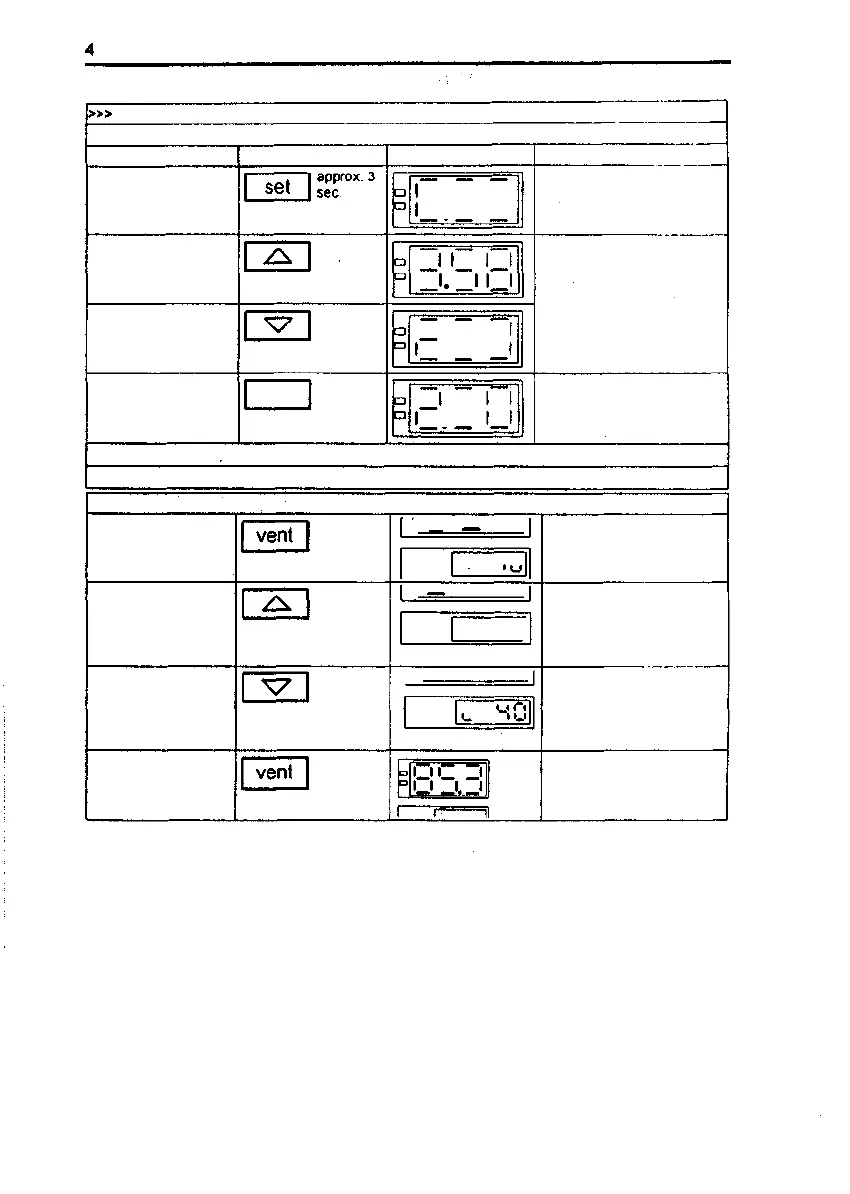
Setting the switching time
Instruction
Select time-switch
function, display time
remaining for timing
period
Increase preset time
Reduce preset time
Key(s)
Example of display
I I II I
I.I II I
l I II
.l I l
Remarks
Display flashes, lime-swilch
funcition is displayed. If liming
period in progress, displays
time remaining
Value can be adjusted
between 1 minule and 99
hours Adjustable in full hours
from 10.0 hour selling
The heating is switched on or
off. according to sel status.
once timing period has
expired
Store new preset time
value
set
I I
.II
The lime value is transferred
to the memory, the inside
temperature then appears on
the display
The flashing status display Indicates that the time-switch function has been activated.
If you do not wish to use the time-switch function, enter 0.0 0 as the preset time.
Selecting the air speed level
Display the preset air
speed level
•"I
1
1 1
1 1
1
r
'—
1
-
1
'-'1
in
•-•1
Preset air speed level
Display flashes,
speed symbol
Increase preset air
speed level
I IUU|
Value increases
(e.g. 70%/100 %)
Display flashes, speed
symbol
Reduce preset air
speed level
l t ~^ —** ~^ i
Value decreases
(e.g. 70 % / 40 %)
Display flashes, speed
symbol
Store new preset air
speed level
Air speed level is stored and
the display then goes dark
Issue: May, 1994 50 042 750
19/34



 To Next Page