33
•
Tighten the lock nut.
•
Slide the dust cover back to its position.
NOTE
To open the right side rear view mirror the
threads are to be loosened in clockwise
direction and tightened in anticlockwise
direction.
(h) Headlamp case
•
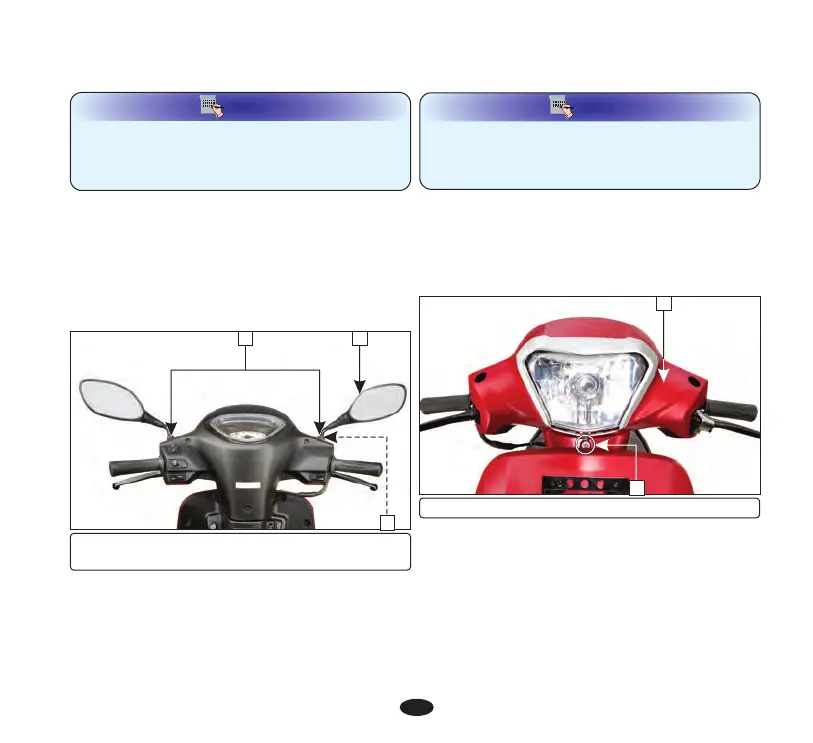
Remove screw (1) from front handlebar
cover (2).
•
Remove the rear view mirror.
Removal
2
(1) Screw (2) Handlebar cover
1
•
Remove the screws (3) on rear handlebar
cover (4).
•
Loosen the rear view mirror (3) and
remove it.
•
Loosen the lock nut (2) until it will no
longer turn.
Removal
(g) Rear view mirror
•
Slide the dust cover up (1).
(1) Dust cover (2) Lock nut
(3) Rear view mirror
1 3
2
NOTE
•
To remove the left floor side cover, open the
side stand.
•
Ensure that the floor side cover tabs are
seated properly.
Installation
Installation is in the reverse order of removal.
•
Loosen the rear view mirror approximately
2 turns.
•
Install the rear view mirror until it will
no longer turn.
Installation
•
Adjust the rear view mirror.


 To Next Page