33
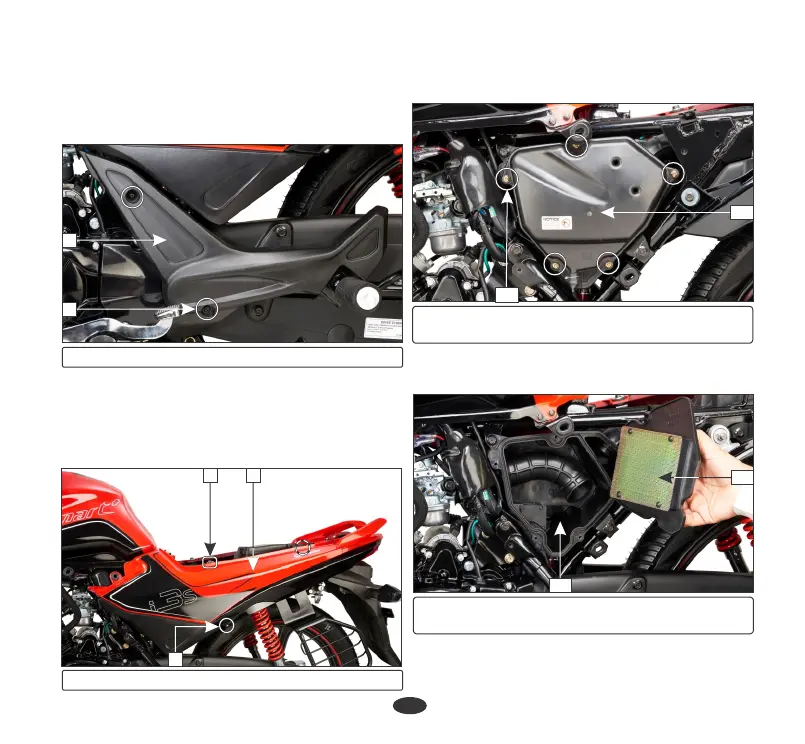
Ÿ Remove the air cleaner cover screws (10)
and the cover (11).
10
(10) Air cleaner cover screws
(11) Air cleaner cover
11
•
Remove the left front cover (3) by
removing the screw (4).
•
Remove the left pillion step cover (5) by
removing the screws (6).
5
•
Remove the side cover screws (7) and bolt
(8).
•
Remove the side cover (9) by releasing the
tabs from the slots and lug from the
grommet.
98
6
(5) Pillion step cover (6) Screws
(7) Screws (8) Bolt (9) Side cover
7
(12) Air cleaner element
(13) Air cleaner housing
•
Remove the air cleaner element (12)
from air cleaner housing (13).
12
13





 To Next Page